Aperçu
Ce guide vous montre comment reprogrammer des tâches dans Morgen quand vos plans changent. Vous apprendrez trois façons de déplacer, continuer ou diviser le travail planifié, et comment utiliser le Planificateur IA pour décider rapidement de la suite en fonction de vos priorités.
Pourquoi reprogrammer des tâches ?
Reprogrammer des tâches vous aide à :
- Continuer le travail en planifiant automatiquement la prochaine session
- Vous assurer que les tâches importantes sont replannifiées au bon moment grâce à la priorisation assistée par IA
Façons de reprogrammer des tâches planifiées
Reprogrammer cette session
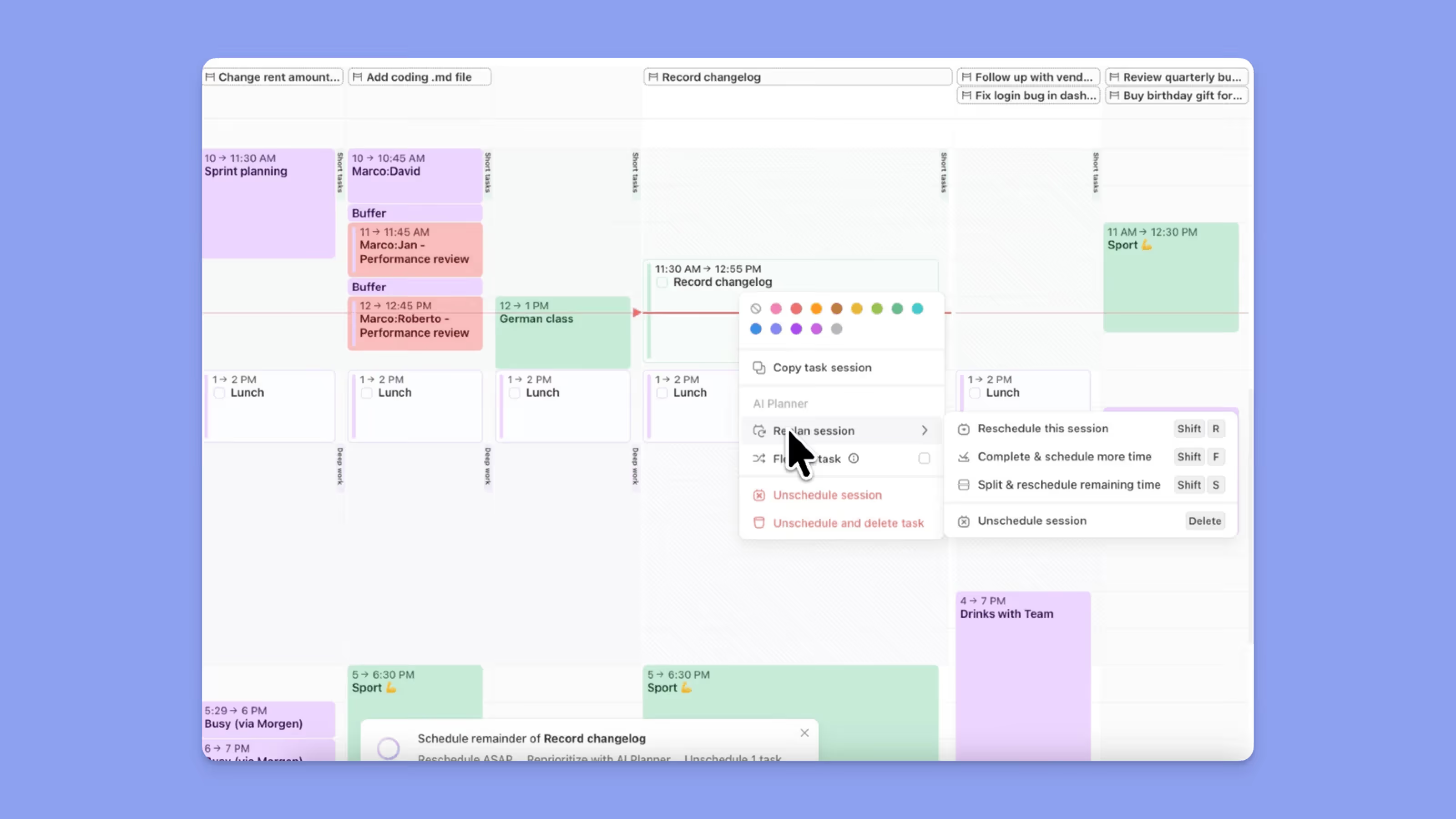
- Cliquez avec le bouton droit sur votre ou vos tâches planifiées
- Accédez à Replan session
- Choisissez Reprogrammer cette session
OU
- Cliquez sur la ou les tâches planifiées et appuyez sur Maj + R
- Une fenêtre contextuelle du Planificateur IA apparaîtra avec 3 options :
- Reprogrammer ASAP trouvera le prochain créneau libre et planifiera la tâche
- Reprioritiser avec le Planificateur IA utilisera le Facteur de Priorité Morgen et planifiera la tâche
- Déprogrammer déprogrammera la ou les tâches sélectionnées
Marquer comme terminé et planifier une nouvelle session
- Cliquez avec le bouton droit sur votre ou vos tâches planifiées
- Accédez à Marquer comme terminé et planifier une nouvelle session
OU
- Cliquez sur la ou les tâches planifiées et appuyez sur Maj + F
- La ou les tâches sélectionnées seront marquées comme terminées, et la prochaine session sera planifiée avec le Planificateur IA et la même durée que la session précédente
- Quand la fenêtre contextuelle du Planificateur IA apparaît, vous aurez 3 options :
- Reprogrammer ASAP trouvera le prochain créneau libre et planifiera la tâche
- Reprioritiser avec le Planificateur IA utilisera le Facteur de Priorité Morgen et planifiera la tâche
- Déprogrammer déprogrammera la ou les tâches sélectionnées
Diviser et reprogrammer le temps restant
- Cliquez avec le bouton droit sur votre ou vos tâches planifiées
- Accédez à Diviser et reprogrammer le temps restant
OU
- Cliquez sur la ou les tâches planifiées et appuyez sur Maj + S
- La ou les tâches sélectionnées seront marquées comme terminées, et le temps restant sera alloué pour la prochaine session
- La prochaine session sera planifiée avec le Planificateur IA et la même durée que la session précédente
- Quand la fenêtre contextuelle du Planificateur IA apparaît, vous aurez 3 options :
- Reprogrammer ASAP trouvera le prochain créneau libre et planifiera la tâche
- Reprioritiser avec le Planificateur IA utilisera le Facteur de Priorité Morgen et planifiera la tâche
- Déprogrammer déprogrammera la ou les tâches sélectionnées
Besoin d'aide ?
📖 Lisez notre guide du Planificateur IA
💬 Vous avez encore des questions ? Contactez-nous, nous sommes heureux de vous aider !