Motion vs Reclaim: 2026 Review & Side-by-Side Comparison

⚡️
Key Takeways

Heading 1

Heading 2

Heading 3

Heading 4

Heading 5
Heading 6

Lorem ipsum dolor sit amet, consectetur adipiscing elit, sed do eiusmod tempor incididunt ut labore et dolore magna aliqua. Ut enim ad minim veniam, quis nostrud exercitation ullamco laboris nisi ut aliquip ex ea commodo consequat. Duis aute irure dolor in reprehenderit in voluptate velit esse cillum dolore eu fugiat nulla pariatur.

Block quote

Ordered list

  1. Item 1
  2. Item 2
  3. Item 3

Unordered list

  • Item A
  • Item B
  • Item C

Text link

Bold text

Emphasis

Superscript

Subscript

Key Takeaways

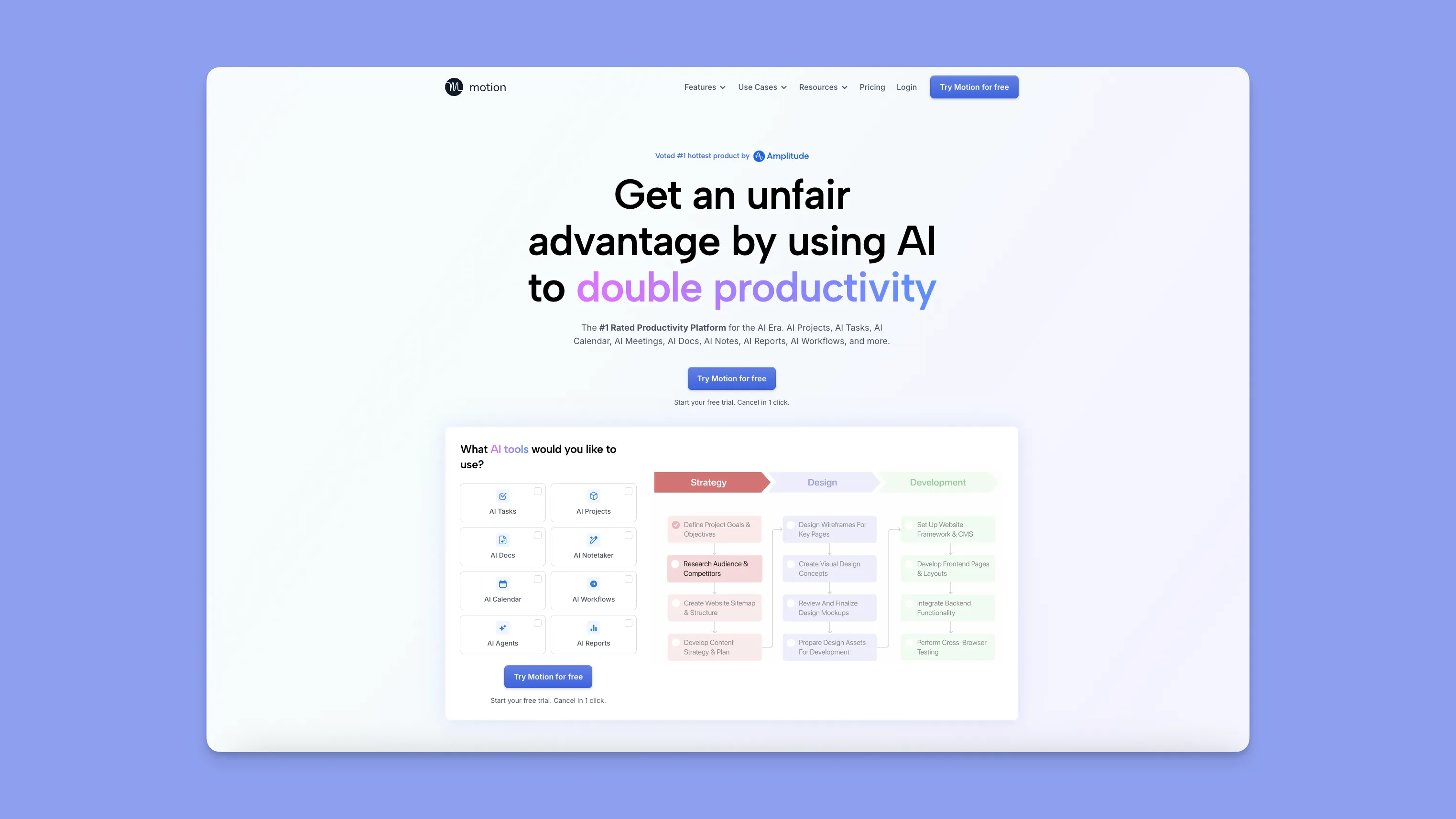
  • Motion is best for teams who want an AI engine to aggressively plan their entire day, including tasks, meetings, and priorities.
  • Reclaim is best for users who want smarter time blocking inside Google or Outlook, with excellent Focus Time, Habits, Tasks, and Smart Meetings.
  • Motion shines when you need constant reshuffling, deadline-driven scheduling, and team-wide coordination.
  • Reclaim shines when you want your calendar to quietly protect your deep work, routines, and availability without replacing your existing setup.
  • Morgen is the middle ground offering AI planning with control, a beautiful interface with time blocking, and a clean unified calendar.

When choosing between Motion and Reclaim, the difference comes down to how much control you want over your calendar. Motion automates everything from tasks, meetings, projects, and capacity to reshuffling your day. Reclaim automates your time blocks, routines, and focus sessions while keeping your existing calendar structure intact.

Motion is for teams that need orchestration, while Reclaim is for individuals who need protection. If you want something in between, Morgen gives you structured planning, intelligent suggestions, and full control over the final schedule.

What follows is a clear breakdown of how Motion and Reclaim compare across scheduling, automation, pricing, and team workflows.

Category Motion Reclaim
Best For Teams needing full AI project automation, capacity planning, and workflow management Individuals and small teams who want smart time blocking, habits, meetings, and focus time automation
Stand-Out Feature AI Project Manager and AI Employees that automate entire workflows AI-powered Focus Time, Habits, Smart Meetings, and automatic rescheduling
Price Starts at $29/month Free plan available; paid plans start at $10/month per seat
Pros Automates scheduling and project management with deep AI workflows and capacity planning Best-in-class personal time blocking, analytics, habits, and focus automation
Cons Expensive, steep learning curve, and built more for teams than individuals Less suitable for complex team projects and limited project-management features
Customer Support Includes 1:1 onboarding calls, workflow setup help, and access to a solutions architect Standard support with lighter onboarding and analytics for teams
AI Task Manager Automatically schedules tasks based on priority, duration, and deadlines Schedules tasks using priorities and smart time windows and dynamically reschedules when conflicts occur
Workflows Turns prompts and SOPs into full projects with auto-assigned tasks Creates recurring smart events that self-schedule and adapt to meetings, PTO, and availability
Proactive & Reactive Scheduling Continuously reshuffles schedules when conflicts arise Defends and reschedules deep-work sessions using AI-driven proactive and reactive scheduling

Who is Motion best for?

  • Teams managing complex projects that need AI to coordinate tasks, deadlines, and workloads.
  • Managers who need capacity planning and automated delegation across multiple team members.
  • Fast-moving startups with shifting priorities and constant changes in schedules.
  • Teams looking to replace PM tools like Asana, ClickUp, or Monday with a single AI-driven workflow system.
  • Users who want full automation without manual input.

For whom is Reclaim useful?

  • Individuals or solopreneurs who want smart time blocking inside Google/Outlook.
  • People who need protected focus time and automatic rescheduling based on availability.
  • Professionals who need AI to defend deep work and routines.
  • Habit and routine builders who want automated scheduling for exercise, learning, admin, etc.
  • Small teams needing flexible smart meetings, automated no-meeting days, and priority-based scheduling.

Morgen: An Alternative

If Motion feels too heavy and Reclaim feels too outdated, Morgen is the perfect alternative to look into. It gives you control over your plan, modern interface with manual or automated time blocking, and AI suggestions for your schedule.

Why Morgen stands out:

  • AI Planning based on Morgen Priority Factor (priority + due date + time estimation + energy levels and more)
  • Reactive rescheduling of tasks
  • Notification for tasks at risk of missing deadlines
  • Multi-calendar and task integrations
  • Automatic travel time scheduler
  • Smart buffer management between scheduled tasks and meetings
  • Multiple time zones visibility
  • Advanced task prioritization and filtering

👉 Try Morgen Today — Your Time, Your Schedule, Your Way.

Tool Starting Price Free Tier
Motion Individuals: $29/month (annual) or $49/month (monthly)
Teams: $19–$29/month (annual)
7-day trial
Reclaim.ai Starter: $10/month
Business: $15/month
Enterprise: $22/month
Free forever (Lite)
Morgen $30/month (monthly) or $15/month (yearly) 14-day free trial and 30-day money-back guarantee

Price

Pricing is often the deciding factor between Motion vs Reclaim. Motion’s pricing reflects its heavy automation and enterprise capabilities, while Reclaim remains accessible and budget-friendly for individuals. Here’s how they compare.

Motion Pricing

  • The AI Workplace plan begins at $29/mo, billed annually, while AI Employee tiers escalate quickly based on credits and seat counts.
  • Teams managing multi-department workflows will appreciate the end-to-end automation across workflows, scheduling, PM, and AI assistance.

Reclaim Pricing

  • Free tier includes unlimited habits, unlimited smart meetings, and automatic Focus Time.
  • Paid tiers begin at $10/seat/month, scaling to $15 and $22 for Business and Enterprise, respectively.
  • Offers discounts for students, nonprofits, and startups.

Verdict

Reclaim is the most affordable option for solo users because it offers a free plan and $10/month paid tier. Motion becomes more cost-effective for teams that will fully leverage AI workflows, resource planning, and multi-project automation otherwise, it’s overkill.

Motion also charges for AI credits.

  • Pro plan includes 7,500 credits, once exceeded, pricing starts at $0.39 / 100 credits
  • Business AI plan includes 15,000 credits, once exceeded pricing starts at $0.19 / 100 credits

Using Motion’s AI features for daily summaries, workflow updates, and project-wide actions can increase monthly bills by 20–40% depending on credit consumption. Multiple reviewers on Reddit mention that the $600/month Business tier doesn’t feel worth it for their use case.

Ease of Use

Motion offers significantly more complexity due to its project automation and team workflows. Reclaim is lighter, simpler, and easier for individuals to adopt quickly.

Motion

  • Motion includes more advanced features, such as AI workflows, capacity planning, and auto-generated project plans, which increase complexity and adoption time, as there's more to learn upfront.
  • UI is often described as confusing or complex.

Reclaim

Verdict

Reclaim wins for its simplicity of connecting your stack and defining simple goals. While Motion offers a full PM hub, it has a significant learning curve to adopt and may demotivate new users.

Customer Support

When your calendar becomes a mission-critical system, support isn’t a nice-to-have, it determines how quickly you can recover from issues and how smoothly your team can deploy the tool. Motion leans into high-touch, guided onboarding for teams, while Reclaim focuses on fast, reliable operational support for day-to-day users.

Motion Support

  • Support Channels: In-app chat, email support, and a large AI-powered help center.
  • Responsiveness: Focused on resolutions within 24–48 hours.
  • Onboarding & Enterprise Support: Larger teams get “white-glove” onboarding, including access to solutions architects and customer success managers who assist with rollout, migration, and workflow modeling.
  • Self-Serve Resources: Extensive tutorials, step-by-step guides, and a strong knowledge base with integrated search.
  • Support Philosophy: Designed for questions involving multi-project setups, AI workflows, or cross-team scheduling.

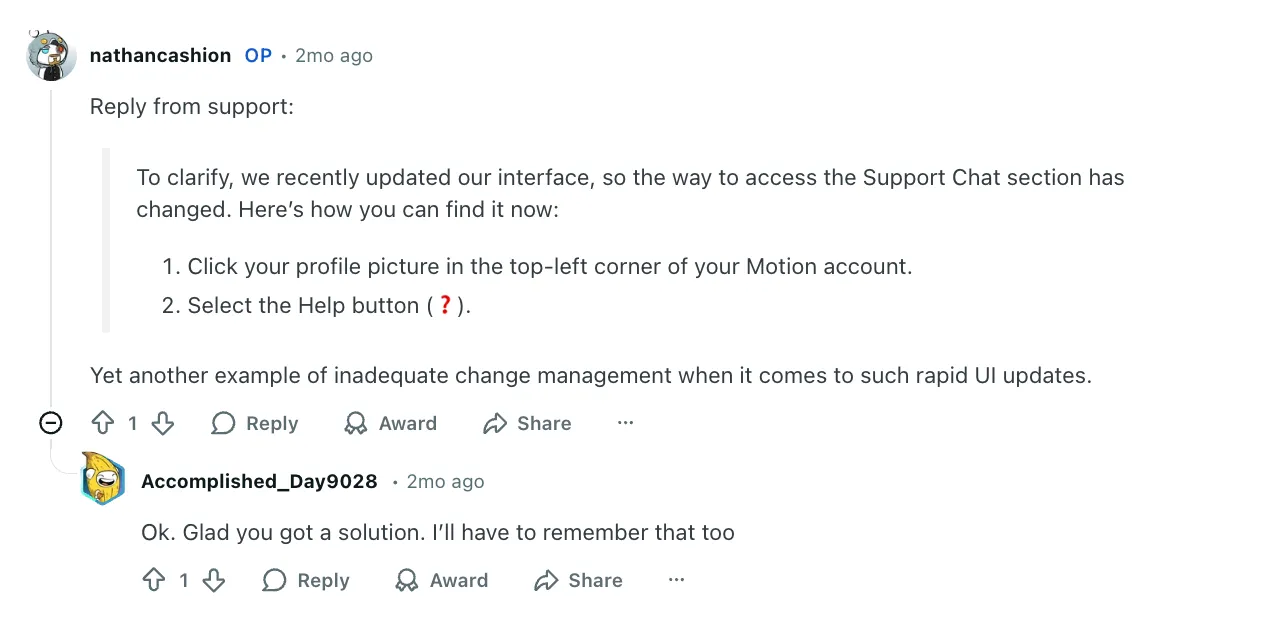
Beware, recent UI changes have caused some confusion among multiple users trying to find chat support.
Reclaim Support
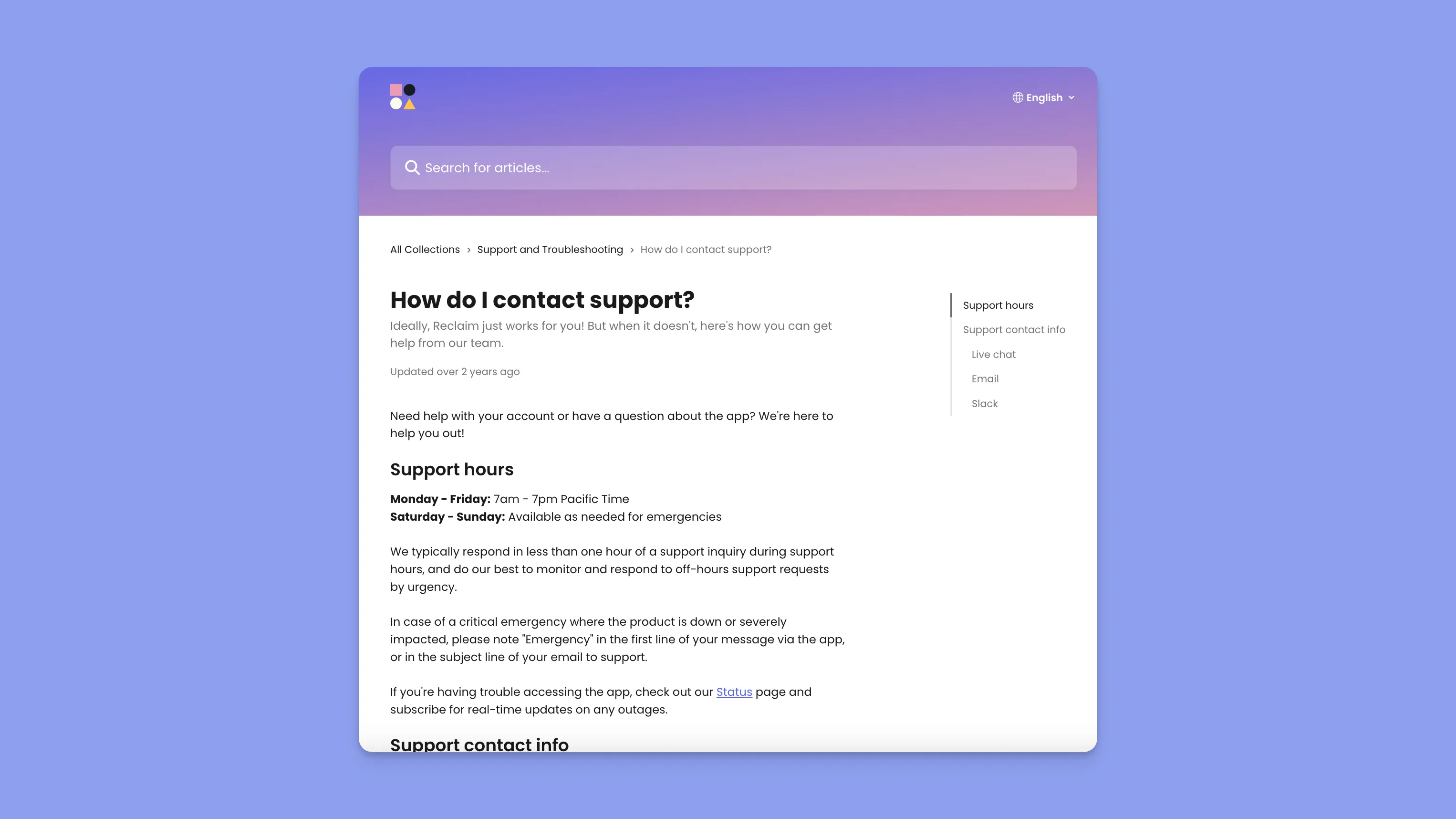
  • Support Hours: Monday–Friday, 7am–7pm PT, with weekend coverage for emergencies.
  • Responsiveness: Should respond in under one hour during support hours.
  • Support Channels: Live chat across the app and docs, email (support@reclaim.ai), plus a Slack community for feedback and peer help.
  • Emergency Protocol: Critical outages are triaged immediately when marked as “Emergency.”
  • Self-Management: Teams are expected to rely on analytics and documentation for configuration rather than dedicated onboarding services.
  • Status Monitoring: Public status page with real-time outage updates.

Reclaim’s support seems to be efficient and user-friendly with no complaints from users, but lighter on structured rollout help and enterprise-grade service layers.

Verdict

Motion wins for teams, offering onboarding, migration support, and access to specialists who help implement the tool at scale. Reclaim has better recognition from users seeking fast responses and straightforward assistance. The downside is, it doesn’t match Motion’s enterprise-level depth for training, deployment, or customer success management.

Integrations

Both tools integrate with calendar and task ecosystems, but Motion focuses on workplace apps while Reclaim focuses more on personal productivity and task managers.

Motion Integrations
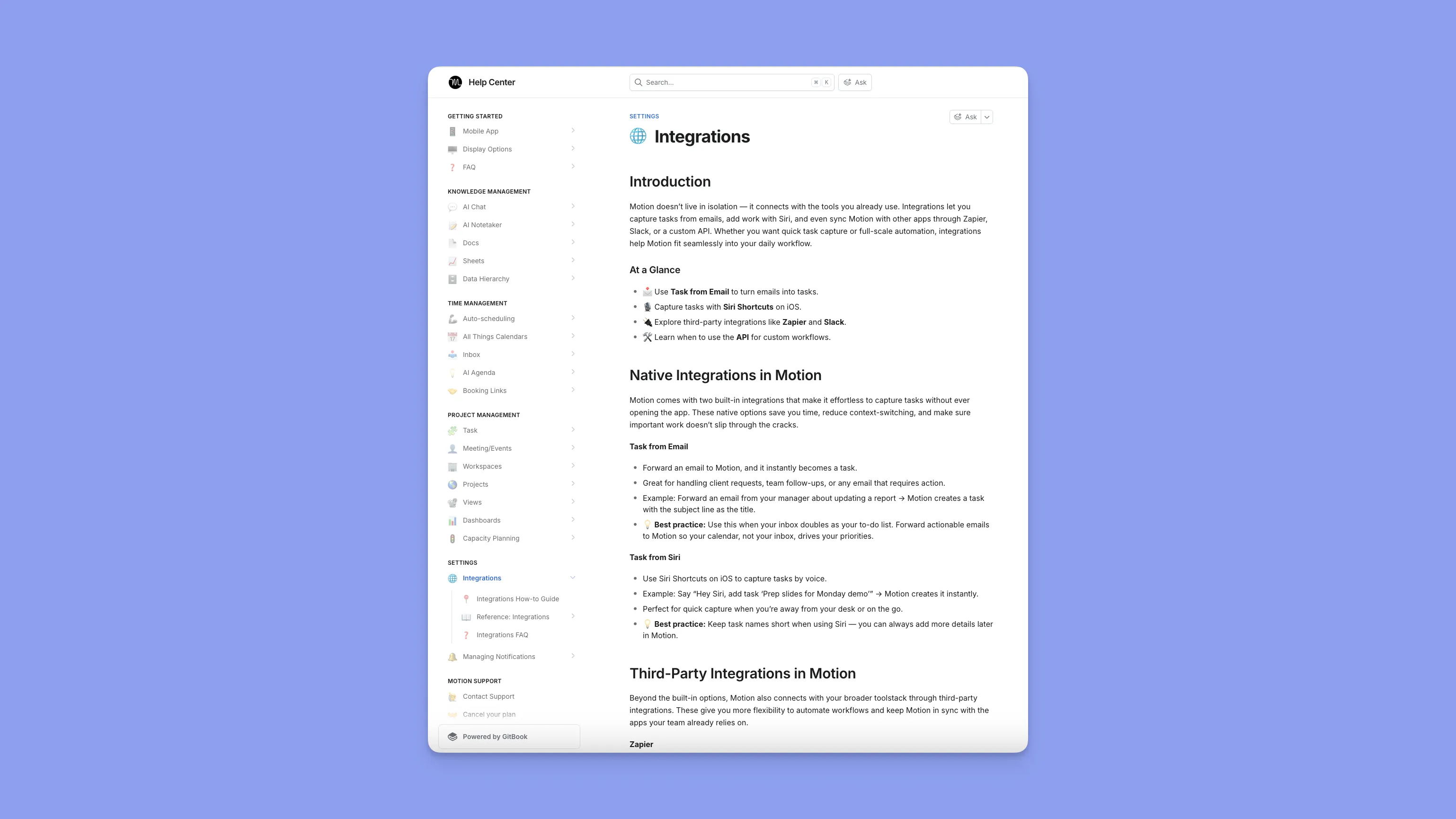
Motion integrates with:

  • Google Calendar, Outlook, Zoom, Gmail, Slack, iCloud, Teams, and Zapier.
  • AI Employees and AI Sheets pull data from CRM tools, email, docs, and project ecosystems.
  • Has an integrations section guiding you on how to connect the integrations with Motion. Users can add their own integrations as well.

Reclaim Integrations

  • Reclaim integrates with Google Calendar, Outlook, Slack, Zoom, and Raycast
  • Also supports task/project tools like Asana, Jira, Linear, ClickUp, Todoist, and Google Tasks.
  • Some users report a lack of integrations (Trello, more apps)

Verdict

Motion wins for enterprise business stacks. Reclaim wins for task-manager integrations and lightweight setups.

Task & Project Management

Reclaim offers solid auto-scheduling and time blocking for tasks, but it’s not a true project management tool. Motion’s AI Project Manager and capacity planning engine go far beyond anything Reclaim offers.

Motion
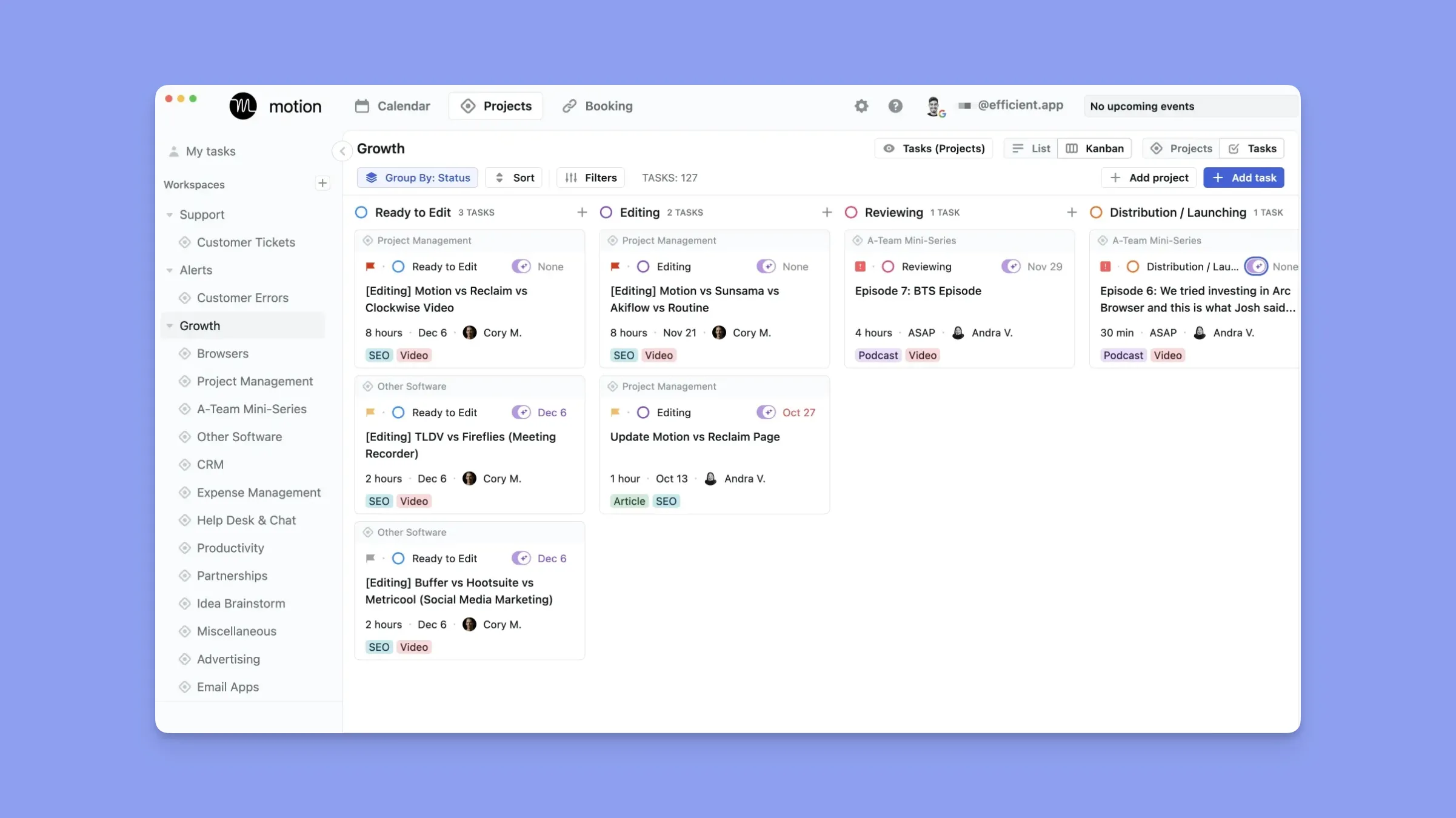
  • AI Project Manager that updates task statuses, moves projects forward automatically, and predicts deadlines
  • Automatic detection of blockers and bottlenecks
  • Real-time Gantt charts, Kanban, and List views
  • Motion also includes workload balancing, auto-assigned tasks, and cross-project dependencies, making it suitable for teams coordinating multiple active projects.
  • Users have an overall positive sentiment towards Motion’s task management features.

Reclaim
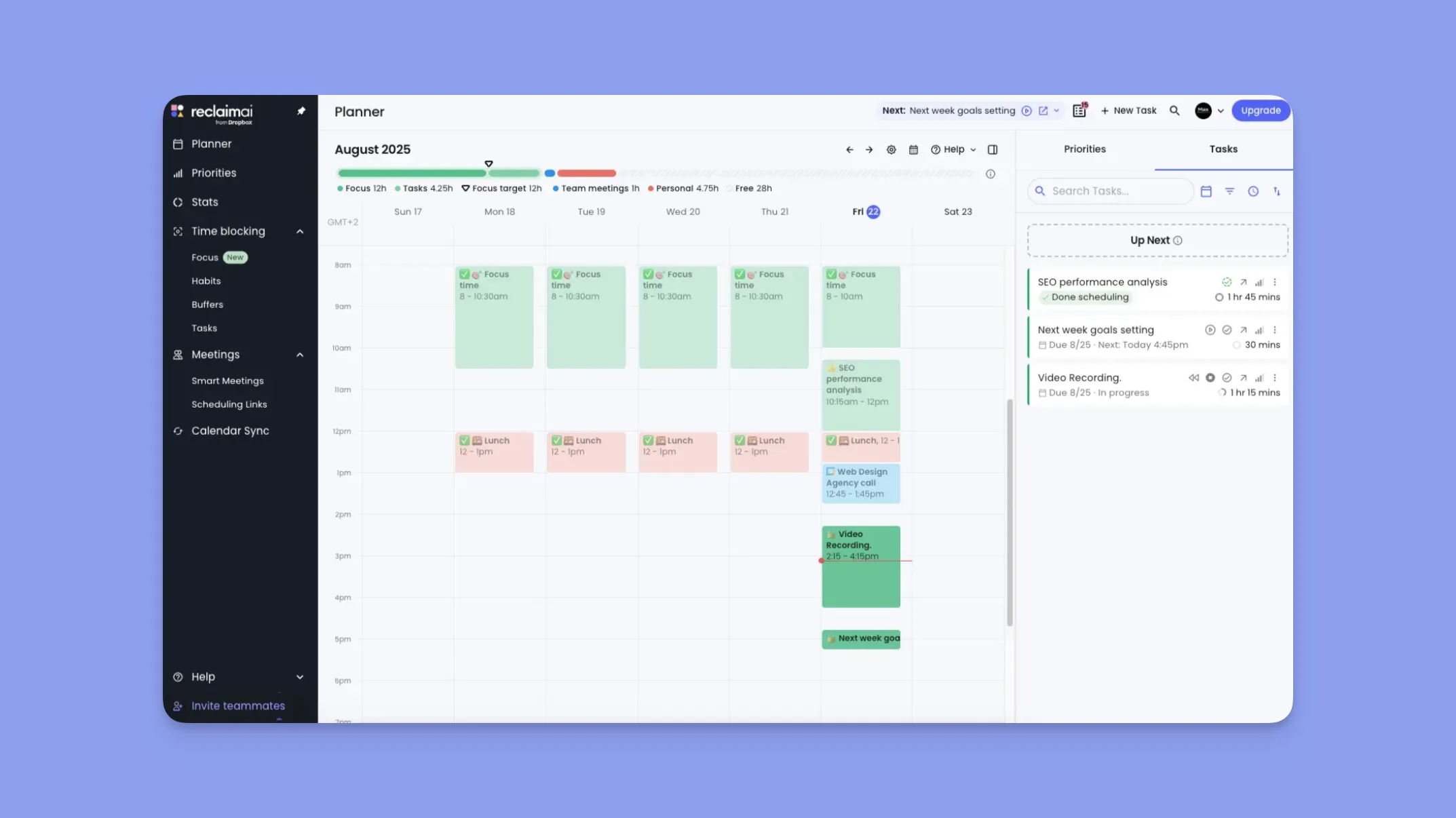
  • AI task scheduling that automatically places work sessions on the calendar based on due dates and priorities
  • Automatic splitting of large tasks into sessions
  • Auto-rescheduling when conflicts occur
  • Task tracking analytics (time spent, productivity patterns, upcoming workload)
  • Integrations with major task apps: Asana, ClickUp, Google Tasks, Jira, Todoist, Linear
  • Lacks task dependencies

Note: Reclaim focuses on helping individuals and small teams defend time for tasks, but it does not include full project management workflows (e.g., dependencies, project stages, automated handoffs).

Verdict

Depending on your needs, Reclaim may work for you if you focus on personal task time blocking or lightweight team coordination. If you’re looking for a replacement for your task management tool, Motion will work like a charm, however, some users note Motion is focused on enterprise solutions rather than personal planning.

Calendar Management

Reclaim gives you smart rules, habits, Focus Time, buffer time, and deep analytics. Motion gives you a dynamically optimized calendar that reshuffles itself instantly.

Motion

  • Offers AI-driven daily planning based on your capacity
  • Auto-detection of when tasks or events overbook
  • Task–meeting conflict resolution without user intervention
  • Multi-calendar consolidation (Google, Outlook, iCloud)
  • Multiple users mention random calendar reshuffling that doesn’t follow their preferred plan

Reclaim

  • Calendar sync across Google/Outlook accounts
  • Privacy controls for personal events
  • Auto-scheduled travel time and buffer breaks
  • Smart time blocking across Meetings, Focus Time, Tasks, and Habits
  • No-meeting day automation via tags (#reclaim_free)
  • Slack sync for status updates
  • Missing iCloud integration
  • Some users have duplicated events across calendars

Verdict (Calendar Management)

Reclaim is the better option to go with, as existing users have rather positive sentiment towards the scheduling capabilities if you can figure out workarounds for the missing integrations.

Team Meetings

Motion

  • AI Meeting Assistant that finds ideal meeting windows
  • Instant booking links with custom templates and pre-meeting questions
  • Auto-adding video links (Zoom, Google Meet, Teams)
  • Includes AI Meeting Notetaker with summaries, transcripts, and autogenerated action items
  • Time-saving meeting workflows to help prep for meetings and email daily meeting overviews

Reclaim

  • Smart Meetings that find the best time for all attendees
  • Auto-rescheduling across PTO, time zones, conflicts, and changes
  • Optional attendees, dependencies, and meeting priorities
  • Team meeting analytics (meeting load, burnout indicators, heavy/light days)
  • Unlimited team scheduling links for external booking
  • Tasks are sometimes perceived by the scheduling links as users being busy

Verdict

Motion wins for its capability of prepping users for meetings and the custom workflows associated with the feature.

How to Choose the Right Smart Scheduling Software

The right tool depends on your workflow, automation needs, and level of control you want over your schedule. Here are the top decision criteria.

AI Automation

Motion delivers aggressive, full-day automation, but its constant reshuffling can feel overwhelming. Reclaim offers lighter automation, though it lacks integrations, and users identify syncing problems requiring manual event booking across calendars, while others experience multiple duplicate events.
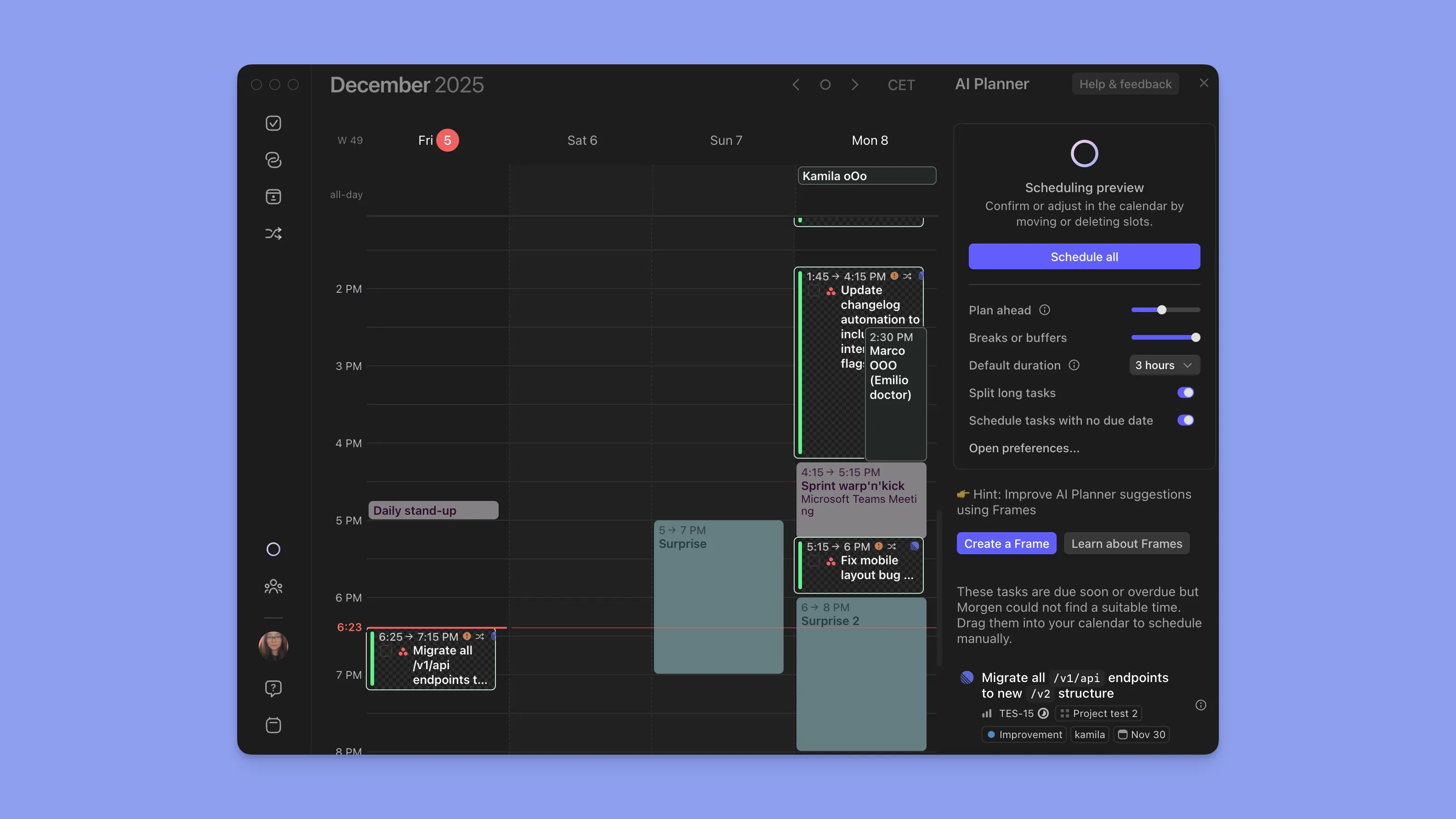
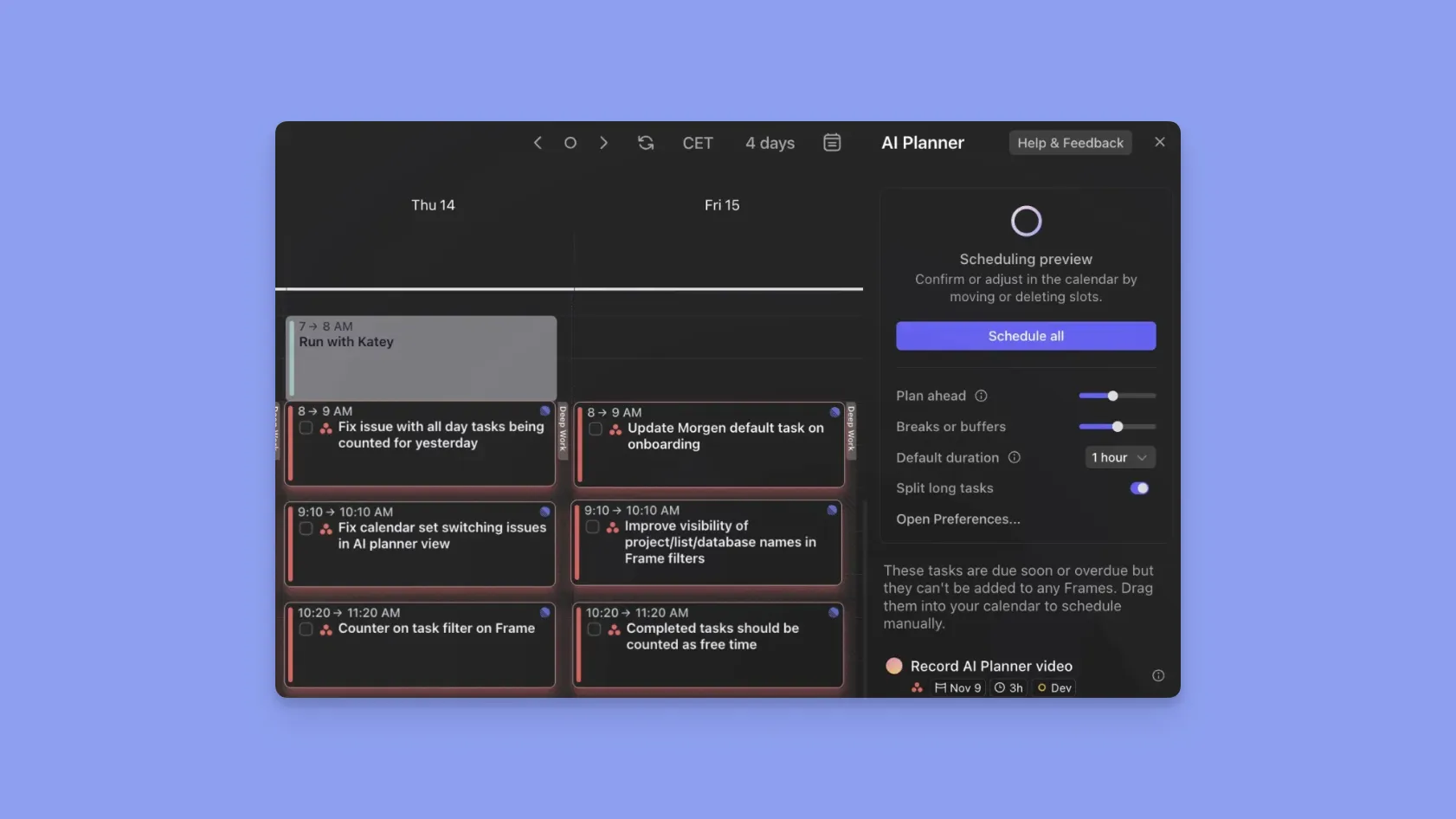
Morgen combines the best of both worlds: its AI Planner uses a “priority + due date + duration + energy level” formula to suggest where tasks should go, then lets the user approve or adjust the plan.

Task Complexity

Motion handles large projects with dependencies, but it introduces heavy setup and a steep learning curve. Reclaim is excellent for habits and small tasks, yet it lacks true project depth.
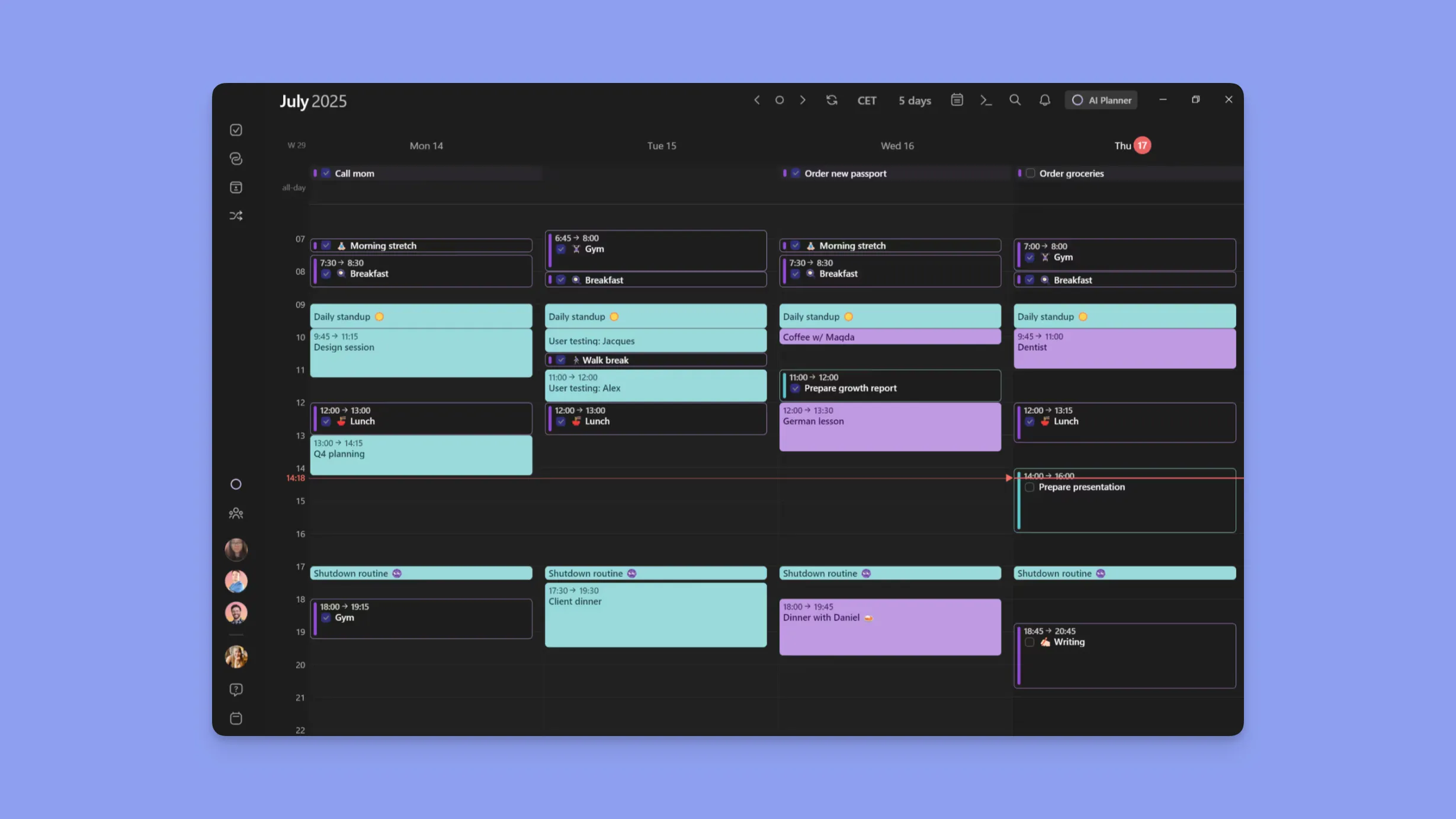
Morgen shines with native calendar, task, meeting, and scheduling-link integration: connecting Google, Outlook, iCloud, Fastmail calendars, as well as apps like Todoist, Linear, ClickUp, and more, and unifies everything in one view.

That means no switching between multiple tabs or apps. Your full schedule, tasks and commitments live in one place.

Flexibility for Time Blocking, Travel, and Buffers

Motion can over-automate, making spontaneous changes difficult. Reclaim offers time-blocking but lacks deeper task/context awareness.
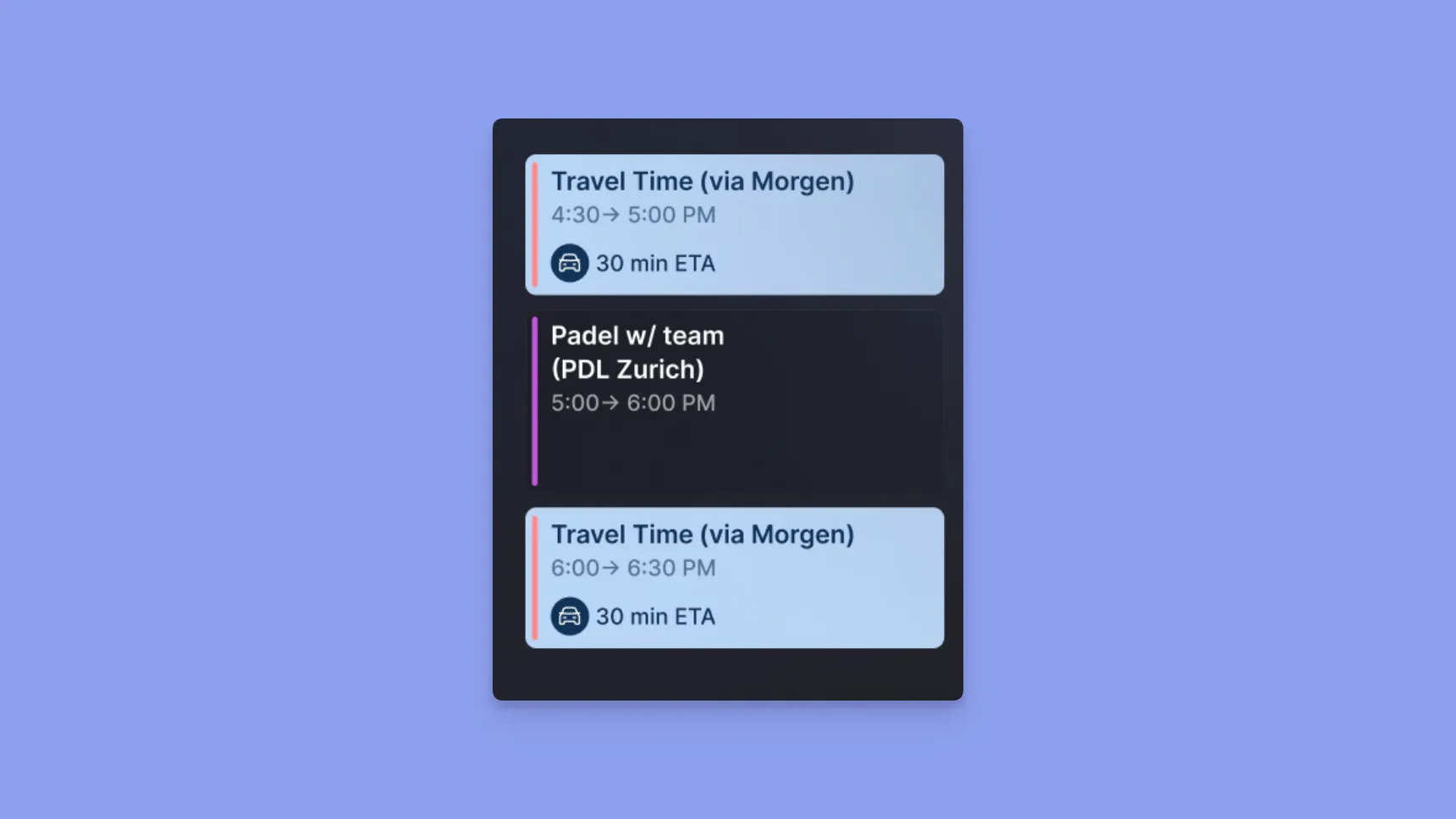
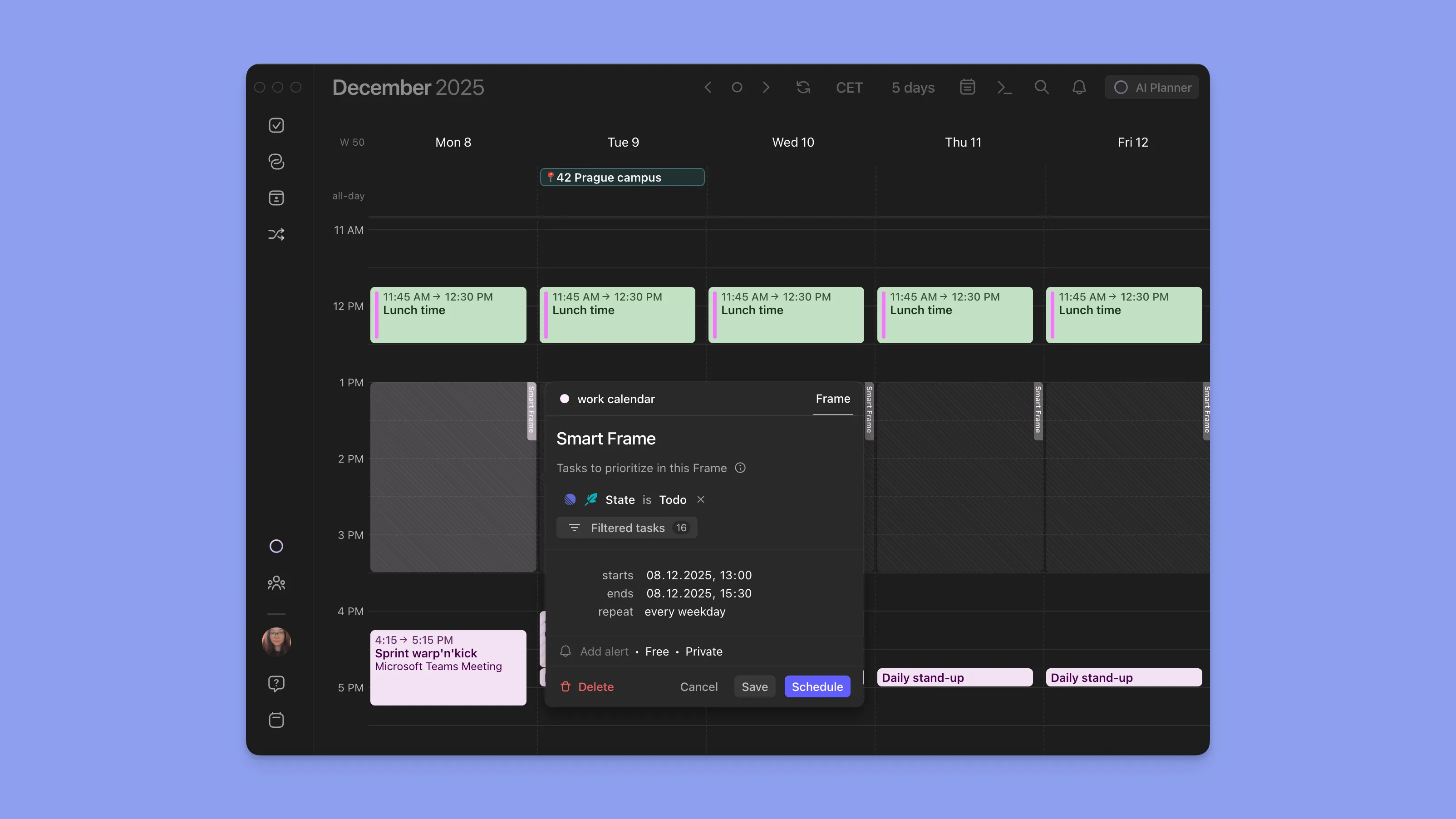
Morgen boosts flexibility with buffer time management, travel-time scheduling, multi-calendar conflict detection, and optional deep-work “Frames.” It’s ideal if your schedule includes commuting, personal errands, and shifting tasks.

👉 Try Morgen — A Balanced Alternative

Alternative to Motion and Reclaim: Morgen

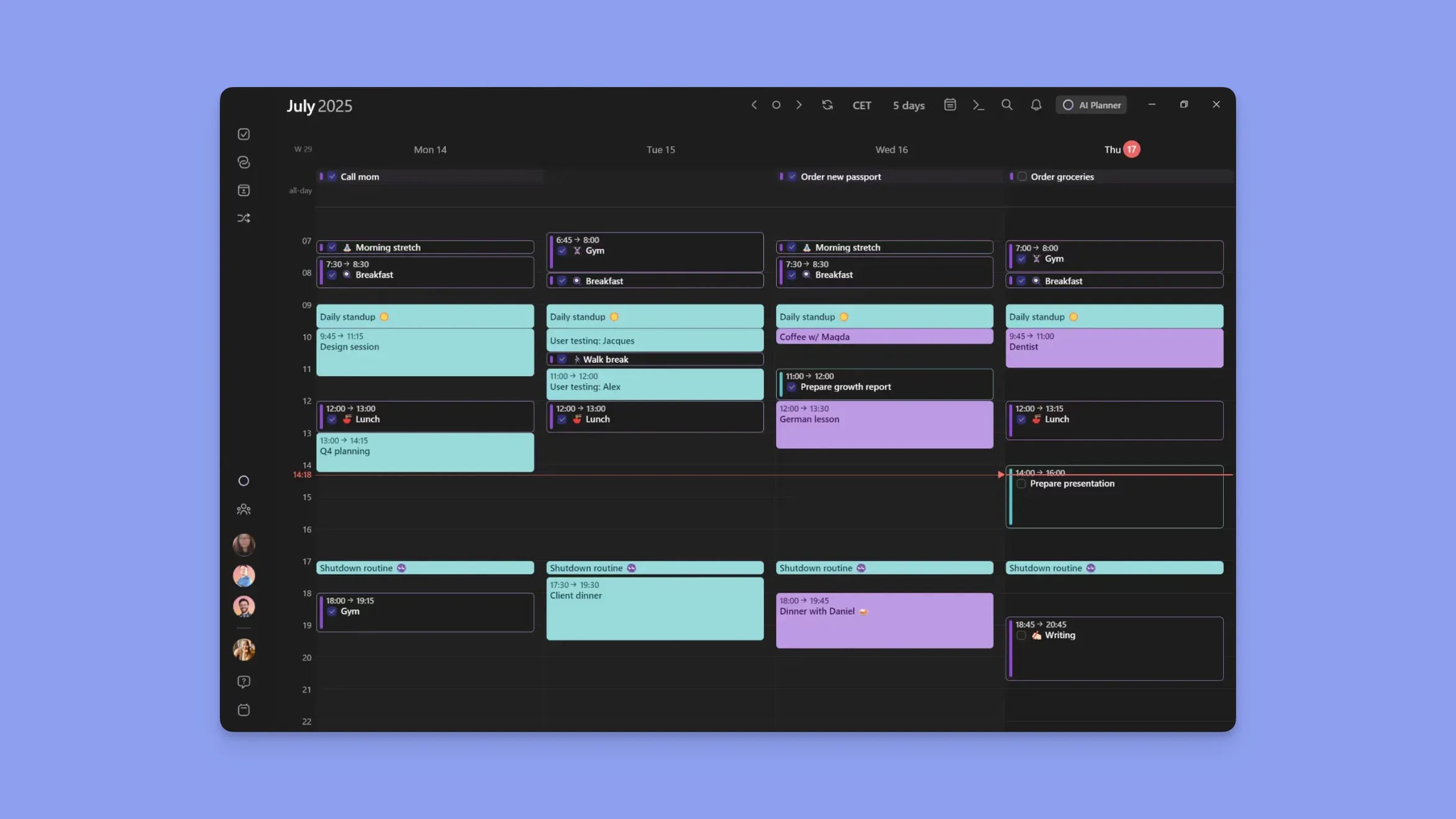
Morgen is a calendar-first productivity system that blends control with smart automation. It brings together unified calendars, task planning, AI assistance, and intuitive time blocking, ideal for users who want structure.

Key Features

#1: AI Planner

Morgen’s AI Planner turns your tasks, meetings, energy levels, and deadlines into a personalized daily plan without overriding your calendar. Prioritizing with the Morgen Priority Factor that looks at task priority, estimated time, and more.

#2: Frames

You can create a Frame inside Morgen, which is a block of time devoted to a certain type of task you want to tackle (protected deep work, quick wins, personal to-dos, etc). You either populate Frames manually with tasks or use custom filters for the AI Planner to recommend which tasks to work on and when.

#3: Unified Calendars

Sync Outlook, Google, iCloud, and more into one clean interface. Morgen prevents double-booking and makes time blocking effortless.

Pricing

Plan Price What You Get
Pro $15/month AI Planner, unlimited calendars and task integrations, calendar automations, booking page and scheduling links, shared calendars, and ongoing updates
Business $10/month per seat AI Planner, unlimited calendars and task integrations, calendar automations, booking page and scheduling links, team availability view, and ongoing updates

Where Morgen Shines

  • Clean UI, unified calendars: No clutter, no chaos.
  • Flexible AI: Suggests, doesn’t overplan your schedule.
  • Ideal for hybrid AI users: People who want control + smart planning.

Where Morgen Falls Short

  • Not a full project management tool
  • Not built for large enterprises needing complex team management features

Customer Reviews

Don’t take it from us, see what the users say about Morgen.

Sync your calendars together within one of the most intuitive and practical interfaces”
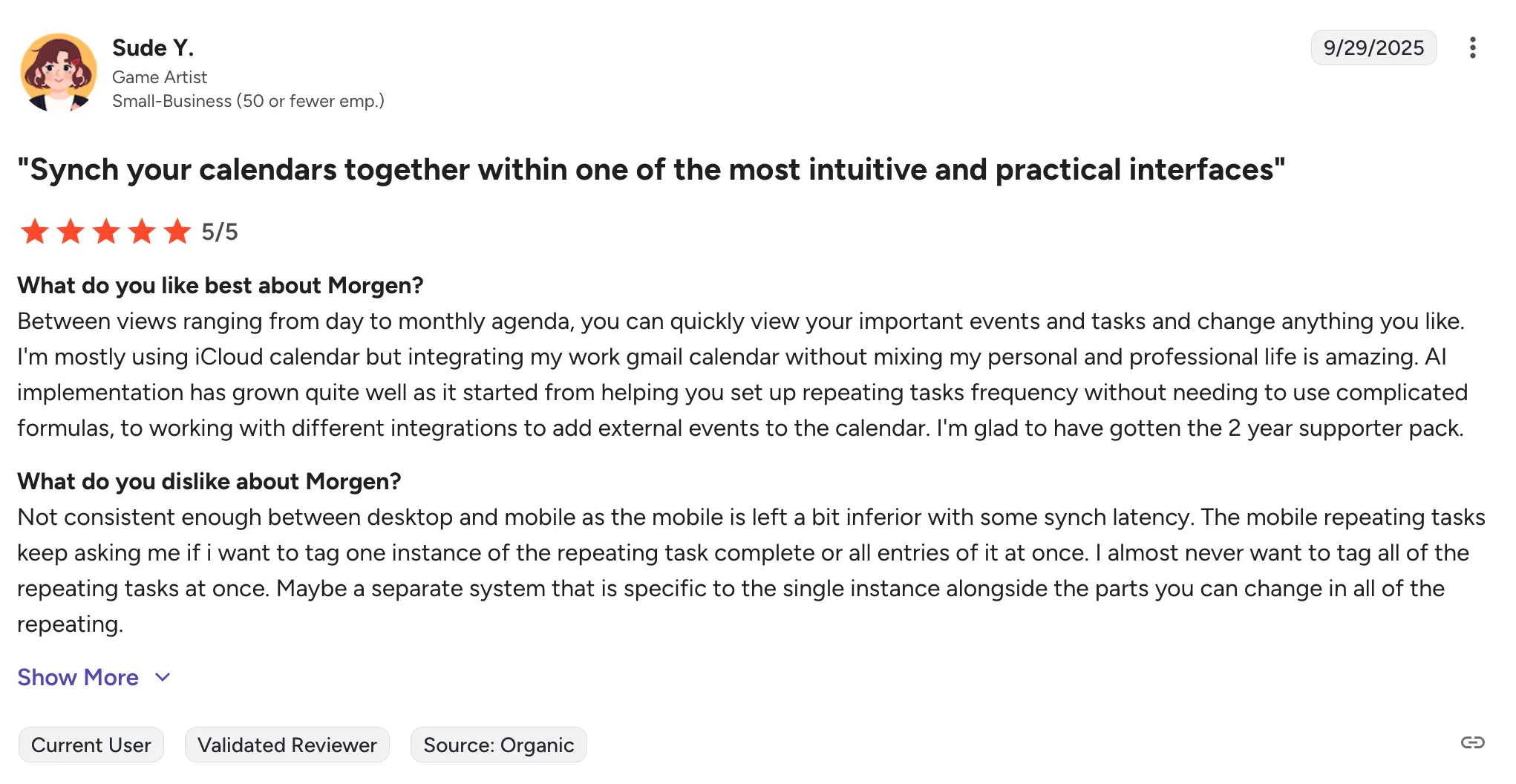
I am very grateful that I use this gemstone software every day I hope to improve more the user experice like kanban view or the week and planner day for time boxing and also make the ai review what you do in your day and give you future next actions”

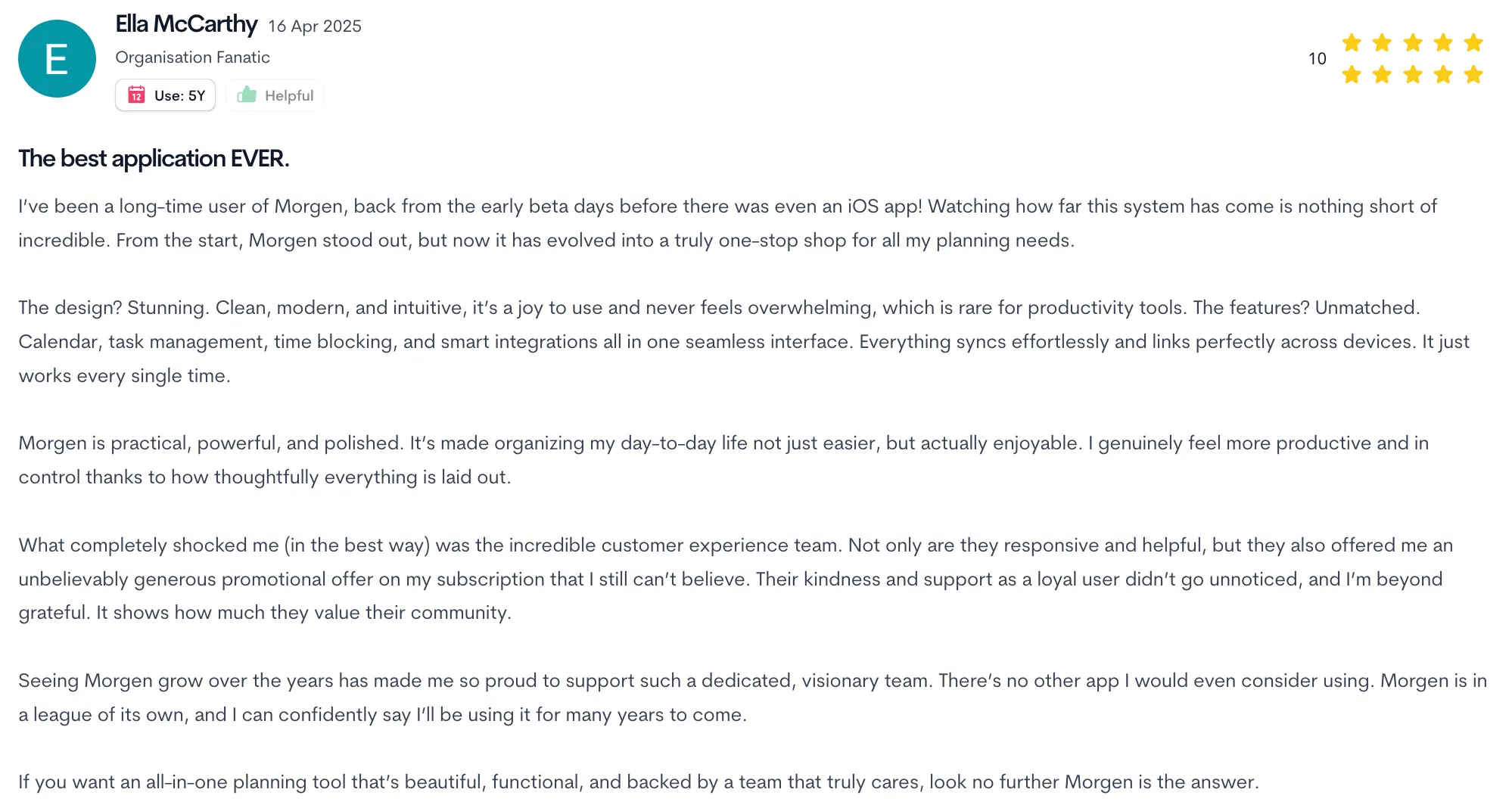
I’ve been a long-time user of Morgen, back from the early beta days before there was even an iOS app! Watching how far this system has come is nothing short of incredible. From the start, Morgen stood out, but now it has evolved into a truly one-stop shop for all my planning needs.”
Who Morgen Is Best For

  • Professionals who want structure without losing control
  • Individuals balancing multiple calendars
  • Time blockers & deep-work practitioners

👉 Try Morgen Free

Take the Next Step Toward Better Productivity with Morgen

If Motion feels overwhelming and Reclaim feels too hands-off, Morgen offers the sweet spot. You stay in control while benefiting from smart AI guidance and clean calendar management. Start planning with clarity and take the next step toward better time management.

👉 Explore Morgen

👉 See Pricing

⚡️
Conclusion
About the author
-
Comparisons

Motion vs Reclaim: 2026 Review & Side-by-Side Comparison

Motion vs Reclaim: 2026 Review & Side-by-Side Comparison

Key Takeaways

  • Motion is best for teams who want an AI engine to aggressively plan their entire day, including tasks, meetings, and priorities.
  • Reclaim is best for users who want smarter time blocking inside Google or Outlook, with excellent Focus Time, Habits, Tasks, and Smart Meetings.
  • Motion shines when you need constant reshuffling, deadline-driven scheduling, and team-wide coordination.
  • Reclaim shines when you want your calendar to quietly protect your deep work, routines, and availability without replacing your existing setup.
  • Morgen is the middle ground offering AI planning with control, a beautiful interface with time blocking, and a clean unified calendar.

When choosing between Motion and Reclaim, the difference comes down to how much control you want over your calendar. Motion automates everything from tasks, meetings, projects, and capacity to reshuffling your day. Reclaim automates your time blocks, routines, and focus sessions while keeping your existing calendar structure intact.

Motion is for teams that need orchestration, while Reclaim is for individuals who need protection. If you want something in between, Morgen gives you structured planning, intelligent suggestions, and full control over the final schedule.

What follows is a clear breakdown of how Motion and Reclaim compare across scheduling, automation, pricing, and team workflows.

Category Motion Reclaim
Best For Teams needing full AI project automation, capacity planning, and workflow management Individuals and small teams who want smart time blocking, habits, meetings, and focus time automation
Stand-Out Feature AI Project Manager and AI Employees that automate entire workflows AI-powered Focus Time, Habits, Smart Meetings, and automatic rescheduling
Price Starts at $29/month Free plan available; paid plans start at $10/month per seat
Pros Automates scheduling and project management with deep AI workflows and capacity planning Best-in-class personal time blocking, analytics, habits, and focus automation
Cons Expensive, steep learning curve, and built more for teams than individuals Less suitable for complex team projects and limited project-management features
Customer Support Includes 1:1 onboarding calls, workflow setup help, and access to a solutions architect Standard support with lighter onboarding and analytics for teams
AI Task Manager Automatically schedules tasks based on priority, duration, and deadlines Schedules tasks using priorities and smart time windows and dynamically reschedules when conflicts occur
Workflows Turns prompts and SOPs into full projects with auto-assigned tasks Creates recurring smart events that self-schedule and adapt to meetings, PTO, and availability
Proactive & Reactive Scheduling Continuously reshuffles schedules when conflicts arise Defends and reschedules deep-work sessions using AI-driven proactive and reactive scheduling

Who is Motion best for?

  • Teams managing complex projects that need AI to coordinate tasks, deadlines, and workloads.
  • Managers who need capacity planning and automated delegation across multiple team members.
  • Fast-moving startups with shifting priorities and constant changes in schedules.
  • Teams looking to replace PM tools like Asana, ClickUp, or Monday with a single AI-driven workflow system.
  • Users who want full automation without manual input.

For whom is Reclaim useful?

  • Individuals or solopreneurs who want smart time blocking inside Google/Outlook.
  • People who need protected focus time and automatic rescheduling based on availability.
  • Professionals who need AI to defend deep work and routines.
  • Habit and routine builders who want automated scheduling for exercise, learning, admin, etc.
  • Small teams needing flexible smart meetings, automated no-meeting days, and priority-based scheduling.

Morgen: An Alternative

If Motion feels too heavy and Reclaim feels too outdated, Morgen is the perfect alternative to look into. It gives you control over your plan, modern interface with manual or automated time blocking, and AI suggestions for your schedule.

Why Morgen stands out:

  • AI Planning based on Morgen Priority Factor (priority + due date + time estimation + energy levels and more)
  • Reactive rescheduling of tasks
  • Notification for tasks at risk of missing deadlines
  • Multi-calendar and task integrations
  • Automatic travel time scheduler
  • Smart buffer management between scheduled tasks and meetings
  • Multiple time zones visibility
  • Advanced task prioritization and filtering

👉 Try Morgen Today — Your Time, Your Schedule, Your Way.

Tool Starting Price Free Tier
Motion Individuals: $29/month (annual) or $49/month (monthly)
Teams: $19–$29/month (annual)
7-day trial
Reclaim.ai Starter: $10/month
Business: $15/month
Enterprise: $22/month
Free forever (Lite)
Morgen $30/month (monthly) or $15/month (yearly) 14-day free trial and 30-day money-back guarantee

Price

Pricing is often the deciding factor between Motion vs Reclaim. Motion’s pricing reflects its heavy automation and enterprise capabilities, while Reclaim remains accessible and budget-friendly for individuals. Here’s how they compare.

Motion Pricing

  • The AI Workplace plan begins at $29/mo, billed annually, while AI Employee tiers escalate quickly based on credits and seat counts.
  • Teams managing multi-department workflows will appreciate the end-to-end automation across workflows, scheduling, PM, and AI assistance.

Reclaim Pricing

  • Free tier includes unlimited habits, unlimited smart meetings, and automatic Focus Time.
  • Paid tiers begin at $10/seat/month, scaling to $15 and $22 for Business and Enterprise, respectively.
  • Offers discounts for students, nonprofits, and startups.

Verdict

Reclaim is the most affordable option for solo users because it offers a free plan and $10/month paid tier. Motion becomes more cost-effective for teams that will fully leverage AI workflows, resource planning, and multi-project automation otherwise, it’s overkill.

Motion also charges for AI credits.

  • Pro plan includes 7,500 credits, once exceeded, pricing starts at $0.39 / 100 credits
  • Business AI plan includes 15,000 credits, once exceeded pricing starts at $0.19 / 100 credits

Using Motion’s AI features for daily summaries, workflow updates, and project-wide actions can increase monthly bills by 20–40% depending on credit consumption. Multiple reviewers on Reddit mention that the $600/month Business tier doesn’t feel worth it for their use case.

Ease of Use

Motion offers significantly more complexity due to its project automation and team workflows. Reclaim is lighter, simpler, and easier for individuals to adopt quickly.

Motion

  • Motion includes more advanced features, such as AI workflows, capacity planning, and auto-generated project plans, which increase complexity and adoption time, as there's more to learn upfront.
  • UI is often described as confusing or complex.

Reclaim

Verdict

Reclaim wins for its simplicity of connecting your stack and defining simple goals. While Motion offers a full PM hub, it has a significant learning curve to adopt and may demotivate new users.

Customer Support

When your calendar becomes a mission-critical system, support isn’t a nice-to-have, it determines how quickly you can recover from issues and how smoothly your team can deploy the tool. Motion leans into high-touch, guided onboarding for teams, while Reclaim focuses on fast, reliable operational support for day-to-day users.

Motion Support

  • Support Channels: In-app chat, email support, and a large AI-powered help center.
  • Responsiveness: Focused on resolutions within 24–48 hours.
  • Onboarding & Enterprise Support: Larger teams get “white-glove” onboarding, including access to solutions architects and customer success managers who assist with rollout, migration, and workflow modeling.
  • Self-Serve Resources: Extensive tutorials, step-by-step guides, and a strong knowledge base with integrated search.
  • Support Philosophy: Designed for questions involving multi-project setups, AI workflows, or cross-team scheduling.

Beware, recent UI changes have caused some confusion among multiple users trying to find chat support.

Reclaim Support

  • Support Hours: Monday–Friday, 7am–7pm PT, with weekend coverage for emergencies.
  • Responsiveness: Should respond in under one hour during support hours.
  • Support Channels: Live chat across the app and docs, email (support@reclaim.ai), plus a Slack community for feedback and peer help.
  • Emergency Protocol: Critical outages are triaged immediately when marked as “Emergency.”
  • Self-Management: Teams are expected to rely on analytics and documentation for configuration rather than dedicated onboarding services.
  • Status Monitoring: Public status page with real-time outage updates.

Reclaim’s support seems to be efficient and user-friendly with no complaints from users, but lighter on structured rollout help and enterprise-grade service layers.

Verdict

Motion wins for teams, offering onboarding, migration support, and access to specialists who help implement the tool at scale. Reclaim has better recognition from users seeking fast responses and straightforward assistance. The downside is, it doesn’t match Motion’s enterprise-level depth for training, deployment, or customer success management.

Integrations

Both tools integrate with calendar and task ecosystems, but Motion focuses on workplace apps while Reclaim focuses more on personal productivity and task managers.

Motion Integrations

Motion integrates with:

  • Google Calendar, Outlook, Zoom, Gmail, Slack, iCloud, Teams, and Zapier.
  • AI Employees and AI Sheets pull data from CRM tools, email, docs, and project ecosystems.
  • Has an integrations section guiding you on how to connect the integrations with Motion. Users can add their own integrations as well.

Reclaim Integrations

  • Reclaim integrates with Google Calendar, Outlook, Slack, Zoom, and Raycast
  • Also supports task/project tools like Asana, Jira, Linear, ClickUp, Todoist, and Google Tasks.
  • Some users report a lack of integrations (Trello, more apps)

Verdict

Motion wins for enterprise business stacks. Reclaim wins for task-manager integrations and lightweight setups.

Task & Project Management

Reclaim offers solid auto-scheduling and time blocking for tasks, but it’s not a true project management tool. Motion’s AI Project Manager and capacity planning engine go far beyond anything Reclaim offers.

Motion

  • AI Project Manager that updates task statuses, moves projects forward automatically, and predicts deadlines
  • Automatic detection of blockers and bottlenecks
  • Real-time Gantt charts, Kanban, and List views
  • Motion also includes workload balancing, auto-assigned tasks, and cross-project dependencies, making it suitable for teams coordinating multiple active projects.
  • Users have an overall positive sentiment towards Motion’s task management features.

Reclaim

  • AI task scheduling that automatically places work sessions on the calendar based on due dates and priorities
  • Automatic splitting of large tasks into sessions
  • Auto-rescheduling when conflicts occur
  • Task tracking analytics (time spent, productivity patterns, upcoming workload)
  • Integrations with major task apps: Asana, ClickUp, Google Tasks, Jira, Todoist, Linear
  • Lacks task dependencies

Note: Reclaim focuses on helping individuals and small teams defend time for tasks, but it does not include full project management workflows (e.g., dependencies, project stages, automated handoffs).

Verdict

Depending on your needs, Reclaim may work for you if you focus on personal task time blocking or lightweight team coordination. If you’re looking for a replacement for your task management tool, Motion will work like a charm, however, some users note Motion is focused on enterprise solutions rather than personal planning.

Calendar Management

Reclaim gives you smart rules, habits, Focus Time, buffer time, and deep analytics. Motion gives you a dynamically optimized calendar that reshuffles itself instantly.

Motion

  • Offers AI-driven daily planning based on your capacity
  • Auto-detection of when tasks or events overbook
  • Task–meeting conflict resolution without user intervention
  • Multi-calendar consolidation (Google, Outlook, iCloud)
  • Multiple users mention random calendar reshuffling that doesn’t follow their preferred plan

Reclaim

  • Calendar sync across Google/Outlook accounts
  • Privacy controls for personal events
  • Auto-scheduled travel time and buffer breaks
  • Smart time blocking across Meetings, Focus Time, Tasks, and Habits
  • No-meeting day automation via tags (#reclaim_free)
  • Slack sync for status updates
  • Missing iCloud integration
  • Some users have duplicated events across calendars

Verdict (Calendar Management)

Reclaim is the better option to go with, as existing users have rather positive sentiment towards the scheduling capabilities if you can figure out workarounds for the missing integrations.

Team Meetings

Motion

  • AI Meeting Assistant that finds ideal meeting windows
  • Instant booking links with custom templates and pre-meeting questions
  • Auto-adding video links (Zoom, Google Meet, Teams)
  • Includes AI Meeting Notetaker with summaries, transcripts, and autogenerated action items
  • Time-saving meeting workflows to help prep for meetings and email daily meeting overviews

Reclaim

  • Smart Meetings that find the best time for all attendees
  • Auto-rescheduling across PTO, time zones, conflicts, and changes
  • Optional attendees, dependencies, and meeting priorities
  • Team meeting analytics (meeting load, burnout indicators, heavy/light days)
  • Unlimited team scheduling links for external booking
  • Tasks are sometimes perceived by the scheduling links as users being busy

Verdict

Motion wins for its capability of prepping users for meetings and the custom workflows associated with the feature.

How to Choose the Right Smart Scheduling Software

The right tool depends on your workflow, automation needs, and level of control you want over your schedule. Here are the top decision criteria.

AI Automation

Motion delivers aggressive, full-day automation, but its constant reshuffling can feel overwhelming. Reclaim offers lighter automation, though it lacks integrations, and users identify syncing problems requiring manual event booking across calendars, while others experience multiple duplicate events.

Morgen combines the best of both worlds: its AI Planner uses a “priority + due date + duration + energy level” formula to suggest where tasks should go, then lets the user approve or adjust the plan.

Task Complexity

Motion handles large projects with dependencies, but it introduces heavy setup and a steep learning curve. Reclaim is excellent for habits and small tasks, yet it lacks true project depth.

Morgen shines with native calendar, task, meeting, and scheduling-link integration: connecting Google, Outlook, iCloud, Fastmail calendars, as well as apps like Todoist, Linear, ClickUp, and more, and unifies everything in one view.

That means no switching between multiple tabs or apps. Your full schedule, tasks and commitments live in one place.

Flexibility for Time Blocking, Travel, and Buffers

Motion can over-automate, making spontaneous changes difficult. Reclaim offers time-blocking but lacks deeper task/context awareness.

Morgen boosts flexibility with buffer time management, travel-time scheduling, multi-calendar conflict detection, and optional deep-work “Frames.” It’s ideal if your schedule includes commuting, personal errands, and shifting tasks.

👉 Try Morgen — A Balanced Alternative

Alternative to Motion and Reclaim: Morgen

Morgen is a calendar-first productivity system that blends control with smart automation. It brings together unified calendars, task planning, AI assistance, and intuitive time blocking, ideal for users who want structure.

Key Features

#1: AI Planner

Morgen’s AI Planner turns your tasks, meetings, energy levels, and deadlines into a personalized daily plan without overriding your calendar. Prioritizing with the Morgen Priority Factor that looks at task priority, estimated time, and more.

#2: Frames

You can create a Frame inside Morgen, which is a block of time devoted to a certain type of task you want to tackle (protected deep work, quick wins, personal to-dos, etc). You either populate Frames manually with tasks or use custom filters for the AI Planner to recommend which tasks to work on and when.

#3: Unified Calendars

Sync Outlook, Google, iCloud, and more into one clean interface. Morgen prevents double-booking and makes time blocking effortless.

Pricing

Plan Price What You Get
Pro $15/month AI Planner, unlimited calendars and task integrations, calendar automations, booking page and scheduling links, shared calendars, and ongoing updates
Business $10/month per seat AI Planner, unlimited calendars and task integrations, calendar automations, booking page and scheduling links, team availability view, and ongoing updates

Where Morgen Shines

  • Clean UI, unified calendars: No clutter, no chaos.
  • Flexible AI: Suggests, doesn’t overplan your schedule.
  • Ideal for hybrid AI users: People who want control + smart planning.

Where Morgen Falls Short

  • Not a full project management tool
  • Not built for large enterprises needing complex team management features

Customer Reviews

Don’t take it from us, see what the users say about Morgen.

Sync your calendars together within one of the most intuitive and practical interfaces”

I am very grateful that I use this gemstone software every day I hope to improve more the user experice like kanban view or the week and planner day for time boxing and also make the ai review what you do in your day and give you future next actions”

I’ve been a long-time user of Morgen, back from the early beta days before there was even an iOS app! Watching how far this system has come is nothing short of incredible. From the start, Morgen stood out, but now it has evolved into a truly one-stop shop for all my planning needs.”

Who Morgen Is Best For

  • Professionals who want structure without losing control
  • Individuals balancing multiple calendars
  • Time blockers & deep-work practitioners

👉 Try Morgen Free

Take the Next Step Toward Better Productivity with Morgen

If Motion feels overwhelming and Reclaim feels too hands-off, Morgen offers the sweet spot. You stay in control while benefiting from smart AI guidance and clean calendar management. Start planning with clarity and take the next step toward better time management.

👉 Explore Morgen

👉 See Pricing