
.svg)
If you are one of the hundreds of people who have requested to use Morgen in your browser, the wait is over.
I'm excited to announce that with Morgen v4, we are extending how and where you can use Morgen. For the first time, Morgen will be available as a web app, alongside our existing (and now more responsive) desktop applications for macOS, Windows, and Linux.
This means you can now access your calendars and tasks from any device with a supported browser.
Building a web app

Bringing Morgen to the browser wasn’t as simple as porting our existing Electron desktop app. Morgen manages tasks, calendars, and scheduling across many providers, with requirements for speed, security, and reliability. To replicate that experience on the web, we had to re-architect core systems like synchronization, integration handling, and replace the database we use to store data locally.
The result is a web app that feels as responsive as the desktop version and a true extension of Morgen across platforms.
Should you move over to the web entirely?
Our goal has always been to make Morgen available on the platform(s) you use. v4 delivers on this commitment with a consistent and reliable experience, whether you prefer the web version or our desktop applications.
There are still good reasons to use the desktop app in certain cases:
- Local integrations (Apple Reminders and Obsidian) are only available on desktop. However, any tasks you time block on your calendar will still be visible in the web app and on mobile
- Global shortcut (Alt + C) for opening and closing Morgen is desktop-only
- Notifications are integrated with the native OS, giving you more control over how they are displayed
- Dock & menu bar integration (macOS) requires the macOS desktop app
In short, the web app complements, rather than replaces, the desktop apps. For the full Morgen experience, we recommend using the Morgen v4 desktop app on your primary device.
Tasks tags, better recurring logic, and routines
Morgen v4 isn’t just about the web, it’s also a major step forward for tasks.
Task tags
.png)
You can now add tags to tasks, create them on the fly with #, customize their colors, and use them everywhere:
- Group or sort task lists by tag
- Filter tasks by tag (including in Frames and the Planner)
- Use tags for areas of life, energy levels, context, or anything else you like
Tags work consistently across desktop, web, and mobile.
📖 Read our Task tags guide here
A clearer split: Routines vs recurring tasks

- Routines are for things that do happen at a specific time—like breakfast, lunch, workouts, or evening shutdowns.
- Recurring tasks are now driven by repeating due dates, not fixed calendar slots.
- Perfect for things like weekly reviews or daily check-ins that need to happen regularly, but not at a specific time.
📖 Read our Recurring tasks guide and Routines guide
Smarter scheduling feedback
Tasks now behave more intelligently when scheduled:
- Tasks scheduled in the past remain visible (instead of disappearing)
- Hovering on the task panel calendar tooltip shows clear feedback on completed vs. remaining time and the scheduled sessions
More control over colors and visual clarity

You can now assign a different color to specific task sessions or events using a color palette, instead of being limited to task list colors.
This makes it easier to visually distinguish:
- Different routines
- Specific task sessions
- Task types or contexts
On shared calendars, routines and tasks remain clear and readable, with consistent visual meaning.
📖 Read our Color guide here
Mobile app updates
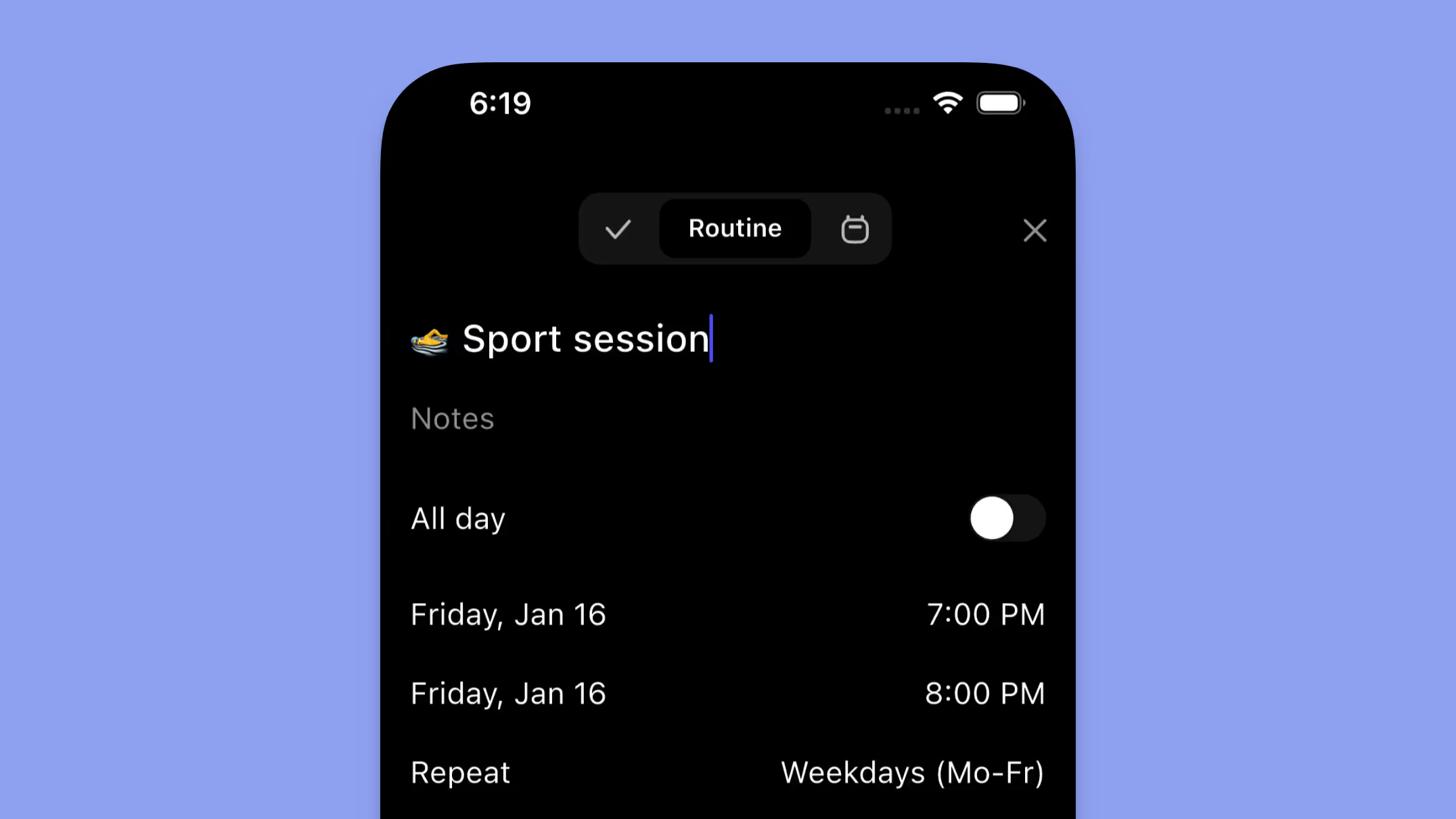
Morgen v4 brings feature parity between desktop, web, and mobile closer:
- Routines and task colors are fully supported on mobile
- You can create events, tasks, or routines directly from the calendar
- All task metadata (tags, estimates, earliest start, due dates) is editable
- You can now edit the entire series of recurring events or routines on mobile, not just single instances
Extended day view for night and shift work

For those who work late or overnight, you can now extend your calendar view beyond midnight (up to a full 24-hour range).
This makes night shifts, late work sessions, or long days much easier to reason about, without breaking the structure of the calendar.
Simplified setup, same privacy guarantees
In v3, some integrations had to be connected twice, once locally and once via the cloud. In v4, that complexity is gone. You now connect an integration once, and it’s automatically available everywhere: desktop, web, and mobile.
We continue to uphold our privacy commitment:
- No calendar data is stored on Morgen’s servers
- Data is proxied securely but never persisted
You can read more in our privacy policy.
Integration updates
Alongside the architectural changes, v4 includes notable integration improvements:
- Obsidian (Bases support): More flexibility for managing notes and tasks
- Microsoft Teams auto-connect: Connecting a Microsoft calendar now automatically enables Teams, making meeting links and scheduling links seamless
Looking ahead
By unifying Morgen across web and desktop, we’ve laid a foundation for faster development and more consistent support across platforms. This release improves performance, simplifies setup, and expands where and how you can use Morgen.
You can try the v4 beta today at https://beta.web.morgen.so.
I’m looking forward to your feedback (and if you’re not there already, you can join the conversation on our Discord).
— Marco
.avif)
.svg)
.webp)


