
.svg)
→ Motion: Best for people with fast-changing, meeting-heavy schedules. Ideal if you want AI to automatically place and move tasks on your calendar. Great for users who prefer a hands-off system but requires precise system optimization to not overplan your day.
→ Best for planners, thinkers, and documentation-heavy workflows. Perfect if you want a customizable workspace for notes, wikis, databases, and project context. It does offer calendar with your Notion tasks, but no AI scheduling.
→ Best for structured planning with flexible, user-approved AI. Built for people who want help planning their day without giving up control. Morgen unifies all calendars + tasks (including native Notion integration), proposes an AI-generated schedule you review, and supports deep-work routines through Frames.
→ Best practical setup for most productivity users: Use Notion for documentation and project planning, and Morgen for execution, a clean, native workflow without relying on Zapier or manual workarounds.
If you’re choosing between Motion and Notion, here’s the answer upfront: Motion is better for daily task planning because it automatically schedules and reschedules your tasks on a calendar. Notion is better for organizing information (notes, docs, databases, and long-form project context), but it lacks real scheduling features.
Most people end up using both: Notion for planning and documentation, and Motion as the execution engine that turns tasks into a workable daily schedule.
This guide breaks down exactly where each tool wins, and where they fall short, plus a third option (Morgen) if you want flexible planning with smarter, user-controlled AI scheduling.
| Category | Motion | Notion |
|---|---|---|
| Best for | AI-powered scheduling and dynamic calendar + to-do management | Notes, documentation, knowledge management, and flexible task databases |
| Standout feature | Auto-scheduling and auto-rescheduling of tasks and meetings | Unified workspace for docs, wikis, databases, and tasks |
| Price | $29/month with AI credits | Free tier or $20/month per member with Notion AI |
| Pros | Strong automation, calendar-first design, less manual planning | Highly flexible “second brain” for projects and documentation |
| Cons | Confusing UI for some users; AI can over-plan (source) | Not calendar-first; setup can be time-consuming |
| Customer support | Mixed feedback (users report issues) | Generally well-rated (G2) |
| Smart scheduling / auto-reschedule | ✓ | — |
| Knowledge base / docs | Basic | ✓ |
| Task & project management | ✓ | ✓ |
| Calendar integration & time blocking | ✓ | Limited / workaround-based |
Who is Motion Best For?

- Users who want to minimize time spent on planning and let AI rearrange tasks when things change.
- Teams or small companies who want a calendar-first task & project management tool, especially those who don’t want to juggle separate calendars, to-do lists, and scheduling tools.
- Individuals with attention difficulties or ADHD, who benefit from automated scheduling. Many Reddit users in r/UseMotion praise Motion for helping them stay on track.
For in-depth comparisons with similar tools, see our list of Motion app alternatives 🔗.
Who is Notion Best For?

- People seeking a central “second brain”: to store notes, docs, research, ideas, project plans, and reference materials in one place.
- Teams needing shared documentation, wikis, knowledge bases, and collaboration on content not just task lists.
- PMs who like flexibility and customization: building Kanban boards, databases, trackers, long-term projects, documentation, and customized workflows.
For guidance on setting this up efficiently, see The ultimate Notion guide (beginner → pro) 🔗.
Morgen: An alternative

If you want the scheduling intelligence of Motion without losing planning flexibility, and the option to use Notion without creating new setup, Morgen sits perfectly in the middle.
- AI Planner with user approval to avoid random task and events reshuffling
- Frames for creating time blocks
- Unified calendar + task hub across Google, Outlook, iCloud, Fastmail (check integrations)
- Fast setup, minimal configuration
| Tool | Price | Notes |
|---|---|---|
| Morgen Pro | $15/month | AI Planner, Frames, task integrations, automations, scheduling links |
| Motion | $29/month | AI auto-scheduling, higher cost, credits-based AI usage |
| Notion | Free–$20/month | Excellent for docs and databases; no native smart scheduling |
Price
Price often determines which tool you choose especially if you’re a solopreneur, student, or small team.
Motion Pricing

- Motion re-introduced a new pricing system after recent Reddit lashout with Pro AI package starting at $29/month for yearly billing or $49/month for monthly billing. The individual plan includes AI chat, projects & tasks, calendar, docs and databases, unlimited storage and 7,500 credits with 30 cents/100 credits.
- The business tier starts at $39/month with monthly billing and 15,000 credits or $69/month with yearly billing. Additional features for business plan include team capacity planning, advanced reports, timeline and gantt charts, time tracking, and more.
- User reviews note that Motion can feel expensive if you don’t fully leverage its AI automation.
For a detailed breakdown of the total cost of ownership and tier differences, you can review our full analysis of Motion pricing to see how it compares.
Notion Pricing

- Notion offers a free tier, which is enough for many basic users: notes, docs, simple task lists, small personal projects.
- Paid tiers (Plus $10/month / Business $20/month / Enterprise custom) add team collaboration, permissions, more advanced database features, and storage. For many small teams or individuals, the free or low-cost plan is often sufficient.
Verdict
If budget is a major concern or you don’t need AI automation, Notion wins on cost-efficiency.
If your time is worth more than the subscription and you need calendar automation Motion may justify the higher price.
Ease of Use
How easy is it to get started, and how fast can you reach “flow”?
Motion
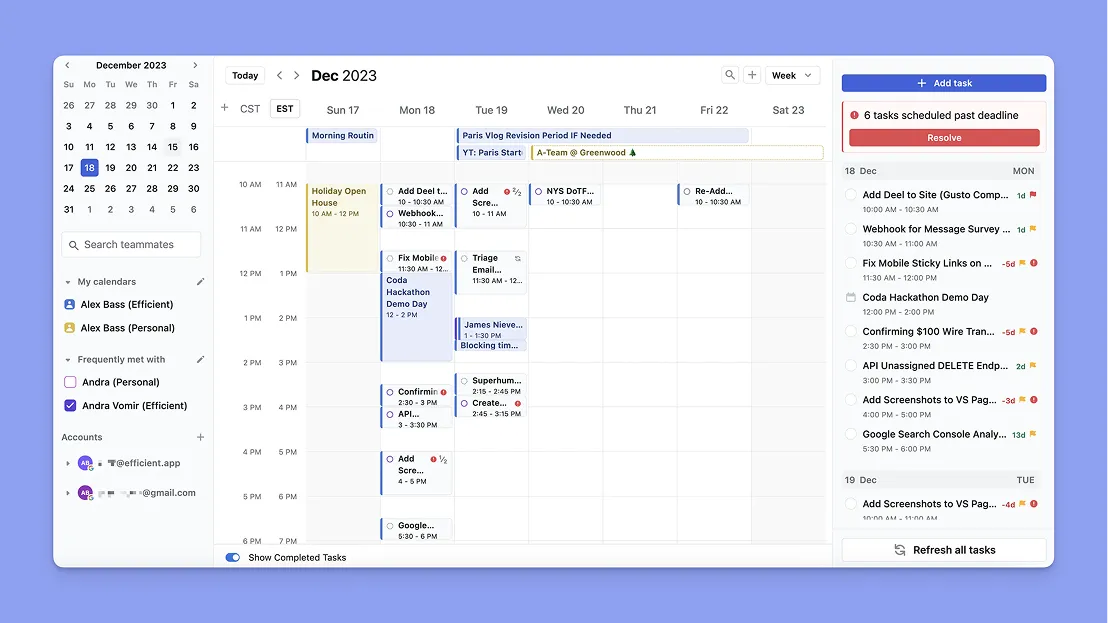
- Once you set task dependencies and task schedules Motion won’t reshuffle your calendar outside those boundaries, although this requires setup time.
- Motion is powerful in theory but users note it feels overly complicated, unintuitive, and finicky in practice. They mention “no clear learning base”, vague YouTube onboarding tutorials and confusing settings (example from OP: iCal “supported” in one place but “not supported” somewhere else).
- More users on Reddit report difficulties understanding what to do, where settings live, or how to build a system.
Notion

- Extremely well done resource database with easy onboarding to get started with writing notes, basic tasks, docs.
- For advanced use (databases, Kanban, task views, permissions), it takes time and effort to build a proper structure. As one of the G2 reviews puts it: the real value appears only when you treat Notion “like an OS, not just a doc app.”
- Notion gives you flexibility with its blank canvas you can build your own system in or using any of the templates the community offers (most of them for free).
Verdict
Considering Motion’s lack of comprehensive resources, Notion wins as it’s easy to start and offers resources to understand the advanced features.
Customer Support
Customer support can make or break the entire product experience. When users get stuck and generic resources aren’t enough, responsive, knowledgeable support becomes the difference between frustration and success. For many companies, that support is powered by dedicated contact center solutions.
Motion

- Mixed reviews on Reddit: users express unhappiness about the pricing changes
- Other users found support lacking: setting up can be confusing, and misconfigured calendars or “AI moving things” caused frustration.
Notion

- According to G2-based summary analysis: users generally report high satisfaction once the workspace is set up correctly.
- Good documentation, templates, community support, and a strong user base help new adopters.
Verdict
If you choose Motion, plan for a bit of onboarding friction and be careful with subscription/billing. With Notion, once you explore templates and structure, support tends to be steady and reliable.
Integrations
Many of us have app stacks we use and migrating system often takes more time than we can justify, which is where integrations become a must.
Motion

- Offers multiple calendar integrations with syncing, scheduling, pulling tasks + events into a unified view.
- Motion doesn’t integrate with task managers natively, only with tools like Zapier or Make
If you are curious about how its native scheduling stack differs from a standard setup, you can read more about Motion vs Google Calendar here.
Notion

- Highly flexible integrations: databases, third-party apps, embed everything (docs, spreadsheets, media). As a workspace, Notion excels at being the “glue” for knowledge, docs, planning, and tracking.
- Calendar-like behavior is possible (Notion Calendar, custom DB views), but calendar automation or smart scheduling needs external tools.
Verdict
For calendar scheduling with tasks Motion wins as long as you don’t mind migrating your docs. If you want a flexible workspace that integrates notes, tasks, docs, and databases, but lacks in the AI scheduling Notion wins.
Smart Scheduling
When meetings get cancelled or postponed, urgent tasks pop up, or you miss a slot, the tool should adapt and offer solutions.
Motion

- Motion can plan your team meetings and automatically send invites via email to invited team members.
- Offers AI to automatically schedule and distribute tasks among your team members.
- An automated workflow can be set up to build your team's calendar once it knows all of your team's tasks and projects.
- Some users experienced an overestimated capacity, crammed days with the need to constantly move deadlines, resolve conflicts themselves, or undoing Motion’s decisions.
- Others warn that if you’re not hitting high usage (tasks + meetings + calendar changes), the value may not justify the price.
- The AI agents functionalities are often described as basic automations or API calls wrapped in AI branding.
Notion

- Notion has no built-in AI scheduler. Time-blocking, calendar views, and task scheduling are all manual.
- Offers custom database automations, several database views, and context-rich task tracking, which is useful for long-term projects, dependencies, and documentation.
- If you want real-time rescheduling when things change you’ll need external tools.
Verdict
For active scheduling that adapts to shifting priorities, after a handful of tweaking Motion wins hands down. For structured, intentional planning where you control when and how tasks are scheduled Notion offers the flexibility.
How to choose the best platform for task scheduling
Pick the tool that matches how you plan your schedule, your collaboration needs, and how much control vs. automation you want.
AI Scheduling
Tools like Motion excel at auto-rescheduling, but users often experience unpredictable shifts, overpacked days, and schedules that don’t match human flexibility.
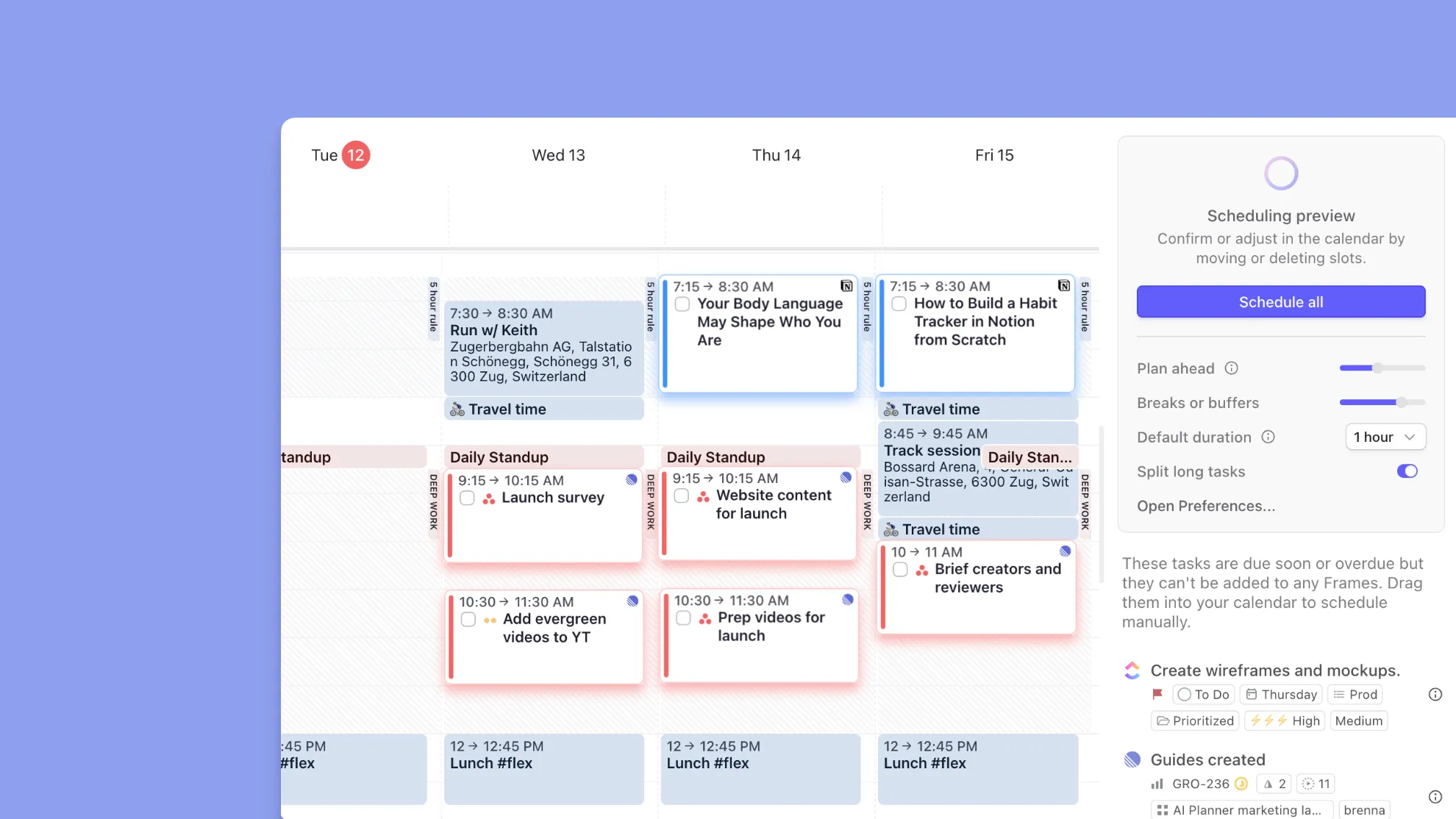
Morgen lets you set up “frames” which are predefined time blocks for work types like Deep Work or Meetings. The AI Planner then suggests where tasks should go based on frames, and you approve the final plan. If you drag a meeting over scheduled tasks, Morgen asks whether to move them immediately or let the AI reprioritize.
Setup
Without a clear structure (templates, naming conventions, folder hierarchy), you may spend more time organizing Motion than working on tasks. Conversely, Motion’s setup is relatively quick, but AI parameters (work hours, blocks, buffers) still require fine-tuning.

Morgen simplifies this with a light setup: add your task managers, calendars, create Frames and do your best work in 3 minutes with intuitive time blocking and AI that complements your workflow.
Value for money
Motion’s lower tiers (from $19–$29/seat/month) exclude advanced features like capacity planning, reporting, and team permissions, while higher tiers ($39–$69/seat/month) add costs through AI credit overages. Notion’s free plan is generous but lacks heavier collaboration and version history.

Morgen offers full calendar, task, and automation capabilities at $15/month, with more flexibility than most scheduling tools and a 30-day money-back guarantee.
You can use Morgen 4 on macOS, Windows, or Linux, and sync it with your mobile workflow on iOS or Android.
Alternative To Motion and Notion: Morgen
Many users end up frustrated with the Motion vs. Notion trade-off: Motion overschedules, Notion underschedules. If you want a tool that keeps the intelligence of AI planning but stays predictable, Morgen with its integration and smart scheduling is the alternative worth considering.
Key features
- Unified calendar view: See all your calendars—Google, Outlook, iCloud, Fastmail—in one place and avoid accidental double-bookings.
- AI Planner: Let Morgen design your day based on priorities, deadlines, time estimates, and more (explore Morgen Priority Factor).
- Frames: Build templates for your ideal week. Use recurring Frames to dedicate time to deep work, routines, or personal tasks, and use AI to place the right tasks into the right Frames (or do it manually).
- Task integrations: Connect Google Calendar, Outlook, Todoist, Notion, Obsidian, and more to plan tasks and meetings together in one unified schedule.
Pricing
No complicated tiers and no hidden limits. Pick a monthly plan to keep things flexible or go yearly to get the best value.
| Plan | Price | What you get |
|---|---|---|
| Pro | $15/month | AI Planner, unlimited calendars and task integrations, calendar automations, booking page and scheduling links, shared calendars, and ongoing feature updates |
| Business | $10/month per seat | AI Planner, unlimited calendars and task integrations, calendar automations, booking page and scheduling links, team availability view, and ongoing feature updates |
Where Morgen shines
✅ AI-assisted scheduling with review — instead of auto-shuffling tasks behind the scenes, Morgen’s AI planner proposes a schedule and waits for your confirmation.
✅ Ideal-week “Frames” — block deep work hours, energy dips, admin time, routines, and tell Morgen “don’t touch these.”
✅ Unified connectors — integrate calendars (Google, iCloud, Outlook), tasks (Notion, Todoist, ClickUp, Linear, etc.), and personalize buffers/travel time. Full list of integrations here.
📖 How to integrate Notion with Morgen
Where Morgen falls short
- Not a full project management tool
- Not built for large enterprises needing workload management features
Customer reviews
- “I am a solo founder in addition to having a pretty busy activity schedule outside of work. I also manage different areas of life into a combination of Airtable, Obsidian and Apple Reminders across 8 different calendars. I was also in the market for an online booking system. Morgen fit like nothing I had ever seen before.”

“Morgen allows me a sense of security when looking at and dealing with my schedule.”

Who Morgen is best for
- Developers: Appreciate Frames for deep-work blocks, unified calendars, and automatic buffer handling for meetings and context switches.
- Freelancers: Value AI Planner suggestions, scheduling links, and managing clients across multiple calendars.
- ADHD users: Benefit from visual drag-and-drop time blocking and structured weekly Frames.
- Creators: Love task integrations (Notion, Todoist) and reserving protected creative hours with repeatable Frames.
Start planning your schedule with Morgen today.
Motion vs Notion vs Morgen: Which One Should You Choose
Motion is ideal if you want automatic scheduling and constant reshuffling which is great for people whose days change fast. Notion shines when you need a flexible workspace for docs, databases, and project context. Morgen sits between them: a unified calendar, AI Planner with user approval, Frames for your ideal week, and deep task integrations. It’s perfect if you want structure without losing control.
Start with Morgen today, connect your whole stack in less than 30 seconds.

.svg)
.webp)


