
.svg)
→ Motion offers two pricing tracks with two tiers each: Individuals and Teams, with Pro AI and Business AI plans starting from $29/month for individuals and $19/seat/month for teams on annual billing
→ AI credits increase the real Motion cost: Beyond the subscription, advanced AI features use monthly credits, and heavy usage adds overage charges on top of your base plan
→ Choose Morgen ($15/month) if you are a freelancer, developer, solopreneur, marketer, or small team that needs an AI scheduling tool: An alternative AI calendar planner with deeper integrations, faster task capture, and AI suggestions that do not aggressively reshuffle your day
If you are looking for an AI planning assistant, and considering Motion, the next logical question is: how much does Motion cost?
Let’s explore Motion's pricing plans, hidden costs, pros and cons, and who it is best for. If you are still comparing options, we’ll show how Morgen is a better AI calendar management app at a lower, predictable price.
How Much Does Motion Cost?
Motion offers two pricing tracks and two tiers, with annual plans saving around 33%. Your actual spend may increase depending on AI credit usage.
Individuals
If you are buying Motion for personal use, freelance work, or solo planning, these are the available individual plans:
Teams
For shared scheduling, workload planning, and team visibility, Motion uses seat-based pricing:
Read our detailed Motion review to decide if it’s the calendar management virtual assistant you need.
Morgen: An Alternative AI Scheduling Software with Fixed, Predictable Pricing

Motion’s cost can rise quickly and unpredictably with heavy AI use. Morgen keeps pricing simple with fixed monthly and annual plans for individuals and teams, with no AI credits.
You get:
- More integrations: Connect multiple calendars and 8+ task tools to pull in existing workflows, instead of rebuilding everything from scratch
- Faster setup: Motion replaces your project and task tools, so you spend more time creating workflows before using AI to build schedules. Through integrations, Morgen surfaces scheduled work in seconds so you can start planning immediately
- AI Planner with a co-pilot approach: While Motion schedules tasks automatically, Morgen’s AI Planner creates a suggested schedule you can accept or edit before confirming the final plan
Here’s how Motion compares to Morgen. You can also check out these 12 Motion alternatives worth considering.
Motion Pricing Plans: A Breakdown
Here is what each Motion plan unlocks at every tier.
Pro AI

Pro AI unlocks Motion’s core planning tools: AI chat, projects and tasks, calendar scheduling, meeting notes, docs and sheets, integrations, and access across iOS, Android, desktop, and web. The plan includes 7,500 AI credits per month.
Business AI

Business AI offers Motion’s advanced team and operations features. You get dashboards, Gantt charts, time tracking, permissions, central billing, and priority support, plus 15,000 AI credits per month for heavier AI usage across teams.
AI Credits: Why Motion Can Cost More Than the Listed Price

AI credits power Motion’s advanced AI tools, including AI Chat, Meeting Notetaker, AI Docs, and task management actions.
Each plan includes a free monthly allowance, but once you exhaust it, you pay extra on top of your subscription. The more you rely on these tools, the faster your monthly cost rises.
Motion Hidden Costs
- No free tier: Motion offers only a 7-day trial, and you must enter your card details upfront. Many users report being charged before the trial begins
- AI credits: Heavy use of advanced AI tools can increase your monthly cost beyond the listed subscription price
- Full buy-in and inflexibility: Motion replaces your stack, leaving you to capture projects and tasks manually. For faster NLP or non-work task capture, you may end up paying for a second app, thus increasing cost and context switching
Motion Pros and Cons
According to Asana’s Anatomy of Work, knowledge workers spend 60% of their time on ‘work about work,’ including switching between tools and managing shifting priorities. Here is where Morgen helps reduce that overhead and where it may fall short.
Pros
- AI-powered automatic task scheduling: Motion automatically places tasks into your calendar and reshuffles them as priorities shift
- Dynamic rescheduling: When meetings shift or tasks run long, Motion reshuffles the affected blocks in real time
- Built-in project management: Use AI projects, assign tasks, use dashboards, and track progress with Gantt charts
- Meeting scheduling tools: Scheduling links, booking pages, and AI-assisted meeting coordination reduce the back-and-forth of finding time
- Priority-aware planning: Higher-priority tasks get earlier, protected time slots; lower-priority work fills the gaps
- Team workload visibility on Business AI: Managers can see what teammates are working on and when, useful for resource planning in agencies and small teams
Cons
- Expensive: Motion is priced as a premium tool, and costs can rise further with AI credit overages
- No task tool integrations: Motion does not import tasks, so you have to create your workflows from scratch on the outline
- Manual task and project capture: You often need to build workflows and input tasks manually before the AI scheduler takes over
- Steep learning curve: Many users find Motion overwhelming at the start, and that “auto-scheduling can feel rigid” when you need flexibility
Motion is also not available on Linux. If you’re a developer, Morgen is the best Linux AI calendar app.
Who Motion Is Best For
Not sure if paying a premium for Motion is worth it? This is who gets the most value from its AI scheduling and built-in project planning.
Professionals Who Want AI to Plan the Day Automatically
Do you have a packed schedule, constantly jumping between projects, tasks, and unavoidable meetings? Motion plans your work around meetings.
If a meeting runs long or a new one appears, the AI automatically pushes tasks into the next available slots.
Teams That Need Workload Visibility
Motion is a strong fit for teams managing shared deadlines, task ownership, and shifting schedules. It surfaces team capacity, timelines, and workloads while automatically adjusting plans as meetings and priorities change.
Users Who Want One Tool for Projects, Tasks, and Scheduling
If you want to replace separate task managers, calendars, and lightweight project tools, Motion brings all three into one workspace with AI-powered scheduling built in.
ADHD Brains Who Struggle Deciding What to Do, When
If deciding what to tackle next feels overwhelming, Motion reduces decision fatigue by automatically prioritizing and placing tasks into your calendar based on deadlines and availability.
Motion Customer Reviews
Motion’s reviews are generally split between praise for how quickly it builds daily schedules and complaints about its high cost and unexpected card charges.
To give you a balanced view, here is one positive review and one common criticism from recent users.
Positives
Joe L. says Motion is “worth it” and especially highlights how unfinished tasks automatically stay on the calendar until they are completed.

Complaints
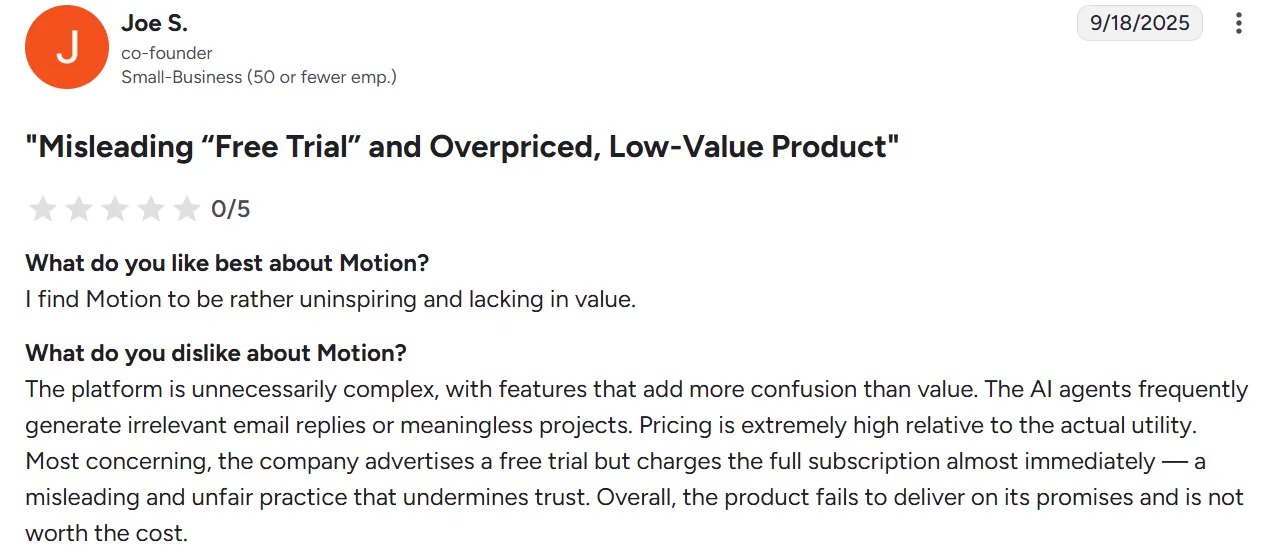
Joe S. echoes a common complaint from recent users, citing immediate charges around the trial period and pricing that feels too high for the value delivered.
Alternative to Motion: Morgen for More Integrations and Human-in-the-Loop AI Planning

Do you want more control over how your day is planned, plus the ability to pull in existing work from your current tools?
Here are features that make Morgen a strong daily planning app alternative for solopreneurs, developers, freelancers, small teams, and ADHD professionals.
AI Planner
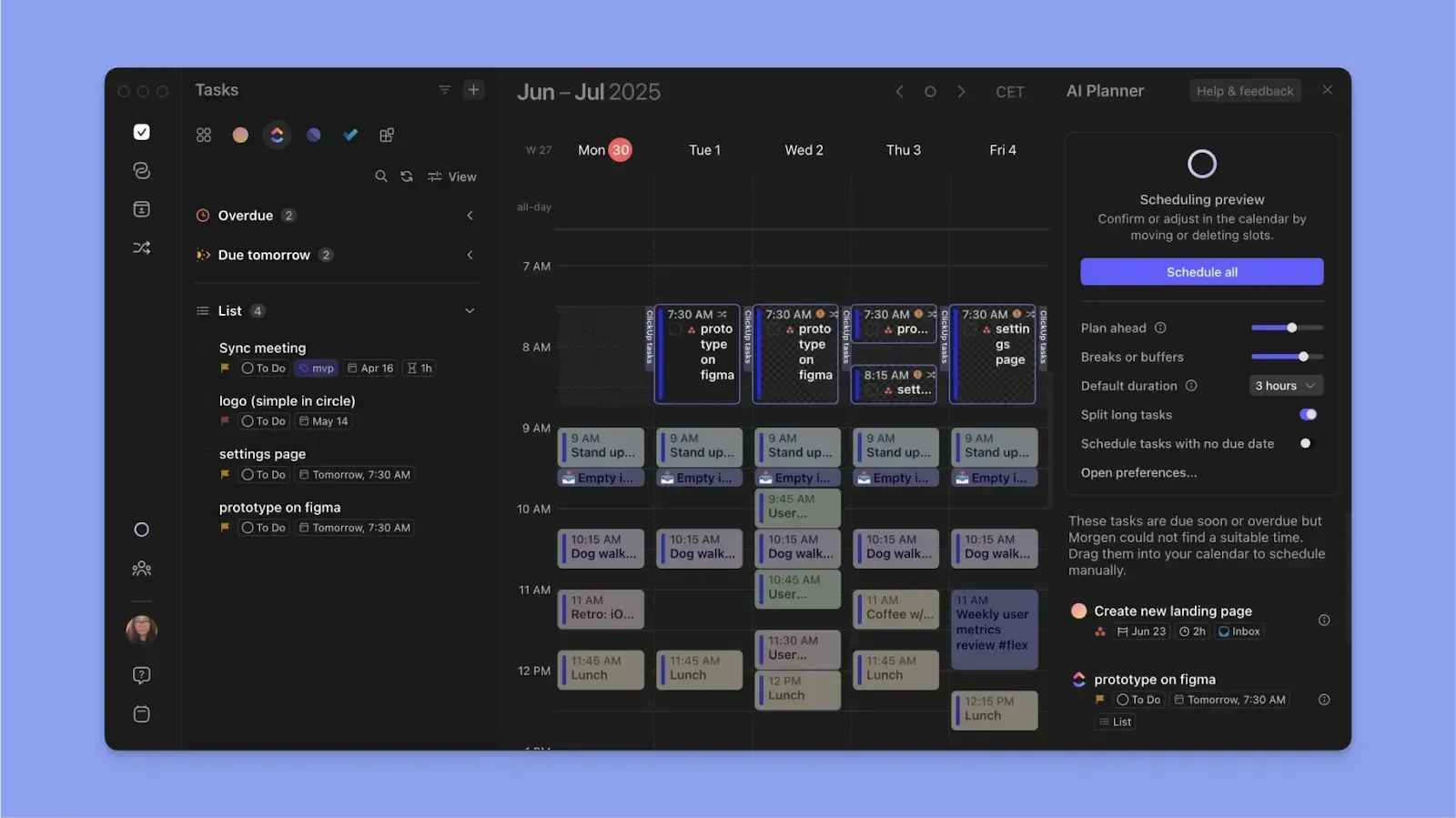
Where Motion's AI plans for you, Morgen’s AI Planner plans with you.
It reads your calendars and task list, identifies free time around meetings and routines, and suggests when to schedule each task.
You get a proposed schedule in seconds, review it, and confirm or adjust before anything is locked in.
Deeper Integrations
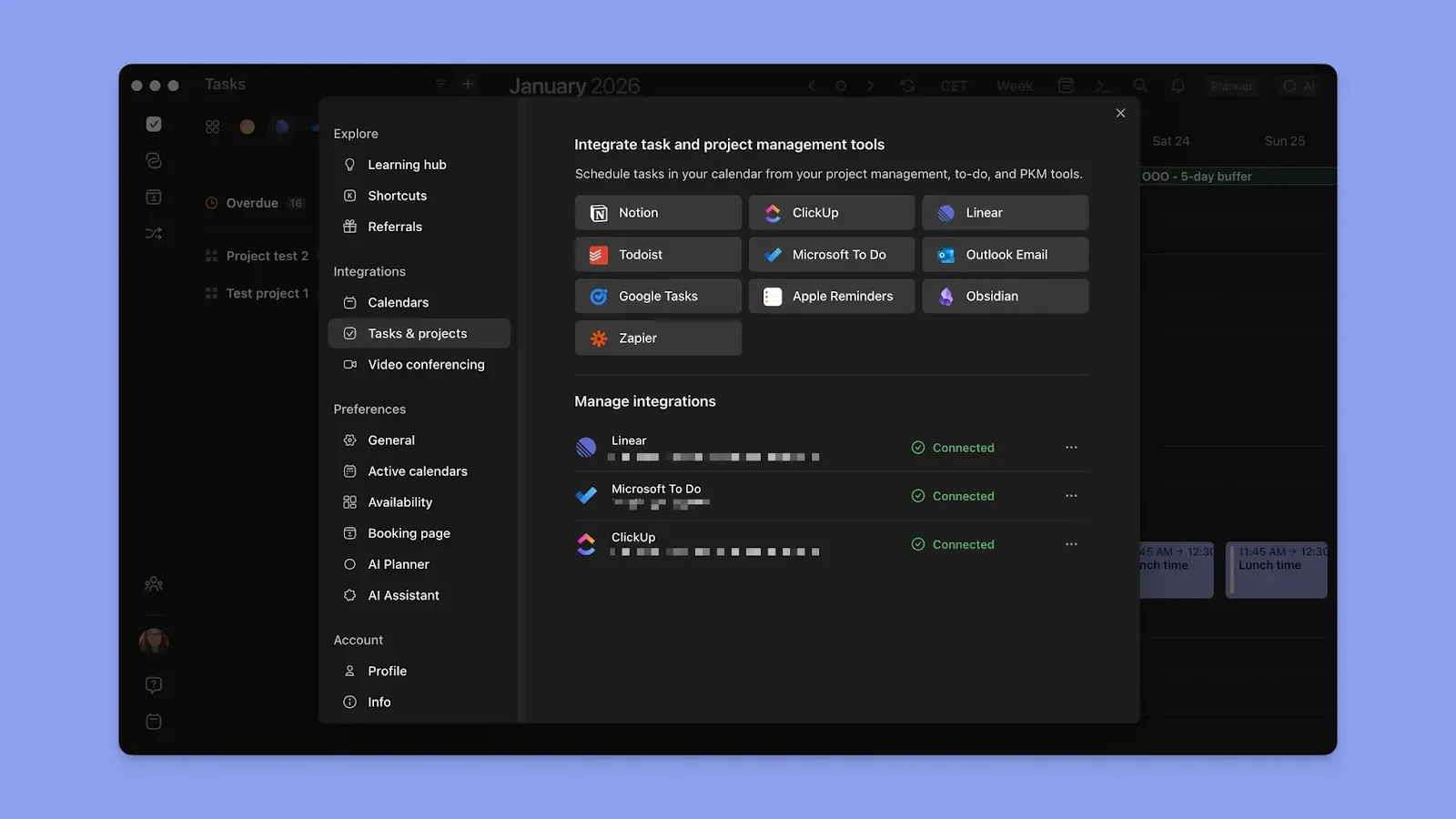
Morgen connects to the tools you already use and pulls everything into one view.
Sync calendars like Google Calendar, Microsoft Outlook, Apple Calendar, and Fastmail.
On the task side, connect Notion, Obsidian, Todoist, ClickUp, Linear, Google Tasks, Microsoft To Do, Outlook Email, and Apple Reminders.
Once connected, tasks appear in Morgen with their deadlines and priorities intact, and the AI Planner uses that data to suggest where each task fits in your available time.
Frames, Time Blocking, and Smarter Calendar Management

After connecting your task tools, create Frames to template recurring time blocks for specific types of work. Attach task filters and tags to each Frame, and the AI Planner will understand what kind of work to suggest there.
Also, use color-coding and Calendar Sets to understand and switch between work and personal calendars. When you build a plan on one calendar, a Calendar Propagation workflow syncs it across all connected calendars to prevent double-bookings.
Want to know how Morgen is the best smart planner to organize your day? Try the free Easy Tasks Chrome extension and Schedule Builder first, then grab your 2-week trial of Morgen for the real experience.
Does Motion Pricing Fit Your Budget?
Motion fits the bill for full AI auto-scheduling and built-in project management.
Morgen, however, is more affordable and offers AI planning suggestions you can edit or approve before scheduling.
Read how to get started with the latest Morgen V4, then download the app to start planning.

.svg)
.webp)


