
.svg)
→ Superhuman Suite offers four pricing plans: Free, Pro ($12/month), Business ($33/month), and Enterprise (custom pricing)
→ You get free Grammarly and Coda features to add value, but most advanced capabilities are paywalled: the free plan is a lightweight entry point and may not suit busy professionals
→ Superhuman Mail is also priced separately from the Suite: Starter at $25/month annually, Business at $33/month, and Enterprise (custom pricing)
→ Choose Morgen ($15/month) if you're a solopreneur, developer, or freelancer who needs an AI daily planner and AI scheduling software that fits tasks around your real calendar availability, without AI reshuffling your day without your say.
Superhuman is an email management platform for professionals whose workflows revolve around email. But is it really worth the cost?
We’ll explore Superhuman pricing, who it is best suited for, what users say about it, and where its value may feel limited. If your work spans calendars, tasks, and multiple tools, not just email, we'll also cover why professionals are switching to an advanced AI planning assistant like Morgen.
How Much Does Superhuman Cost?
Superhuman has two products with separate pricing: the main Suite and Superhuman Mail. Here’s what you pay for each.
Superhuman Suite
This offer bundles Mail with Grammarly, Coda, and Go, with four pricing plans:
| Plan | Monthly | Annually |
|---|---|---|
| Free | $0 | $0 |
| Pro | $30/month | $12/month |
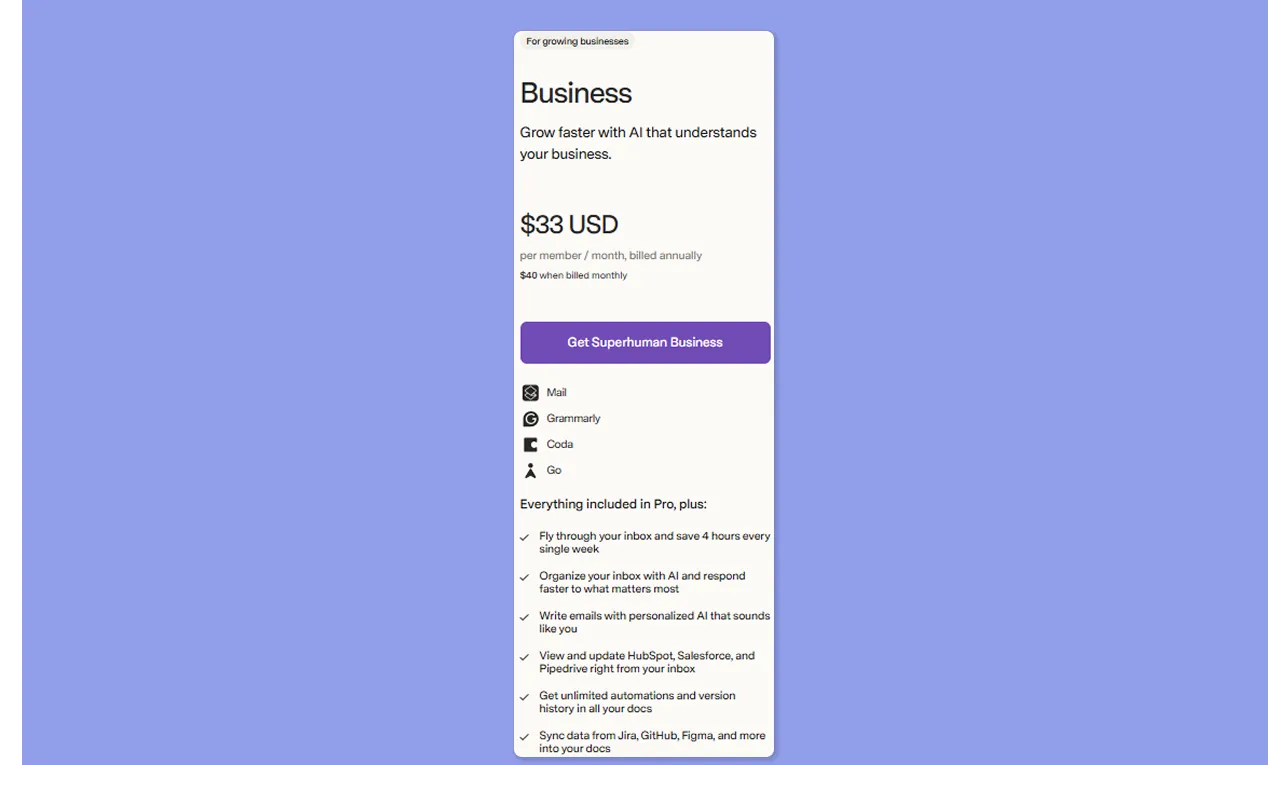
| Business | $40/month | $33/month |
| Enterprise | Custom | Custom |
Note: The Superhuman free tier covers AI writing across apps, but does not include Superhuman Mail.
Superhuman Mail
The email service is available as a standalone product, but without a free tier or trial.
| Plan | Monthly | Annually |
|---|---|---|
| Starter | $30/month | $25/month |
| Business | $40/month | $33/month |
| Enterprise | Custom | Custom |
Morgen: A Better Option for Advanced Calendar and Availability Planning

Superhuman's calendar is an extension of your inbox. It surfaces Gmail and Outlook events, lets you share availability from within an email thread, and connects to Zoom, Meet, and Teams. That works well if your scheduling starts and ends in email.
If you have advanced calendar planning needs, try Morgen for:
- Full calendar visibility across accounts: Connect multiple calendars and see your real availability in one unified view
- Workflows across tools, not just email: Pull tasks from 8+ external tools into one planning layer, then schedule and update them without switching apps
- Availability sharing: Control what appears as busy so clients and teammates only see your true availability
- Booking pages and scheduling links: Share real-time availability without back-and-forth emails
- AI-powered task scheduling: Morgen’s AI Planner suggests when to schedule tasks based on deadlines, priorities, and open time, then lets you review and confirm
Note: Morgen connects natively to Outlook Email. Flag an email, and it becomes a task you can schedule on your calendar.
| App | Pricing | Scope |
|---|---|---|
| Morgen | $15/month (billed yearly) / $30/month (billed monthly) | Calendar and task integrations, human-in-the-loop AI Planner, Frames, Routines, booking pages, scheduling links, and team availability |
| Superhuman (Pro) | $12/month (billed yearly) / $30/month (billed monthly) | Email productivity, AI writing + drafting, keyboard shortcuts, read statuses, snippets. Limited calendar + availability features |
Tip: Superhuman’s calendar and availability features are only available on the Business plan ($33/month/year). At $15/month/year, Morgen includes full calendar management, task planning, and AI scheduling out of the box.
Want to turn emails into scheduled tasks? Capture them instantly and plan them on your calendar with Morgen’s Easy Tasks extension.
Superhuman Pricing Plans: A Breakdown
Here's exactly what you unlock at each level:
Free

The free plan provides entry-level access to Grammarly, Coda, and Go. You get AI writing assistance across apps, support for six languages, voice and tone adaptation, and collaborative docs with tables, Kanban boards, and forms.
Superhuman Mail is not available in this tier.
| Plan | Monthly | Annually |
|---|---|---|
| Free | $0 | $0 |
Pro

Superhuman Pro unlocks Grammarly with unlimited paragraph rewrites, plagiarism detection, and brand consistency checks. Coda adds custom domain publishing, 30-day version history, and AI templates. However, Superhuman Mail is still locked on this tier.
| Plan | Monthly | Annually |
|---|---|---|
| Pro | $30/month | $12/month |
Business
| Plan | Monthly | Annually |
|---|---|---|
| Business | $40/month | $33/month |
Enterprise

This plan is built for organizations with security and compliance requirements. It adds analytics and reporting, SAML single sign-on, custom roles and permissions, data loss prevention, BYOK encryption, and a dedicated support team. Pricing is negotiated directly with sales.
| Plan | Monthly | Annually |
|---|---|---|
| Enterprise | Custom | Custom |
Superhuman Mail

Superhuman Mail is best if you only want the email client without the bundled Suite tools.
The Starter plan covers the core Superhuman experience: Split Inbox, 100+ keyboard shortcuts, AI writing, Auto Summarize, Snippets, calendar, Share Availability, and integrations with virtual conferencing tools.
The Business tier adds Auto Drafts, Ask AI, Custom Auto Labels, and full CRM integrations with HubSpot, Salesforce, and Pipedrive.
Enterprise mirrors the Suite Enterprise tier with added security controls and advanced support.
Superhuman Hidden Costs
- Underlying email provider: Superhuman sits on top of Gmail or Outlook, so you still pay separately for Google Workspace or Microsoft 365
- CRM tools not included: Business connects to HubSpot, Salesforce, and Pipedrive in read-only mode, but full CRM functionality still requires separate subscriptions
Superhuman Pros and Cons
Unboxd reports that professionals spend 28% of their workweek on email, roughly 11 hours every week. Superhuman aims to reduce that time, but where does it deliver value, and where does it fall short?
Pros
- Inbox speed: Helps you process emails twice as fast, largely through keyboard shortcut architecture
- 100+ keyboard shortcuts: Every inbox action has a shortcut. After learning them, you can move through emails like a breeze
- AI that writes in your voice: Write with AI, Instant Reply, and Auto Summarize learn your tone over time, so drafts need minimal editing
- Clean, focused interface: Split Inbox categorizes important emails to improve your focus
- Concierge onboarding: Every paid plan includes a 1-on-1 onboarding session to get you up to speed on shortcuts and workflows from day one
- Team collaboration: Shared Conversations, team comments, and read statuses make it viable for small teams managing shared email threads
Cons
- Premium price for an email layer: You still need Gmail or Outlook underneath it, which makes the extra cost harder to justify for some users
- No unified inbox: Multiple email accounts cannot be merged into a single view
- Gmail and Outlook only: Superhuman does not support iCloud, Fastmail, or other providers
- Steep learning curve: The shortcut-driven workflow requires deliberate investment before productivity gains kick in
- Workflow scope is limited to email: If your work spans tasks, projects, and multiple calendars, you will still need separate tools to plan and execute your day
Tired of jumping between your inbox, task manager, and calendar just to build a plan for the day? Read our recommendations for the best personal time management apps and best productivity apps for focus and planning to find tools built for your busy workday.
Who Is Superhuman Best For?
Superhuman works best for professionals whose main productivity bottleneck is their inbox, especially when response time and email volume directly impact outcomes:
Sales Professionals Who Live by the Follow-Up
If your revenue depends on timely replies, Superhuman gives you a clear edge.
Read statuses show when prospects engage, so you can follow up at the right moment. Auto Drafts prepare responses before you write them, while CRM integrations keep deals updated without leaving your inbox.
Founders and Executives Managing High Email Volume Daily
When email volume is high, processing speed becomes critical. Superhuman’s keyboard-first workflow, Split Inbox, and AI summaries help you move through conversations quickly while staying on top of priorities. If missing an email has real consequences, the efficiency gains compound.
Marketers Who Use Email as Their Primary Client Channel
In email marketing, it’s the high-frequency, one-to-one communication that drives client relationships. Superhuman’s snippets standardize responses, AI writing adapts to your tone, and shared conversations keep account communication visible across your team without forwarding threads.
Professionals Who Read Every Email and Want to Keep It That Way
If you want to read everything, respond deliberately, and close the day at inbox zero, Superhuman's a good fit for you.
The keyboard shortcuts speed up triage, Send Later helps time responses, and Remind Me resurfaces conversations that need follow-up so nothing slips through.
Superhuman Customer Reviews
Most users report that Superhuman improves email speed and focus once they adapt to its shortcut-driven workflow.
At the same time, some users note that the platform feels expensive relative to its focus on email alone.
Positive Reviews
One user, Deborah N., highlights how Superhuman improves prioritization and repeatable workflows:

Complaints
“Superhuman Mail is pretty expensive compared to other email products I've tried,” says Alan G.

Alternative to Superhuman: Kai, an AI assistant that works your inbox for you
Superhuman makes you faster at email. Kai sorts then drafts the email for you:
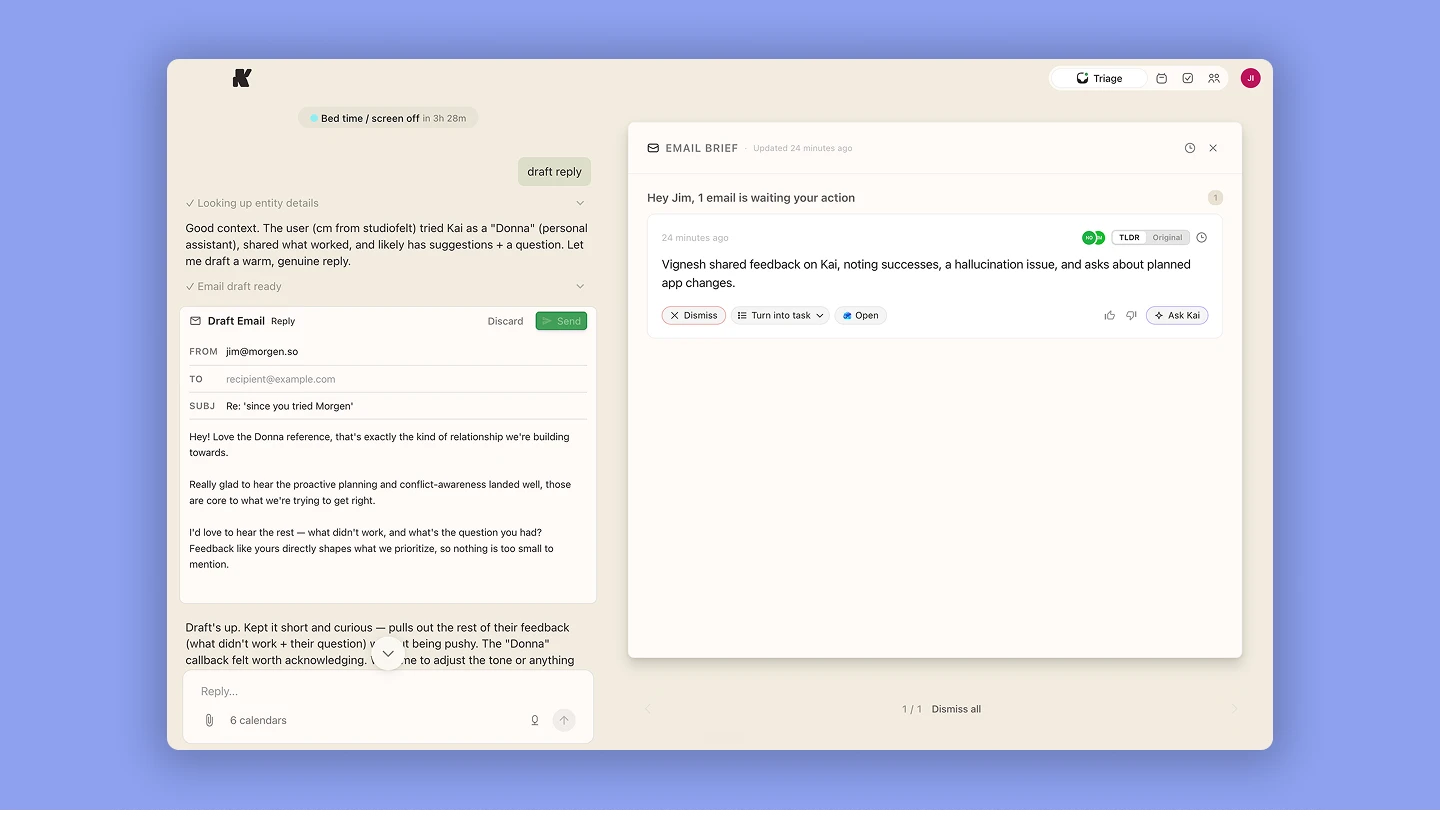
Kai learns from your tone of voice and your meeting transcripts to write drafts for you. With that full context, Kai delivers ready-to-send replies to the important emails in your inbox.
The difference from a faster inbox is that Kai doesn't stop at email. It sees your meetings, tasks, and calendar in the same picture and acts across all of them. The email that needs a reply, the follow-up you owe, the meeting you should prep for. No copy-pasting context between tools to get your work done.
No setup needed. You connect your accounts and Kai gets to work. Try it here.
Does Superhuman Pricing Fit Your Budget?
For high-volume communicators who depend on fast, deliberate email, the speed gains justify the Superhuman cost.
For solopreneurs, developers, freelancers, and busy individuals who need daily planning beyond email, Morgen is the AI scheduling software that helps structure tasks and availability across the day.
And if what you actually want is an assistant that runs the inbox and the calendar for you, not just a faster way to do it yourself, that's Kai, Morgen's AI executive assistant.
Explore how Morgen task management works, then start your 14-day free trial.

.svg)
.webp)


