
.svg)
→ TickTick: For individuals who want an all-in-one productivity hub with a built-in calendar, Pomodoro timer, Eisenhower matrix, and a habit tracker
→ Todoist: For teams and professionals who need fast task capture through voice notes and natural language processing, and simple AI for breaking down complex projects
→ Morgen: The planning layer alternative that combines multiple calendar accounts, deep task integrations (including Todoist), and an AI Planner that suggests calendar planning
→ Recommended setup: Integrate Todoist into Morgen and create your unified planning interface. Schedule tasks alongside calendar events and routines using human-approved AI, and without context switching
Are you choosing between TickTick and Todoist for task management?
Simply put, TickTick offers task lists and productivity tools in one place. Todoist has a minimalist interface and lets you capture tasks quickly via natural-language parsing and voice notes. You can integrate both and pull Todoist tasks into TickTick's calendar view if you’d rather use both.
Below is our comparison of the two across pricing, integrations, and other unique features, plus insights on how Morgen is an alternative if you need task consolidation and calendar management.
| Feature | TickTick | Todoist |
|---|---|---|
| Best For | Individuals seeking an all-in-one productivity hub | Teams and professionals who need a minimalist interface for adding tasks and projects fast |
| Stand Out Feature | Easy task capture, plus free productivity tools | AI Task Assist and best-in-class natural language processing |
| Price | Free plan available, or $35.99/year | Free plan or paid plans starting at $60/year |
| Pros | Most affordable premium option, free filters and tags, and two view options (countdown and task time) | Dictate to Ramble and better NLP compared to TickTick, Slack integration, and short learning curve |
| Cons | No AI features, can take a bit to understand all features, not the best community engagement, according to this Reddit user | Users complain that helpful features, including reminders, are paywalled. Unless you subscribe, Todoist also sends a lot of emails for each action you take, which can lead to overwhelm and anxiety |
| Calendar Integration | Built-in calendar with multiple views (drag-and-drop scheduling) | Calendar layout view (Premium only), no instant sync with Google Calendar/Outlook |
| Task & Project Management | List, Kanban, Timeline view (Premium), plus Eisenhower matrix-style planning for prioritization | List and Kanban views on free plan, Calendar view (Premium) |
| AI Capabilities | None | Task Assist (Premium) |
| Customer Support | On Reddit, reviewers complain about poor documentation, but there’s a help center and ‘Contact Us’ option | Help center, email support, active community, extensive documentation |
| Built-in Productivity Tools | Pomodoro timer, Habit tracker, Eisenhower Matrix, Usage Countdown | Karma points and productivity streaks for gamification |
Who is TickTick Best For?

- ADHD users who’ll benefit from visual urgency cues, countdowns, Pomodoro timers, and the ability to pin or intentionally mark tasks as “won’t do” to reduce overwhelm
- Visual planners who prefer customizable views, themes, and interface colors that make the app easier to engage with daily
- Productivity-focused individuals who want an all-in-one hub for tasks, planning, focus sessions, and habits, rather than juggling multiple apps
Who Is Todoist Best For?

- Professionals who prioritize fast capture, especially natural language processing and Ramble voice notes, to add tasks instantly
- Users who need basic AI to break down complex projects, brainstorm next steps, and get completion guidance
- Teams that need shared projects, comments, assignments, and integrations with tools like Slack and email
- Integration-heavy users who work across many apps and services and want a task manager that plugs into a broader ecosystem
Pro tip: If you love Todoist’s fast capture but struggle to turn long task lists into a realistic day, you can connect Todoist with Morgen. Morgen displays your Todoist tasks and lets you schedule them alongside calendar events, such as meetings.
Morgen: An Alternative

TickTick doesn't offer automated planning beyond basic natural-language parsing, and some users also complain that Todoist's Google Calendar 2-way sync doesn’t always work.
If you need actual calendar-first planning with AI assistance and deep task integrations, Morgen fills that gap.
- Deep calendar and task integrations: Connect multiple calendars and task managers in one interface with instant sync
- Native Todoist integration with bidirectional sync: Pull your Todoist tasks directly onto your calendar and schedule them with proper time blocks. Changes sync back automatically, keeping both tools updated without manual work
- AI Planner and AI personal assistant: Set up Frames and let AI suggest optimal scheduling. You approve every change, giving you more intelligence than TickTick's manual planning and more control than Todoist's basic Task Assist
| Tool | Price | Features |
|---|---|---|
| Morgen | $15/month ($30/month billed monthly) | Add calendars/tasks, AI Planner, Frames, Booking pages, scheduling links |
| TickTick | Free or $35.99/year | Full calendar views, custom filters, premium themes, white noise sounds, 299 lists |
| Todoist | Free, premium plans starting from $60/year | 300 projects, calendar layout, task duration, 150 filter views, Task Assist |
Download Morgen for Linux, Windows, Mac, iOS, and Android.
Price
With 58% of US software buyers regretting their decisions after a year, you want to understand the exact task management features you need and can find in your tool of choice.
TickTick

- TickTick’s free plan is enough if you want a reliable place to add tasks, get reminders, organize lists, and stay on top of day-to-day to-dos
- There are some complaints about automatic charging for the premium plan, often without consent. Still, it is cheaper than Todoist at $35.99/year or $3.99/month
Todoist

- Users say the Beginner plan offers essential features, enough to start planning tasks
- Todoist Pro unlocks more powerful features at $5/user/month, while Business (at $8/user/month) offers team workspaces with admin/member roles
For a complete breakdown of what you get at each level, you can research Todoist pricing to see which tier fits your budget.
Verdict
TickTick wins on pure affordability, but Todoist can justify the more expensive plan with task durations and Task Assist AI, which genuinely saves time on complex projects.
Ease of Use
How quickly can you start adding tasks, or is there a steep learning curve when you choose your tool?
TickTick

- This G2 reviewer shares that TickTick comes with user-friendly features
- Some people may find TickTick a bit feature-heavy for a to-do list app, and need time to learn how to use all the productivity tools it comes with
Todoist

- You get better natural-language parsing and shortcuts (like Q) for faster, more accurate capture.
- Dictate or type "Meeting with Ada today in 3 hours," and it will automatically parse the date and time
- As Milton A says on Capterra, Todoist is an “Excellent application for managing my tasks, with very advanced features and minimalist design. I love it!”
Verdict
Both are easy to use, with simple interfaces and fast task capture. If you need visual planning with color themes, TickTick is better. If you want speed and flexibility through natural language, you can go with Todoist.
Customer Support
If you run into technical issues or need help understanding advanced features that aren't covered in standard documentation, are you likely to get help? Here’s what to know about TickTick and Todoist:
TickTick

- TickTick offers a comprehensive help center with feature guides, best practices, FAQs, and guidance on new releases.
- If your problem is not covered, the “Contact Us” button lets you share issues or suggestions.
- This reviewer on Trustpilot says customer support is prompt in addressing issues
Todoist

- There’s an extensive help center with troubleshooting guides, feature tutorials, billing support, and product updates. Users generally find answers without needing to contact support
- Active Reddit communities and user forums can fill gaps when official support is slow. On Capterra, Calvin P shares that customer support gets slow during peak times
- This user notes that customer support has largely disappeared
Verdict
TickTick users have fewer complaints about customer support and responsiveness, while Todoist has better documentation on advanced features.
Integrations
You need to connect your task manager with the rest of your productivity stack, or you'll spend time manually copying tasks between apps.
TickTick

- You get direct connections with Gmail, Outlook, Slack, Amazon Alexa, and Apple Shortcuts, plus automation tools like Zapier and IFTTT.
- This user reports calendar sync issues, where changes made in TickTick don't always update in Google Calendar automatically
Todoist

- Todoist organizes integrations into clear categories, with over 200 connections to platforms Gmail, Slack, Google Calendar, Outlook, Trello, Asana, and Evernote
- Reddit users say that the integration to Google Calendar helps them plan more realistically with time blocks and even create Booking pages through third-party tools
Verdict
Todoist offers more integrations, while TickTick is ideal if you have a simpler workflow or can even pull tasks from Todoist.
You can also learn more about choosing a Todoist alternative in our in-depth guide to see how different tools handle complex sync requirements.
Calendar Management
Managing tasks alongside calendar events helps you see your full schedule, including meetings, deadlines, and time-blocked work, in one place.
TickTick

- You can switch between day, week, month, and Timeline views when planning and tracking your upcoming tasks on the calendar
- TickTick lets you adjust task duration on the calendar by dragging task edges, and you can color-code your tasks for better visibility
- The calendar view helps this user create blocks of time to stay on top of things daily
Todoist

- Todoist's calendar view displays tasks with specific dates and times. You can drag tasks to adjust start times and deadlines
- One Reddit user explains: "There is no way you can color-code your tasks in Todoist calendar by yourself; you can only see tasks by priority color.
Verdict
If you like a built-in calendar with visual time blocks and color-coding, TickTick is better than Todoist.
Automation & Smart Features
Here's how TickTick and Todoist handle the intelligent side of task management.
TickTick

- Automate task capture by using Siri, or voice input by long-pressing the "+" button (only on mobile)
- You can forward emails to create tasks or set up triggers that add tasks automatically when specific events occur
- There are mixed reactions to TickTick’s lack of AI features, seen in this Reddit discussion
Todoist

- While you can use Task Assist during task creation, the AI can feel too basic for heavy users who need more automation and time/calendar management
- Users add AI APIs to their Todoist workflows to prioritize tasks with chat prompts
Verdict
If you want to try AI features and reliable natural language parsing, Todoist may offer superior features, while Todoist works if you prefer full manual control with shortcuts to make capture easier.
How To Choose a Time Tracking and Planning System
The right system should do more than list tasks. It should help you allocate real time, protect focus, and adjust plans quickly when schedules change.
Task Capture and Execution
You can add tasks fast on TickTick and Todoist, on mobile and desktop, but you still don’t get execution features. Editing tasks directly inside the calendar is limited to dragging timelines or changing dates.

Morgen lets you schedule and reschedule tasks inside your calendar view, adjust duration, move blocks intelligently, or let AI suggest better placements with your approval.
Pro tip: Add tasks flawlessly using natural language with Morgen’s command bar, too. You can also create recurring tasks and subtasks for processes you repeat regularly. When you complete a parent task with subtasks, Morgen automatically recreates all subtasks for the next cycle.
Download the free Morgen Chrome Extension to flag and turn emails, videos, and tasks into actionable tasks.
Task Organization
TickTick and Todoist have projects, lists, and Kanban boards that let you group tasks by priority, time, or assignee.

When you pull tasks from integrations, Morgen records your priorities, projects, spaces, and lists from your to-do tools. When you create tasks on Morgen, you can set their importance (High, Medium, Normal, Low), estimated duration, and set the earliest start and due date.
You can then sort the Morgen tasks manually or by tags, task list, importance, estimated duration, created date, earliest start date, updated date, due date, and the Morgen Priority Factor, which auto-recalculates urgency as deadlines approach.
Pro tip: Use Task Tags to organize work across all your integrations. Create different tags to sort, group, or filter tasks by energy level, project, or other context, and also apply tags in Frame filters to pull relevant tasks during AI planning sessions.
Actual Time Blocking
TickTick and Todoist display tasks as visual calendar blocks, but they don't reserve your availability across calendars. Meetings can still override planned work, and you can schedule different tasks with the same deadlines without the tools warning you.

Morgen creates true time blocks that propagate to connected calendars and can be marked as busy. You’ll protect your focus time, and Morgen will prompt you to adjust your schedule when conflicts arise.
Read our roundup of the best calendar management tools that prevent scheduling conflicts better than Todoist and TickTick.
Alternative To TickTick and Todoist: Morgen

Morgen is a calendar-first planning tool designed for professionals who want tasks, meetings, personal errands, and focus time to live in one system.
Key Features
Morgen fills the calendar and time management gaps left by both TickTick and Todoist with:
AI Scheduling with Human Approval

TickTick and Todoist don’t help you plan your day. TickTick has no AI, while Todoist’s AI gives you task tips after tasks are created.
Morgen’s AI Planner suggests where tasks should fit around real calendar commitments to build a realistic day. Nothing moves unless you approve it, which reduces calendar overwhelm for most busy professionals.
Note: Morgen’s AI Planner works after you've added tasks or set up Frames to suggest scheduling based on your calendar events, routines, priorities, and available time.
Bi-Directional Integrations
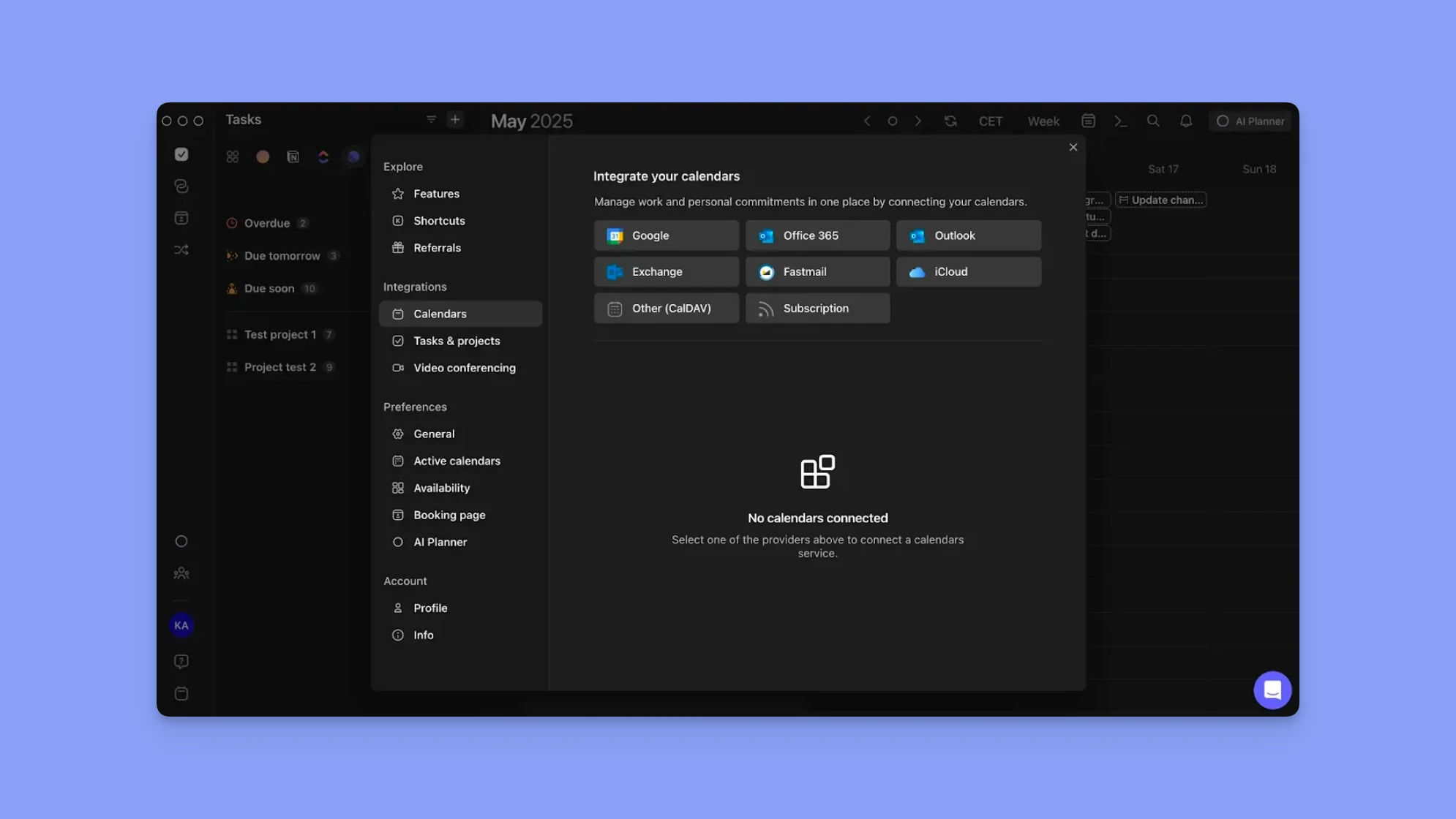
Morgen pulls tasks from Todoist, Google Tasks, Linear, Apple Reminders, Notion, Obsidian, and ClickUp into one planning view.
Complete a task in Morgen, and it updates in the source tool. Schedule a task, and that time block propagates across all connected calendars (Google Calendar, Outlook, iCloud, Fastmail), keeping your availability accurate across all platforms.
Pro tip: Mark your calendars busy to protect focus time from meeting requests, and use Calendar Sets with keyboard shortcuts to instantly toggle between work and personal calendar views.
Built-In Meeting Scheduling

Morgen lets you create booking pages, scheduling links, multi-person scheduling links, and open invites directly inside the platform.
You can see meetings, buffers, and availability rules alongside tasks and focus blocks, eliminating the need for extra scheduling tools you’d typically use with Todoist or TickTick.
Pro tip: Set up automatic buffer and travel time between meetings to prevent back-to-back scheduling and account for commute duration based on location and transportation mode.
Pricing
| Plan | Yearly | Monthly |
|---|---|---|
| Individual | $15/month | $30/month |
| Teams | $10 per seat/month | $25 per seat/month |
Note: If you’re switching from Fantastical, Motion, Sunsama, and Reclaim A, you can get a 15% discount on your first year. Students and non-profit organizations can also get a 25% forever discount.
Where Morgen Shines
- Built for ADHD-friendly planning: Morgen answers “what should I work on now” better than TickTick or Todoist by combining priorities, calendar reality, and focus protection
- True consolidation: When tasks and calendars live in separate tools, notifications multiply. Research shows 70% of people check their phones within five minutes of a notification, making fragmented systems a major driver of context switching and lost focus
- Stronger time blocking: Color-coding by source calendar plus 13 colors for task and routine blocks on the view, recurring tasks, subtasks, and frames, and protected blocks create a more reliable schedule than visual-only task calendars
Where Morgen Falls Short
- No Kanban or board views: Morgen focuses on calendar-first time-blocking rather than project visualization like TickTick and Todoist's Kanban boards
Customer Reviews
“Definitely the best in class. Great integrations,” shares Edward Smith.

Gaia S. uses Morgen for calendar, task planning, and scheduling, and shares:

Who Morgen Is Best For
- Busy professionals managing complex schedules: You need calendar-first planning, protected focus time, and AI assistance without losing control
Read how to get started with Morgen to connect your tools, set up Frames, and start building realistic daily plans.
Centralize Your Work and Personal Calendars Using Morgen
For busy professionals, productivity breaks down when work and personal calendars, client deadlines, family or rest time, and tasks from different tools compete for the same time.
Morgen brings your commitments into one planning system, syncing multiple calendars and task sources, protecting focus time, and using AI to shape realistic schedules you approve.
If planning still feels overwhelming, start a 14-day free trial and manage everything from one clear view starting today.

.svg)
.webp)


