.svg)
→ Elige Motion si quieres que las tareas se programen automáticamente: ideal para profesionales ocupados y gestores de proyectos que confían en la IA para planificar el trabajo según la disponibilidad real del calendario
→ Usa Todoist si quieres un sistema estructurado para gestionar tareas y trabajo recurrente: ideal para individuos y pequeños equipos que organizan proyectos, plazos y hábitos en un espacio enfocado en tareas
→ O, elige Morgen para tener un asistente de programación con IA que planifique el trabajo alrededor de eventos del calendario y tareas sin cambiar de herramienta: ideal para profesionales que necesitan programación asistida por IA, integraciones profundas y bloqueo de tiempo en múltiples calendarios
→ Configuración recomendada: Todoist + Morgen: Integra Todoist y extrae tus tareas existentes en Morgen, luego programa las en el tiempo disponible en tus calendarios conectados
¿Estás considerando Motion o Todoist para la planificación diaria de proyectos y gestión de tareas?
Puedes elegir Motion si quieres que tu carga de trabajo se programe automáticamente, o Todoist si prefieres gestionar tareas manualmente.
Aquí te mostramos cómo se comparan en precios, proyectos, planificación de tareas y gestión de calendario, y cuándo usar Morgen para añadir programación con IA sobre tu configuración existente.
Motion vs Todoist: Una comparación rápida
| Herramienta | Motion | Todoist |
|---|---|---|
| Ideal para | Profesionales ocupados que quieren que las tareas se programen automáticamente alrededor de su calendario | Individuos y pequeños equipos que prefieren planificar tareas manualmente |
| Característica destacada | Programación impulsada por IA | Captura rápida de tareas con entrada en lenguaje natural |
| Ventajas | Programa tareas automáticamente, incluye enlaces de reserva de reuniones, admite ejecución de proyectos estructurada con cronogramas y dependencias | Fácil de usar y flexible, captura rápida de tareas (PNL), asequible sin costos ocultos |
| Desventajas | Caro comparado con estas alternativas a Motion. Curva de aprendizaje pronunciada según usuarios; la planificación agresiva puede causar ansiedad | Sin programación automática, profundidad limitada de proyectos (sin dependencias), la vista de calendario está detrás de un muro de pago |
| Precio | Desde 19 $/puesto/mes, posiblemente más por créditos de IA | Plan gratuito disponible; planes pagos desde 5 $/usuario/mes |
| Gestión de proyectos | Proyectos con tareas, estados y asignados; vistas Kanban, lista y cronograma con dependencias y visibilidad de carga de trabajo | Crear proyectos con secciones y tareas; organizar trabajo en listas o tableros Kanban; usar plantillas para flujos de trabajo repetibles |
| Planificación de tareas | Crear tareas, añadir asignados, prioridades, fechas límite, duraciones y dependencias | Crear tareas con fechas de vencimiento, prioridades, etiquetas, subtareas y programas recurrentes |
| Gestión de calendario | Característica principal; programa y ajusta tareas en tiempo real | Vista de calendario disponible en planes pagos; principalmente para visualización |
| Enfoque de planificación | Automático; la IA programa y reprograma tareas según disponibilidad | Manual; tú decides cuándo se hacen las tareas y cómo se organizan |
| Integraciones | Google Calendar, Outlook, iCloud, Zoom y Slack, pero integraciones limitadas de aplicaciones de tareas directas | Integraciones amplias incluyendo Google Calendar, Outlook, Zapier y herramientas como Morgen, Slack y Google Drive |
| Equipo/Colaboración | Asignar tareas según disponibilidad, rastrear cargas de trabajo, planificación compartida | Proyectos compartidos, comentarios y espacio de trabajo en equipo en plan Business |
| Soporte al cliente | Centro de ayuda, correo electrónico y soporte por chat (prioridad en niveles superiores) | Documentación sólida y soporte basado en tickets |
¿Para quién es Motion lo mejor?
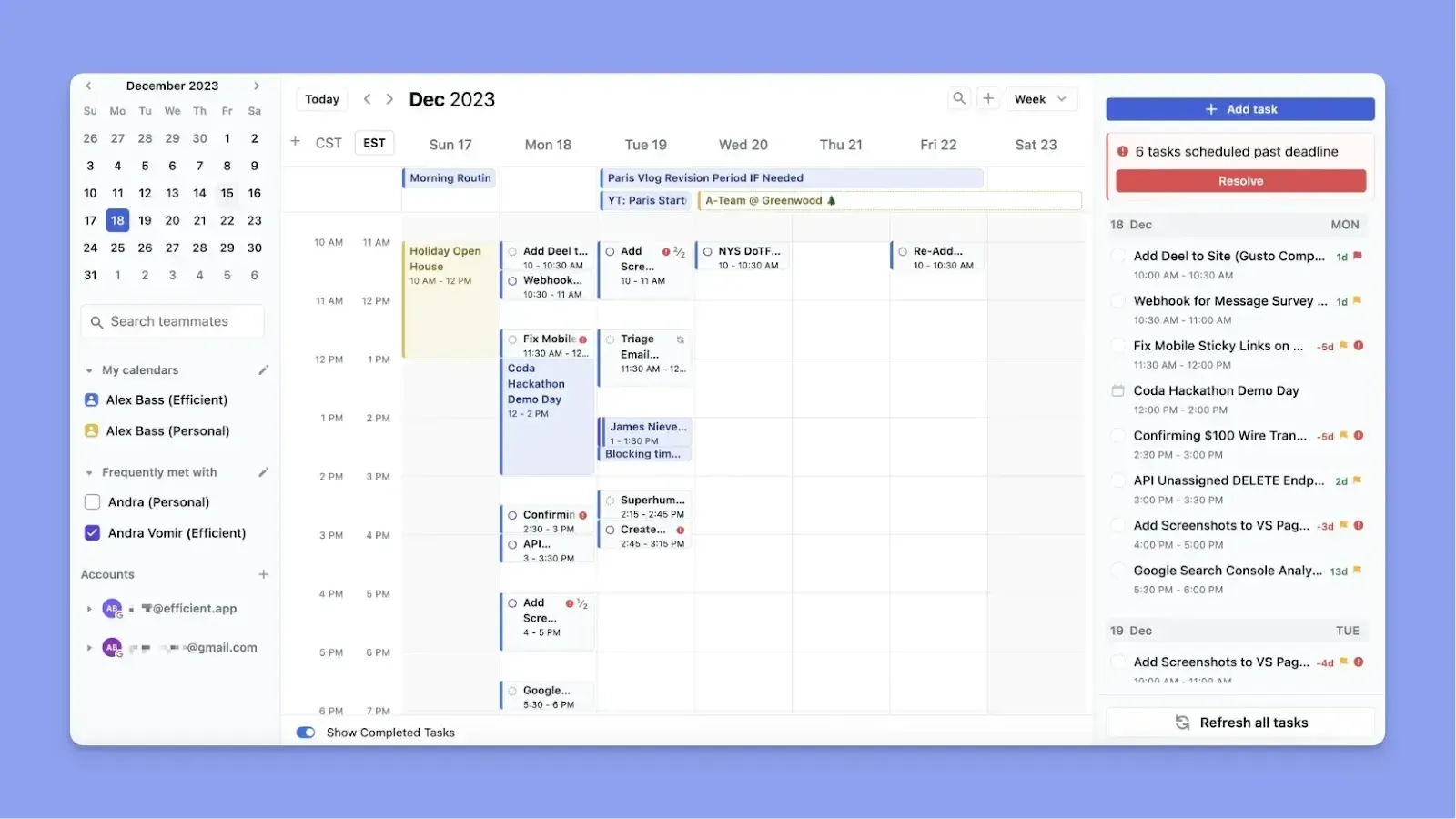
- Profesionales ocupados que quieren ahorrar tiempo programando tareas y pueden confiar en un planificador de IA para decidir cuándo abordar el trabajo
- Gestores de proyectos que lideran pequeños equipos y necesitan asignar y rastrear trabajo según la disponibilidad del equipo
- Usuarios que quieren seguimiento de proyectos estructurado con cronogramas, dependencias y ejecución construida alrededor de su calendario
Nota: También consulta cómo Motion se compara con Reclaim para usuarios que quieren programación automática.
¿Para quién es Todoist lo mejor?

- Todoist es bueno para individuos que quieren crear y organizar listas de tareas rápidamente usando entrada en lenguaje natural
- Pequeños equipos que necesitan una forma simple de compartir proyectos, asignar tareas y rastrear progreso sin configuración compleja
- Usuarios que prefieren planificación manual con control total sobre tareas, prioridades y flujos de trabajo recurrentes
Si quieres un gestor de tareas similar, aquí te mostramos cómo TickTick se compara con Todoist.
Morgen: Una alternativa para planificación asistida por IA con integraciones más profundas
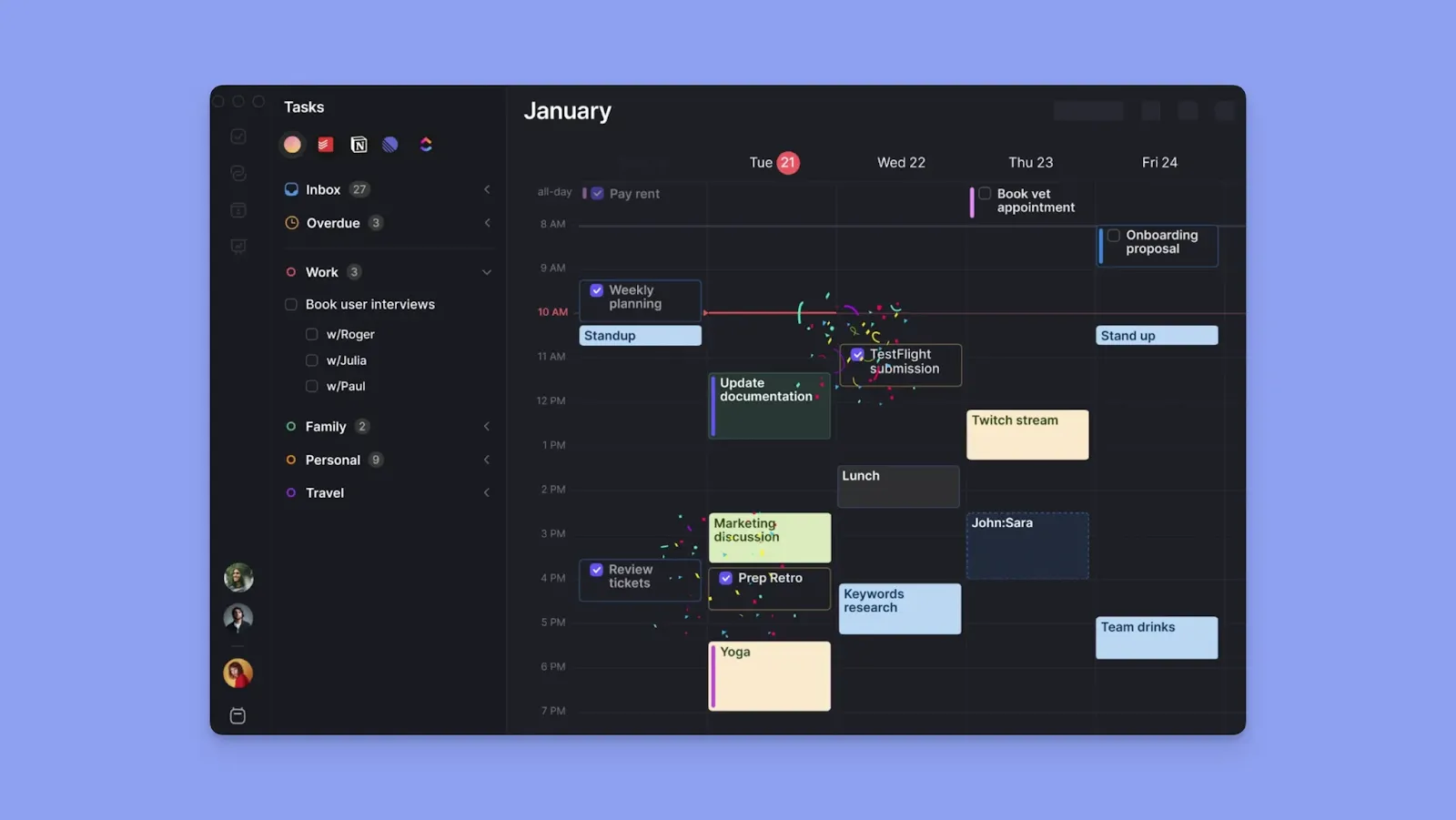
Morgen es una alternativa para individuos que necesitan:
- Integraciones profundas entre herramientas: Integra Todoist y más herramientas de tareas para programar tu flujo de trabajo sin cambiar de sistemas
- Visibilidad centrada en el calendario: Ve todos los eventos y disponibilidad antes de colocar tareas
- Planificación de IA con participación humana: Obtén sugerencias de programación que puedas revisar, ajustar o aprobar
- Planificación de eventos y rutinas: Crea reuniones, bloques de tiempo y rutinas recurrentes en una sola interfaz
Nota: Cuando conectas Todoist a Morgen, puedes programar automáticamente todas tus tareas en el tiempo disponible del calendario. También puedes usar Morgen para sincronizar Todoist con calendarios como Google, Outlook, iCloud y más.
| Herramienta | Precio | Qué obtienes |
|---|---|---|
| Morgen | 15 $/mes | Vista de calendario + tareas unificada, Planificador de IA (con participación humana), rutinas, integraciones profundas (incluyendo Todoist y Zapier) |
| Motion | 19 $/puesto/mes | Programación automática con IA, gestión de tareas y proyectos, sincronización de calendario, reserva de reuniones y créditos de IA para planificación |
| Todoist | Gratuito, 5 $/usuario/mes | Captura rápida de tareas (PNL), tareas recurrentes, etiquetas, filtros, gestión ligera de proyectos, espacios de trabajo en equipo |
Prueba Morgen gratis durante 14 días y comienza a programar tus tareas alrededor de la disponibilidad.
Comparación de precios
Según Mordor Intelligence, la fatiga por suscripción comienza dentro de 2-4 años de adoptar una nueva herramienta. Quieres enfocarte en si Motion o Todoist ofrece suficiente valor diario para convertirse en indispensable.
Motion

- Los precios anuales actuales de Motion comienzan en 19 $/puesto/mes para Pro AI y 29 $/puesto/mes para Business AI, ahorrando 33% con facturación anual
- Los individuos pagan más, con la suscripción más barata comenzando en 29 $/mes
- Cada plan incluye una asignación mensual de créditos de IA. Cuando usas la mayoría de características de IA, como toma de notas y documentos, agota créditos y es posible que necesites recargar a un costo adicional
- Los precios han aumentado múltiples veces recientemente, dejando a muchos usuarios inseguros de si pueden permitirse Motion
Todoist
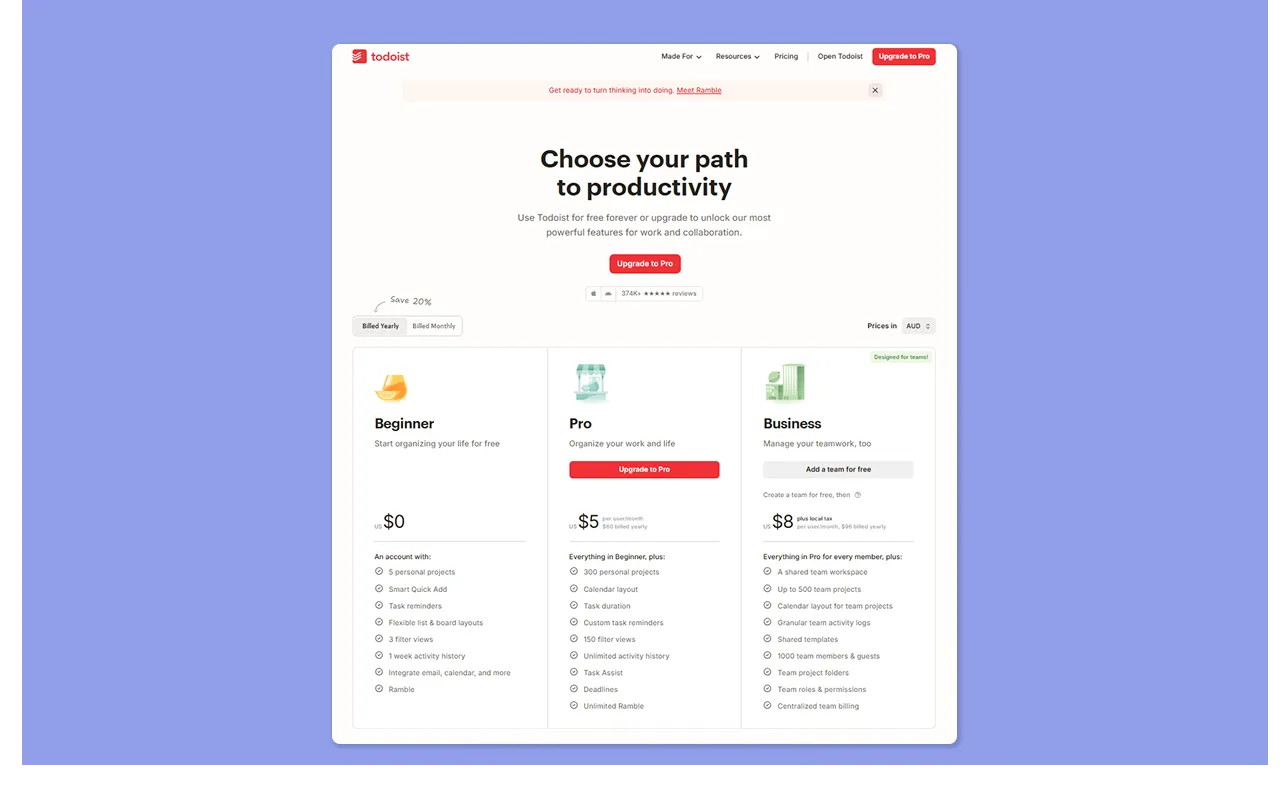
- El plan gratuito es suficiente para algunos, pero la mayoría de características útiles están detrás de un muro de pago, lo que usuarios dicen se vuelve caro para individuos
- Pro cuesta 7 $/mes (mensual), y ahorras 20% con una suscripción anual
- Aunque más asequible que Motion, algunos usuarios aún encuentran Todoist menos versátil para comunicación y colaboración al precio
Veredicto
Todoist es la opción asequible, pero solo si estás cómodo planificando manualmente. El costo de Motion tiene sentido si la programación con IA te ahorra horas reales cada semana, y tu calendario es genuinamente complejo.
Comparación de gestión de proyectos
Cuando manejas múltiples clientes o entregables, agrupar tareas en proyectos te ayuda a mantener el trabajo organizado y evitar perder plazos.
Motion
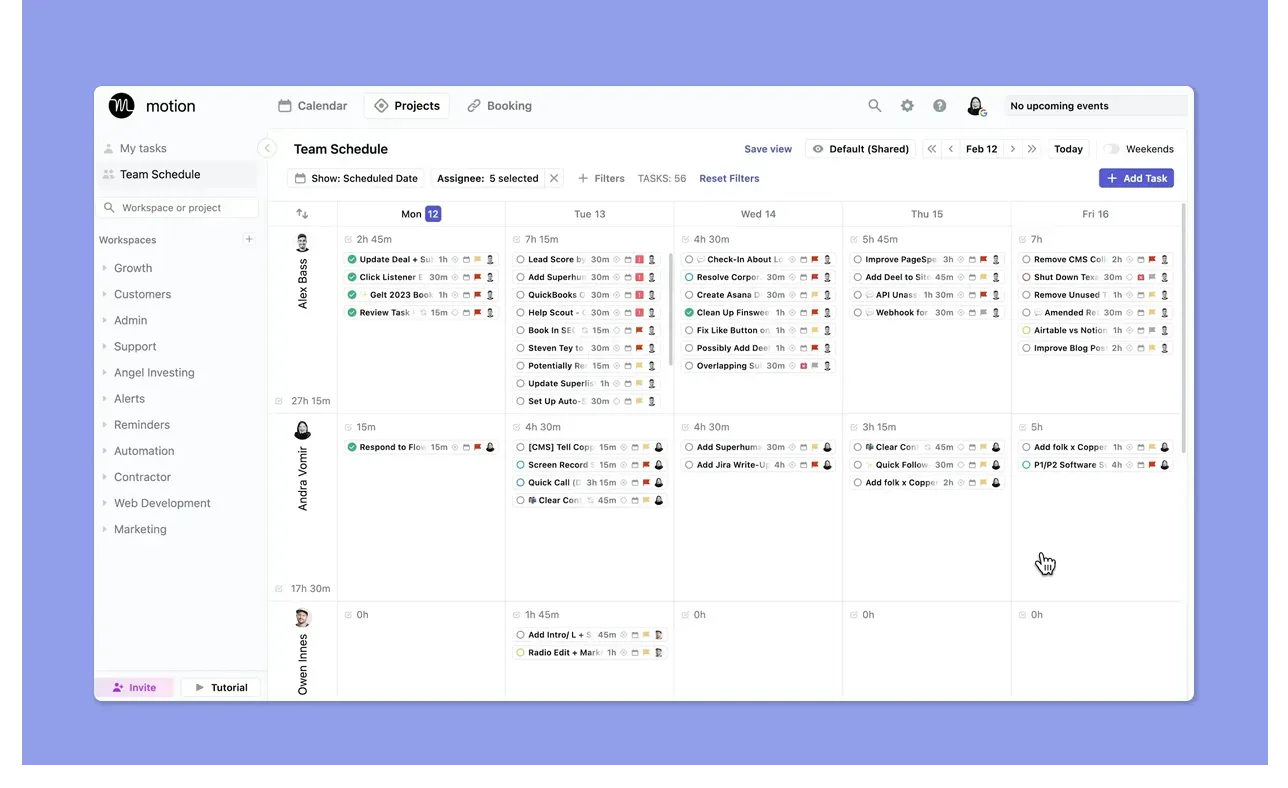
- Motion admite planificación de proyectos con vistas de lista, Kanban y Gantt, con más filtros como espacio de trabajo, asignado y estado. También admite dependencias/bloqueadores y plantillas de flujo de trabajo reutilizables
- Los proyectos contienen tareas con fechas límite y prioridades, y estas se alimentan directamente al programador de IA para colocación automática
- Motion muestra la disponibilidad del calendario de cada persona antes de que entregues trabajo, así que asignas tareas cuando la gente realmente tiene capacidad
- El sentimiento del usuario aún encuentra que la capa de PM en sí es básica, mientras que otros, como Kitty S y Victoria S, aman cómo la IA ordena tareas dentro de proyectos
Todoist

- Los proyectos de Todoist admiten tareas, plantillas y fechas de vencimiento, y puedes cambiar entre vistas de lista, tablero y calendario
- Comparte proyectos y asigna tareas en cualquier plan. La colaboración básica funciona en planes gratuito y Pro, pero las características completas de espacio de trabajo en equipo requieren Business
- Aunque usuarios comparten que Todoist puede gestionar listas de verificación de proyectos y trabajo recurrente, Evan L comparte que carece de la lógica de dependencias y características de colaboración que la mayoría de equipos requieren
Veredicto
Motion ofrece gestión de proyectos más fuerte con la capa de programación con IA, vistas de cronograma y asignación consciente de disponibilidad. Todoist es bueno para organización de proyectos ligera y gestionada manualmente.
Comparación de características de planificación de tareas
Aquí te mostramos qué tan rápido puedes crear, programar y completar tareas en Motion y Todoist:
Motion
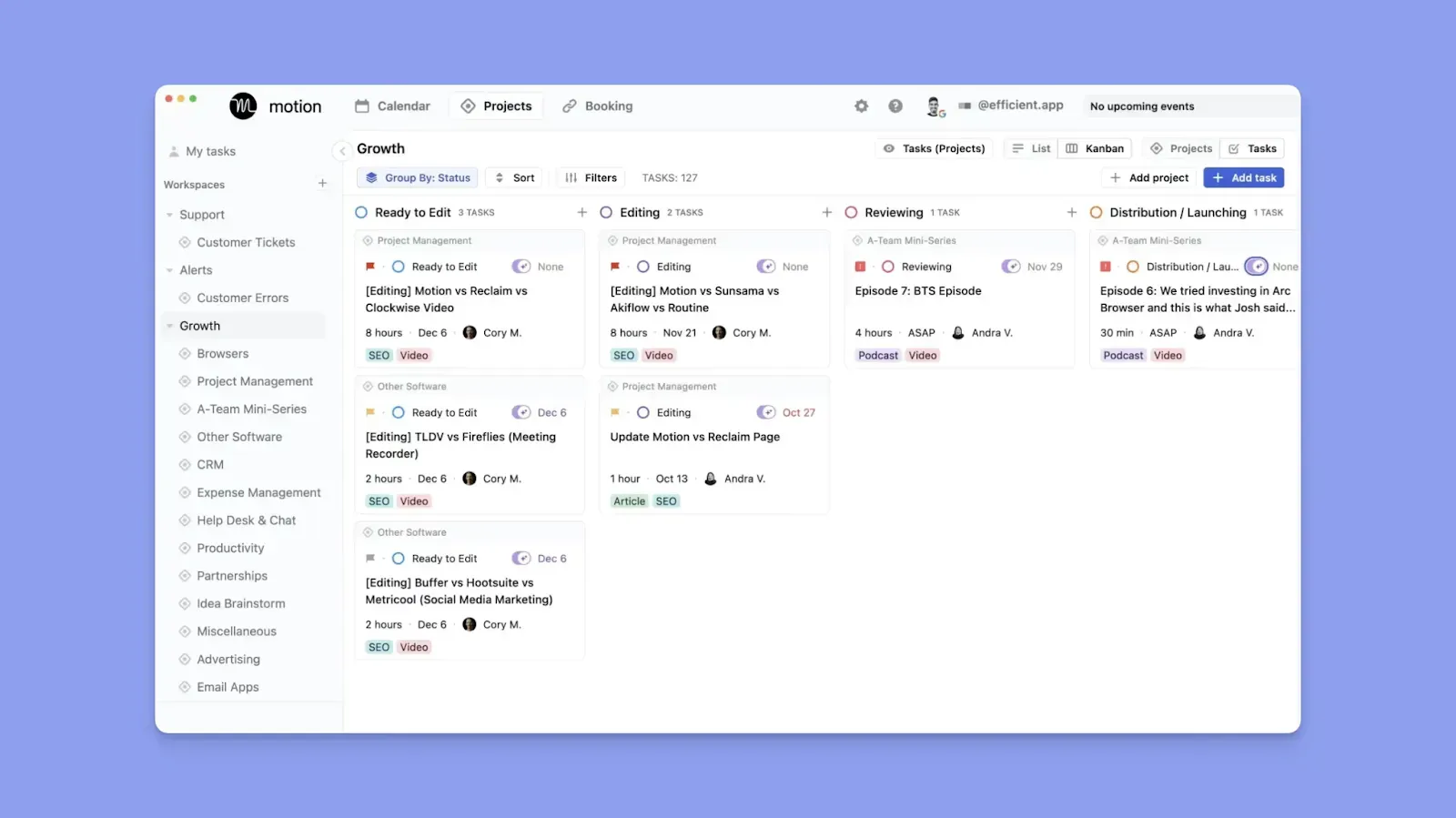
- Crea una nueva tarea, añade dependencias, fechas límite, prioridades, estados y subtareas. Motion usa este contexto para programar tareas en la secuencia correcta
- Si añades una reunión, Motion encuentra nuevos espacios para cualquier tarea conflictiva automáticamente
- No hay atajo de captura rápida, y usuarios se quejan de hacer muchos clics antes de programar una tarea
- Otros dicen que la programación automática de Motion los mantiene organizados y previene fatiga para cerebros con TDAH
Todoist

- Las tareas de Todoist pueden tener subtareas, recordatorios, fechas límite, fechas recurrentes, filtros y etiquetas, pero programas todo manualmente
- Quick Add y el análisis de lenguaje natural te permiten capturar más rápido, y Ramble está disponible para captura de tareas dictadas
- Aunque no obtendrás dependencias de tareas, los planes pagos añaden recordatorios de ubicación, uso más rico del calendario y planificación recurrente flexible
- Algunos reportan una curva de aprendizaje antes de entender prioridades, etiquetas y tags, pero Rami A dice que Todoist es intuitivo, con características poderosas de gestión de tareas
Veredicto
Elige Todoist si la captura rápida, la lógica recurrente y el control manual importan más. Motion se ajusta si quieres secuenciar tareas contra el tiempo, fechas límite y compromisos de calendario cambiantes.
Comparación de soporte de calendario
Motion trata el calendario como el sistema operativo de tu trabajo. Todoist lo trata como una forma de visualizar tareas con fecha. Esa diferencia decide esta sección rápidamente.
Motion
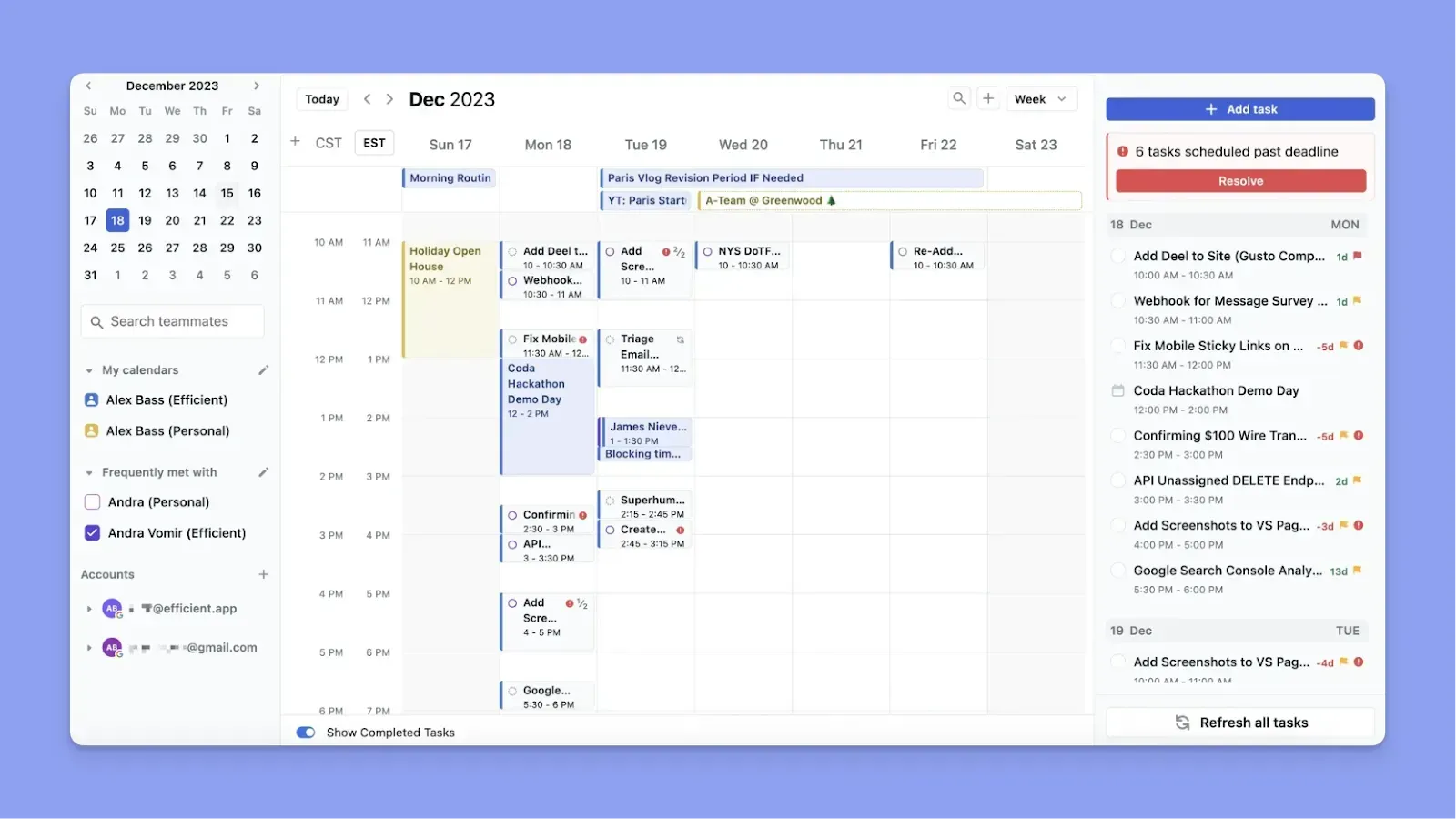
- Motion lee tus eventos, encuentra espacios abiertos y los llena con tareas según prioridad, duración y fecha límite automáticamente
- Puedes sincronizar Google Calendar, Outlook e iCloud para mostrar todos los compromisos de calendario en Motion. Si añades una reunión o mueves un evento, Motion actualiza tu plan de tareas instantáneamente
- Este revisor de Capterra dice que Motion los ayuda a gestionar calendarios y reuniones con clientes, mientras que Scott S dice que sincronizar calendarios de trabajo es fluido
- Si fijas un bloque de tarea a una fecha y hora particular, o programas manualmente una tarea, Motion no reprograma esos bloques incluso si añades reuniones
Todoist
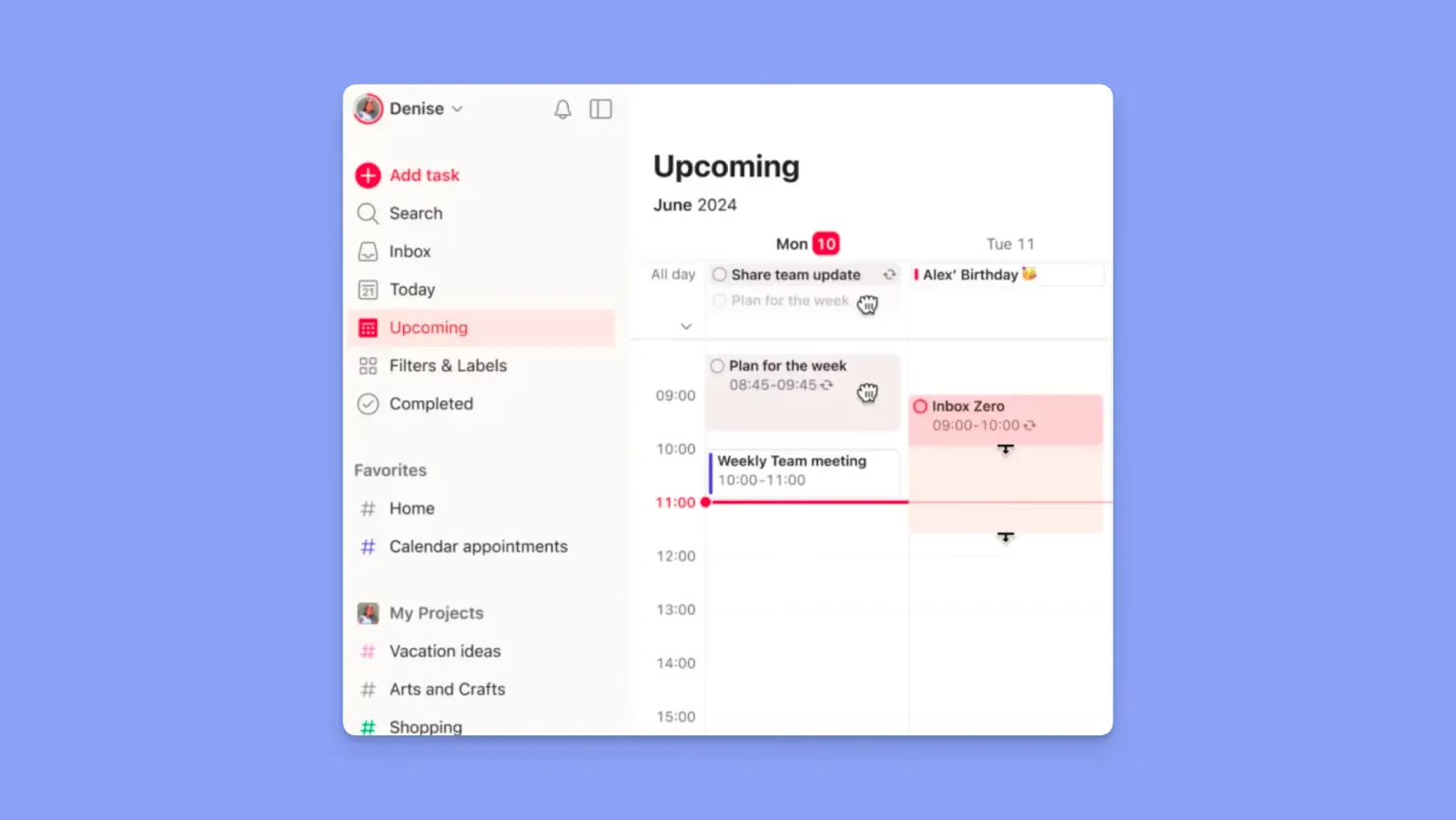
- La vista de calendario muestra tareas trazadas por fecha dentro de Todoist, útil para visibilidad de fechas límite, pero no una superficie verdadera de bloqueo de tiempo
- Obtienes sincronización unidireccional con Google Calendar y Outlook, así que Todoist publica tareas como eventos en tu calendario externo
- Cambia proyectos y vistas al modo calendario, trabaja con duraciones y usa la barra lateral Plan en Hoy y Próximamente para ajuste manual
- Además de que la vista está detrás de un muro de pago, usuarios también encuentran que poner recordatorios detrás de un muro de pago limita la planificación de calendario. Otros se quejan de problemas de sincronización con Google Calendar
Veredicto
Elige Motion si quieres que tu calendario impulse lo que se hace, y Todoist si principalmente necesitas una línea de tiempo visual de tareas que ya has planificado.
Cómo elegir la mejor aplicación de gestión de tareas
Cuando eliges una herramienta diaria de gestión de tareas, como Motion o Todoist, considera:
Profundidad de integraciones
Motion conecta calendarios pero reemplaza tu sistema de tareas, así que reconstruyes tu flujo de trabajo dentro de él. Todoist integra más herramientas, pero solo sincroniza con un calendario a la vez.

Si usas diferentes herramientas, necesitas integraciones más profundas para consolidar planificación. Morgen ofrece más integraciones nativas de calendario y herramientas que Todoist y Motion.
Nota: Si tu pila de herramientas carece de una conexión nativa, puedes añadirla a Morgen a través de Zapier. De lo contrario, aquí te mostramos cómo conectar Morgen a las herramientas de tareas externas que usas.
Automatización
Todoist deja la programación completamente manual, mientras que Motion automatiza completamente tu plan, incluyendo decisiones que es posible que quieras controlar.
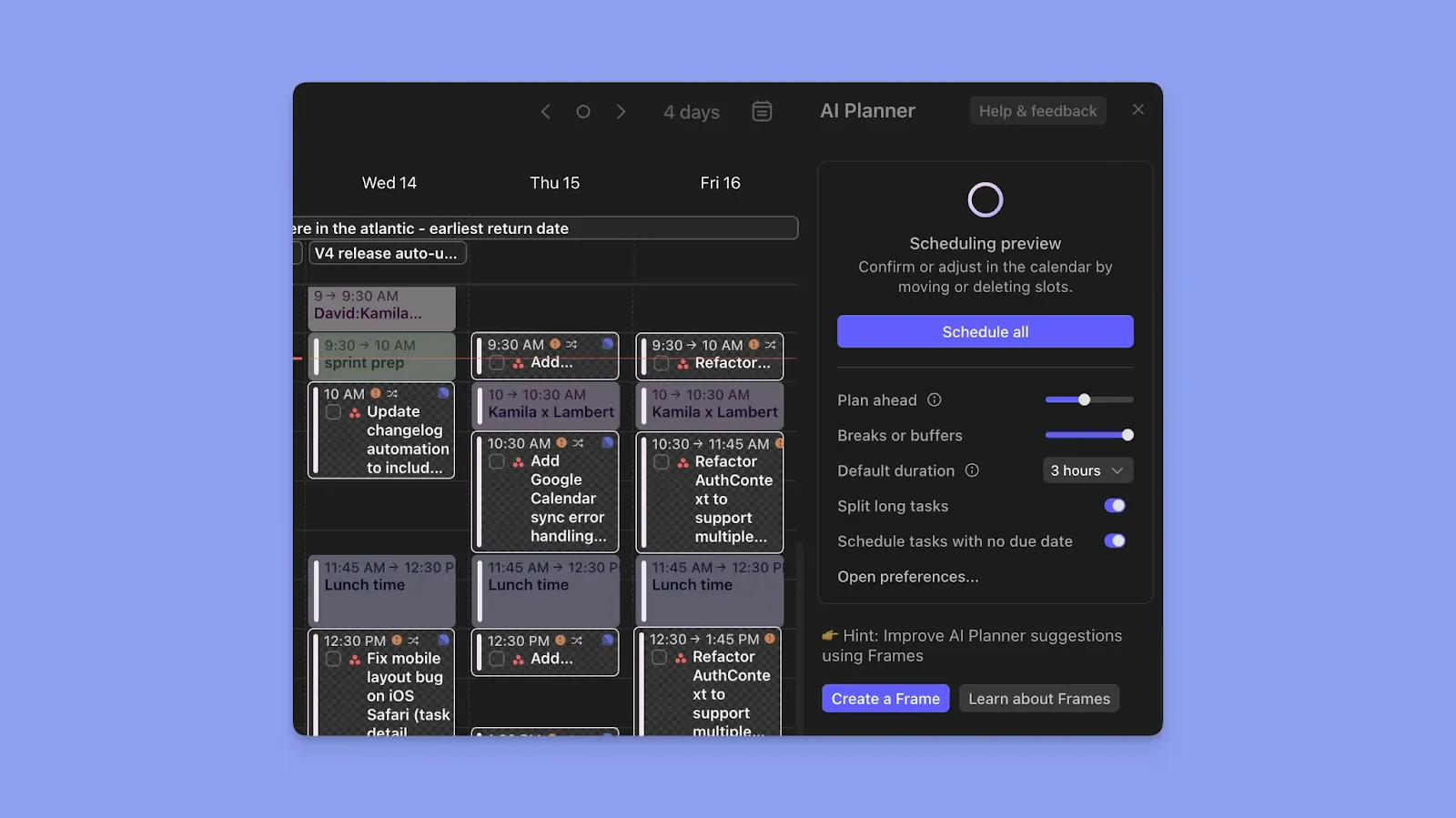
Si quieres planificar más rápido pero sin rendirte completamente al control, busca una herramienta que ofrezca planificación de IA con participación humana. El Planificador de IA de Morgen propone un horario realista que puedes revisar, ajustar o confirmar antes de que nada se finalice.
Nota: El planificador de IA solo sugiere dónde mover tareas alrededor de tus reuniones y eventos de calendario. Cuando programas una tarea, creas un bloque de tiempo de enfoque en calendarios conectados.
Facilidad de uso
Motion requiere configuración previa antes de que la IA planifique con precisión. Todoist es más simple para comenzar a usar, pero también toma tiempo estructurar bien proyectos y flujos de trabajo.

Para planificación individual, Morgen reduce la configuración mostrando tu disponibilidad primero, luego sugiriendo dónde encajan las tareas según tiempo, prioridad y carga de trabajo. Esencialmente, pasas menos tiempo configurando y más tiempo planificando.
Lee cómo comenzar con Morgen V4 ahora.
Alternativa a Motion y Todoist: Morgen
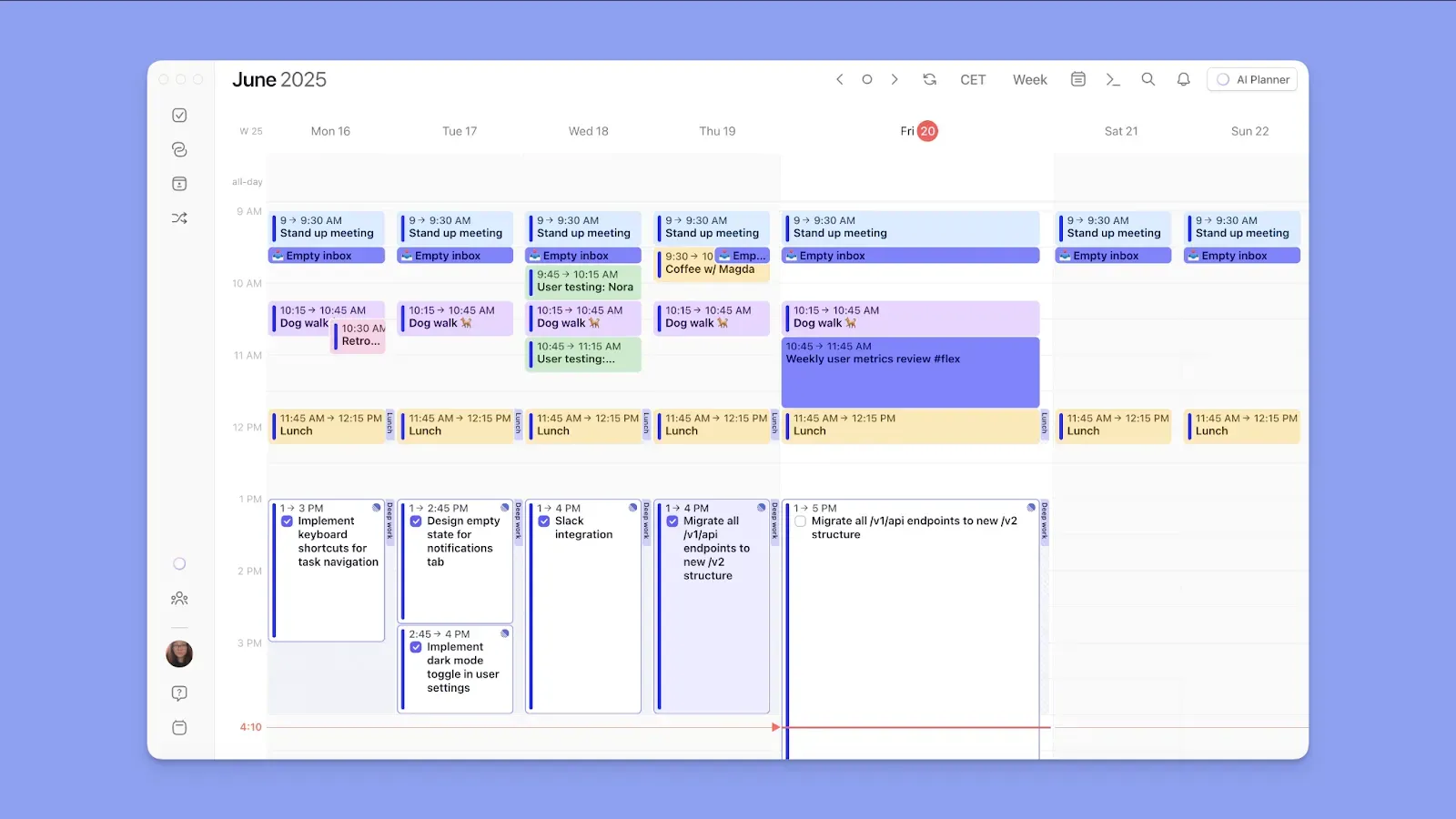
Morgen es un planificador de calendario estético que consolida tus calendarios y herramientas de tareas en una sola vista.
A diferencia de Motion, te mantiene en control de cada decisión de programación. Comparado con Todoist, muestra tus tareas directamente en tu calendario para que puedas planificar alrededor de disponibilidad real.
Características clave de Morgen
Aquí están las características destacadas de Morgen:
Consolidación de calendario y tareas

Sincroniza tus calendarios desde Google, Outlook, iCloud y Fastmail, junto con tareas desde Todoist, Notion, Linear, ClickUp, Obsidian, Google Tasks, correo de Outlook, Apple Reminders y Microsoft To Do.
Frames y bloqueo de tiempo
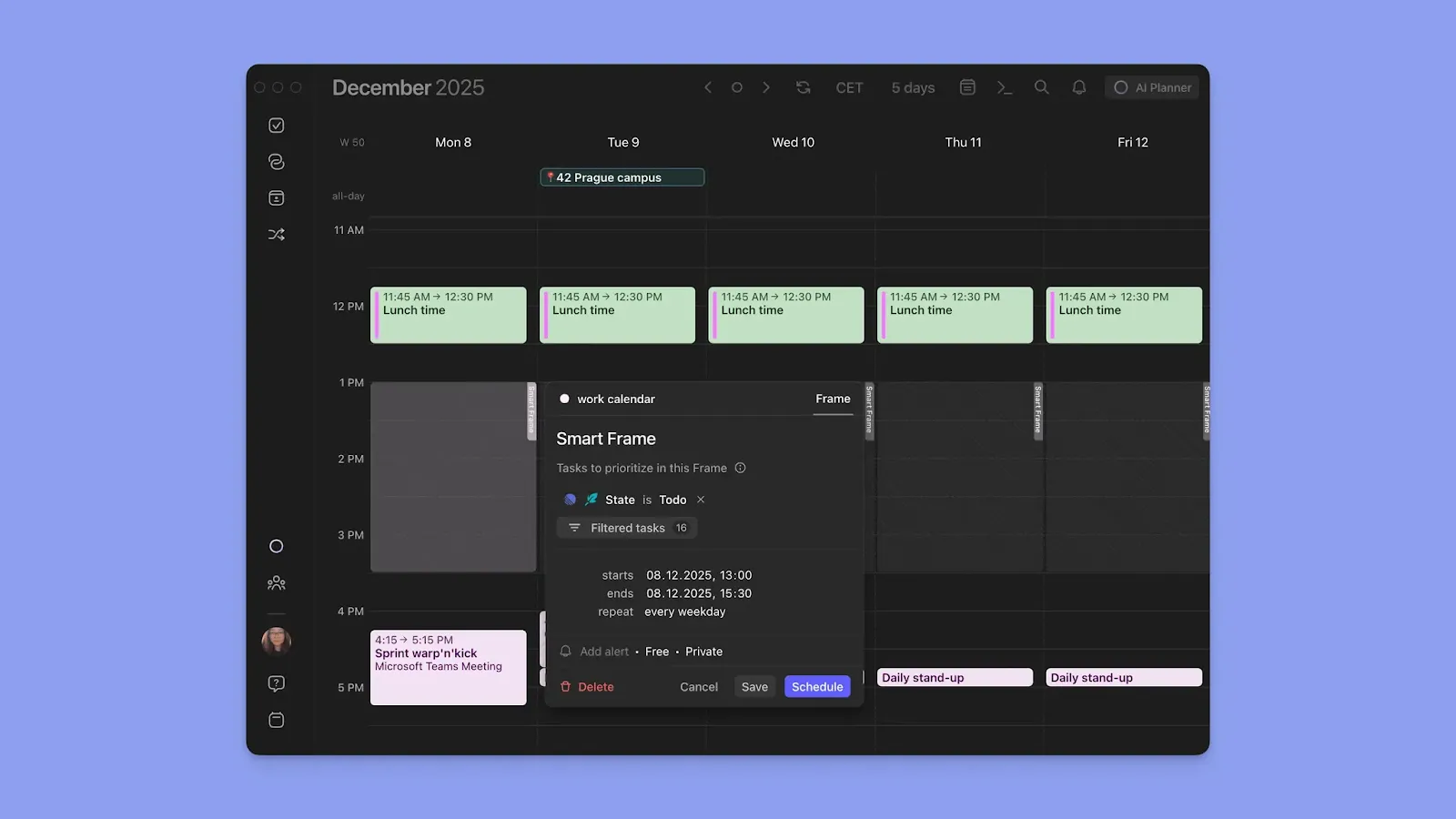
Frames son bloques de tiempo recurrentes dedicados a un tipo específico de trabajo, como trabajo profundo, administración o proyectos secundarios. Añade filtros de tareas a cada Frame y extrae las tareas correctas en cada bloque.
Morgen también crea bloques de tiempo enfocado para cada tarea. Cuando arrastras y sueltas para programar una tarea, ese bloque se añade a tu calendario como tiempo ocupado.
Consejo: Dado que el Planificador de IA sugiere reprogramar tareas cuando añades reuniones/eventos, marca tareas importantes como "No flexible" para evitar moverlas a otro espacio de tiempo.
Planificador de IA
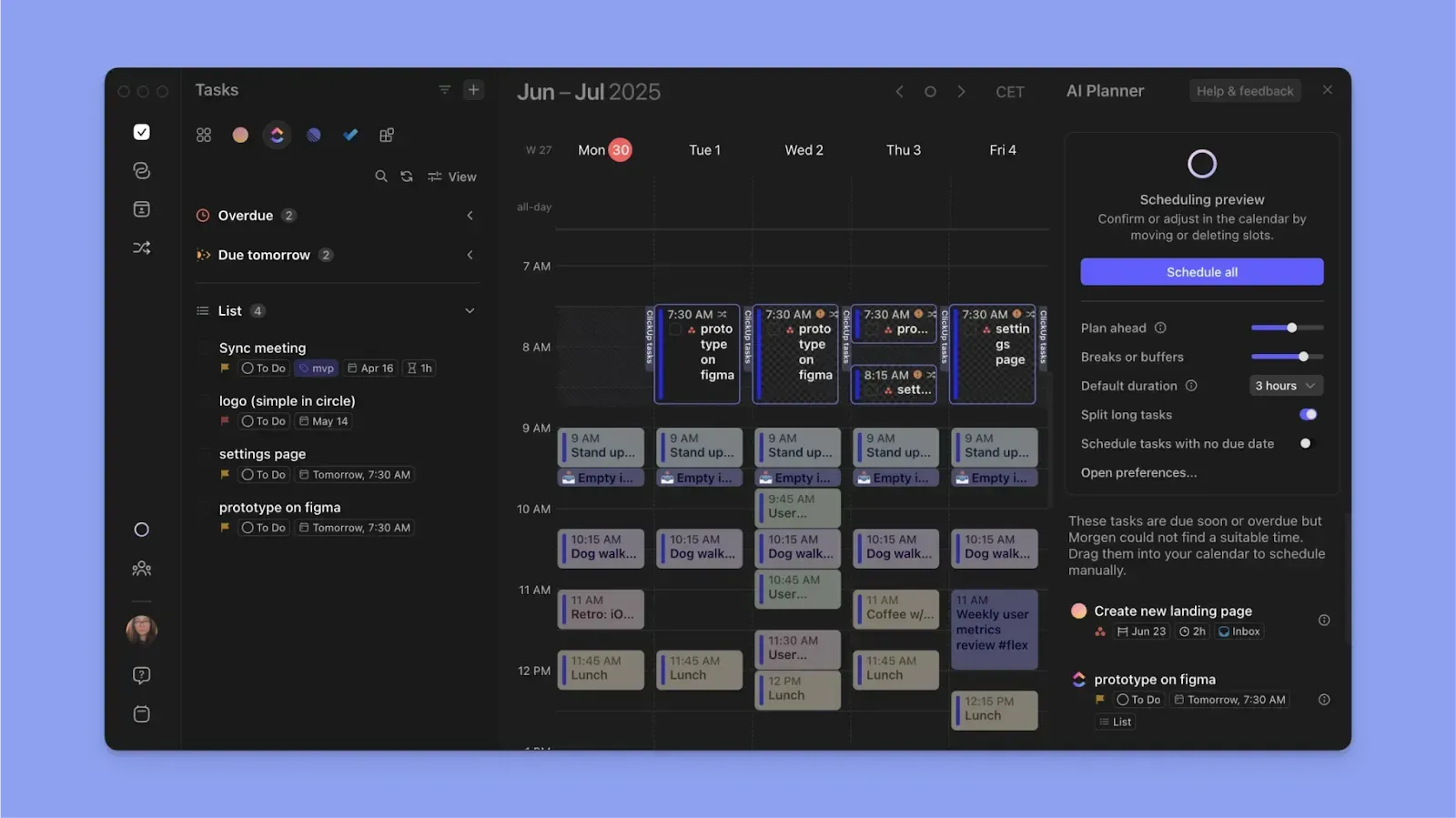
El Planificador de IA lee tu disponibilidad de calendario, prioridades de tareas y duraciones, luego propone un horario diario realista. Revisas y confirmas cada sugerencia antes de que aterrice en tu calendario.
Nota: Puedes rellenar Frames a través de sugerencias de IA ya que el planificador entiende tus filtros.
Eventos de calendario

Puedes crear eventos, reuniones y rutinas recurrentes directamente dentro de Morgen y junto a tus tareas. Programa automáticamente tiempo de amortiguación y viaje para mantener conflictos fuera de tu día antes de que ocurran.
Consejo: Usa la encuesta de programación gratuita para encontrar tiempos de reunión ideales para todo tu equipo.
Precios de Morgen
| Plan | Anual | Mensual |
|---|---|---|
| Individual | 15 $/mes | 30 $/mes |
| Equipos | 10 $/puesto/mes | 25 $/puesto/mes |
Obtendrás un descuento del 15% en tu primer año después de cambiar a Morgen desde Motion, Sunsama, Akiflow, etc.
Dónde brilla Morgen
- Integración con Todoist: Morgen mantiene propiedades de tareas como etiquetas y prioridades
- Planificación basada en calendario: Sincroniza múltiples calendarios, planifica tareas alrededor de tus eventos reales y propaga cambios en cada calendario conectado
- Programación flexible de tareas: Cuando programas tareas, añade subtareas y programa tareas complejas en múltiples sesiones
- Captura fácil: Crea un evento, rutina o tarea directamente desde la interfaz, o usa la función de voz o Barra de comandos para entrada más rápida
- Codificación por colores: Codifica por colores calendarios, bloques de tareas y etiquetas de tareas para leer tu carga de trabajo de un vistazo
- Atajos para planificación rápida: Usa Conjuntos de calendario para mostrar calendarios específicos, atajos de teclado para cambiar vistas instantáneamente y establece notificaciones de calendario personalizadas para evitar cambiar contextos durante sesiones de enfoque
Dónde Morgen se queda corto
- Sin planificación de proyectos nativa: Morgen no ofrece tableros para organizar y rastrear tareas por etapa de proyecto
Nota: También hemos comparado Motion con ClickUp para gestión de proyectos.
Reseñas de clientes
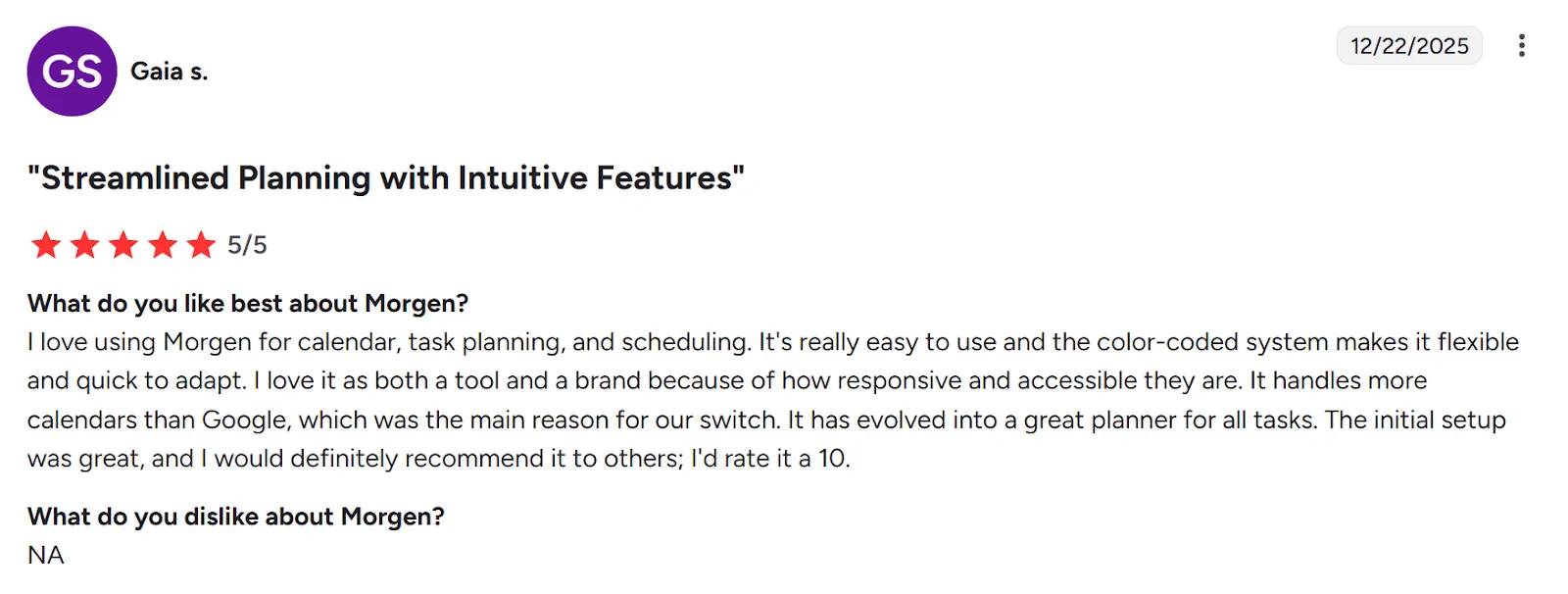
"Me encanta usar Morgen para calendario, planificación de tareas y programación," comparte Gaia S.
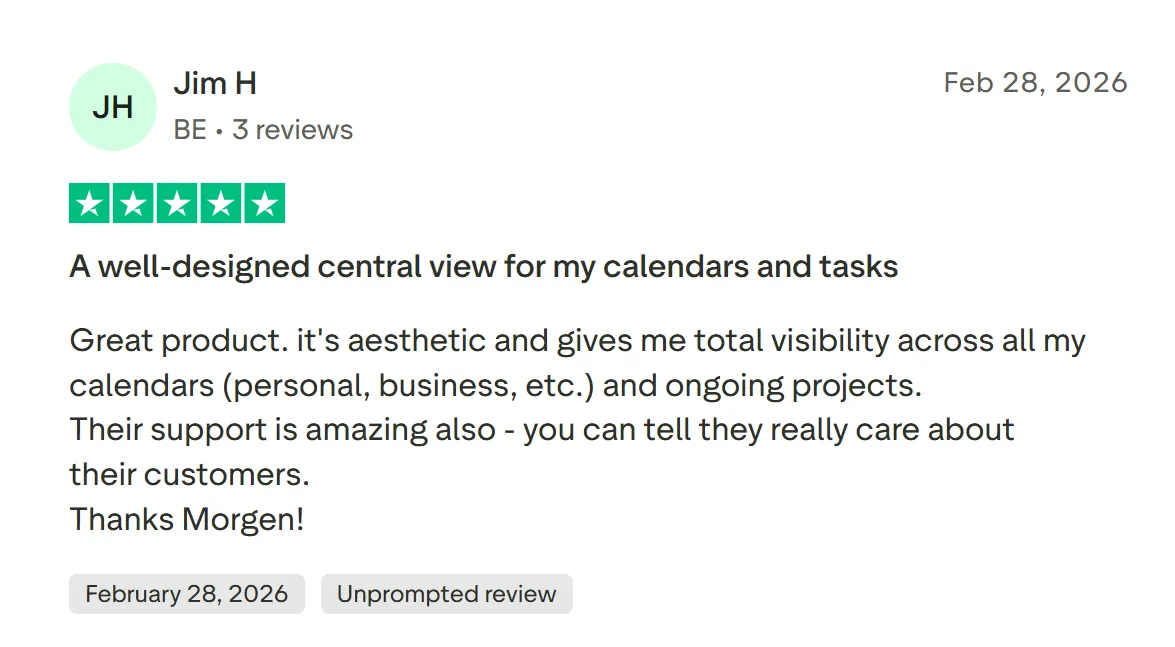
Jim H llama a Morgen, "Una vista central bien diseñada para mis calendarios y tareas."
Para quién es Morgen lo mejor
- Individuos, freelancers y emprendedores en solitario: personas que quieren ver eventos y tareas en un lugar y planificar su día con sugerencias de IA
- Profesionales con TDAH: personas que necesitan bloques de tiempo estructurados, claridad visual y un planificador que elimine decisiones de programación
¿Quieres ver cómo funciona Morgen antes de comprometerte? Prueba nuestras herramientas gratuitas, incluyendo la extensión Easy Tasks Chrome y Schedule Builder.
Motion vs Todoist vs Morgen: ¿Cuál deberías elegir?
Motion es un ajuste fuerte para programación automática de tareas, mientras que Todoist funciona mejor para organizar tu lista de tareas o como herramienta modular dentro de un planificador de calendario separado.
Como alternativa, Morgen consolida tus herramientas, planifica alrededor de disponibilidad y te da control sobre sugerencias de IA.
Ve cómo funciona el Planificador de IA, luego descarga Morgen para Linux, Windows, Mac y móvil para comenzar a planificar.

.svg)
.webp)