→ Motion auto-schedules tasks on your calendar using AI that analyzes deadlines, priorities, and available time slots, then continuously re-optimizes when plans change
→ Pricing starts at $29/month (annual) or $49/month (monthly) with no free plan. A 7-day free trial is your only way to test before paying.
→ The "SuperApp" pivot has divided long-time users. What began as a focused AI calendar has expanded into docs, sheets, workflows, and more—adding complexity some users did not ask for.
→ User sentiment is mixed to negative in 2026. Users praise the core AI scheduling engine but consistently raise concerns about pricing increases, feature bloat, and uneven support.
Motion is an AI-powered platform that uses AI to analyze your tasks, deadlines, priorities, and calendar commitments, then builds an optimized schedule for your day. When meetings shift or priorities change, Motion re-optimizes everything without manual intervention.
In 2025–2026, Motion expanded from a focused AI calendar app into what it calls "The AI Powered SuperApp for Work" adding docs, sheets, workflows, meeting notetakers, and more. The ambition is impressive, but it has divided users who loved the focused simplicity of the original product.
This Motion review breaks down whether the tool can solve that problem in 2026. Motion promises to eliminate manual scheduling by using AI to plan your entire day, automatically slotting tasks between meetings, protecting deep work time, and rescheduling everything when plans change.
Below, you will find a thorough look at Motion's:
- AI scheduling and task management features
- Updated 2026 pricing and plan breakdown
- Real user feedback from review sites and communities
- How it compares to alternatives like Morgen
- Honest verdict on who it is (and is not) for
Motion at a Glance
What Is Motion?
Motion is not just a calendar app. At its core, it is an AI-driven work orchestration platform that attempts to manage every aspect of your professional life—from scheduling individual tasks to running multi-person projects with dependencies and deadlines.
The tool started as an AI calendar focused on auto-scheduling, but in 2025–2026 it expanded significantly. Motion now includes AI-powered docs, wikis, sheets, databases, meeting notetakers, and workflow builders. The company claims over one million users and positions itself as a replacement for up to 10 separate tools.
Whether that breadth is a strength or a weakness depends on what you need. If you want a single platform that does everything, Motion aims to be that. If you prefer focused tools that integrate with your existing stack, you may find Motion's approach overwhelming.
Who Is Motion Best For?
Motion works best for people who want AI to make all their scheduling decisions for them with minimal manual input.
Busy professionals with packed calendars: If your days are filled with meetings and you struggle to find time for focused work, Motion's AI scheduling can carve out task blocks automatically between commitments.
People with ADHD or executive dysfunction: The external structure of having AI plan your entire day can reduce decision fatigue. Users with ADHD consistently highlight this as one of Motion's strongest benefits.
Team leads managing projects: Motion's built-in AI project manager handles task dependencies, capacity planning, and deadline tracking. You get Gantt charts, bottleneck alerts, and cascading schedule adjustments without a separate PM tool.
All-in-one seekers: If you want to consolidate calendar, tasks, projects, docs, and meetings into one platform, Motion's SuperApp approach eliminates tool-switching.
Who Should Look Elsewhere
- Budget-conscious individuals: At $29–$49/month with no free plan, Motion is one of the more expensive options in the AI calendar category.
- Users who want control over their schedule: Motion's AI is opinionated. It decides when you work on tasks. If you prefer to review and approve plans before they hit your calendar, this "fully automated" approach may feel intrusive.
- Linux users: Motion has no Linux support. Morgen and several alternatives do.
- Users with deep integration needs: Motion's integration ecosystem is relatively narrow (9 native integrations). If you rely on Todoist, ClickUp, Notion, or Linear for task management, Motion requires you to abandon those tools and use its built-in task manager instead.
Morgen: An Alternative
Motion auto-schedules well, but it demands you replace your existing tools and surrender control to its AI. If you want an AI-powered daily planner that works with your current tools and lets you review plans before they go live, Morgen fills that gap.
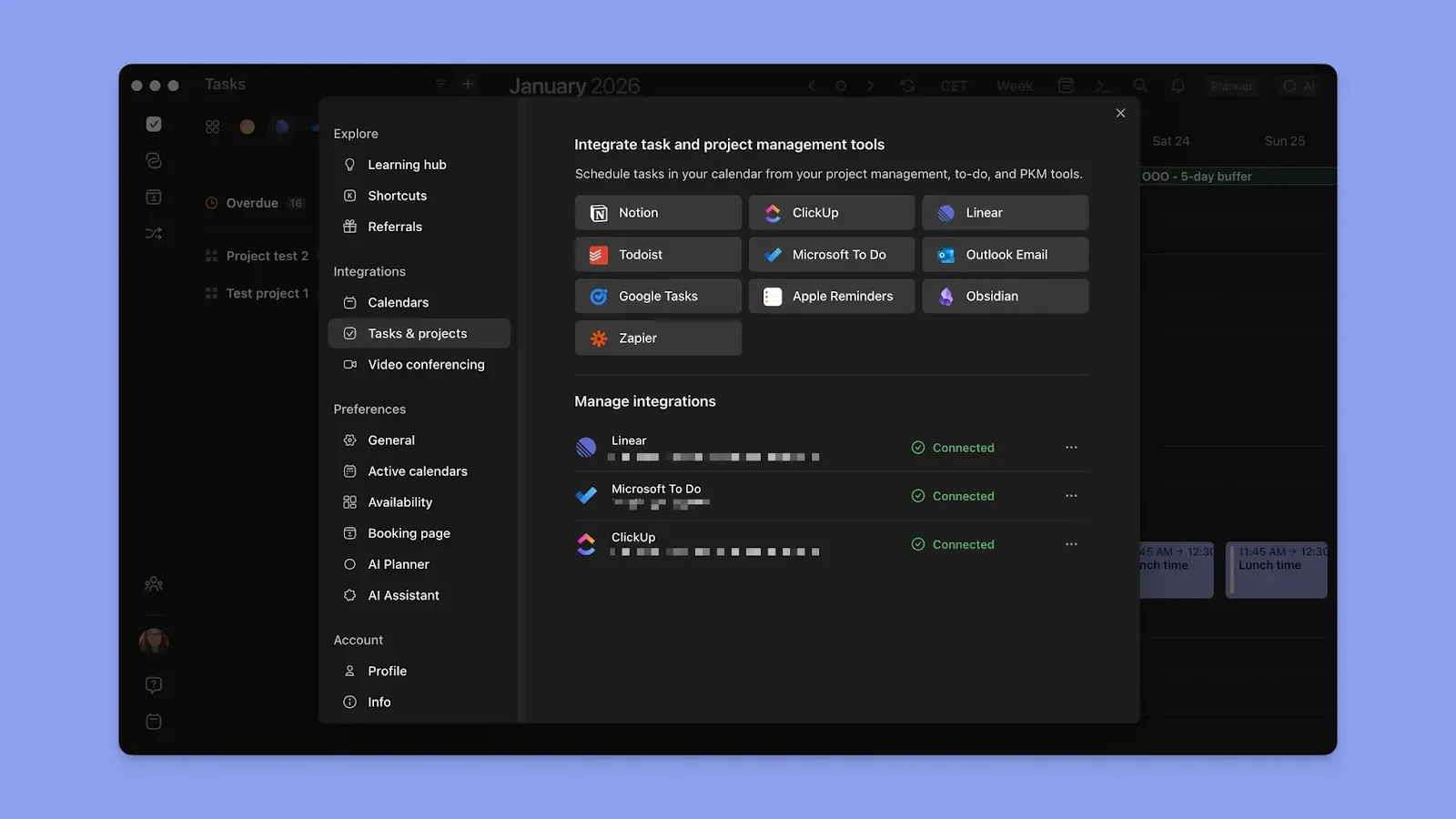
- Integrates with your existing stack: Morgen connects to Todoist, ClickUp, Notion, Linear, and more—so you keep the task tools you already use.
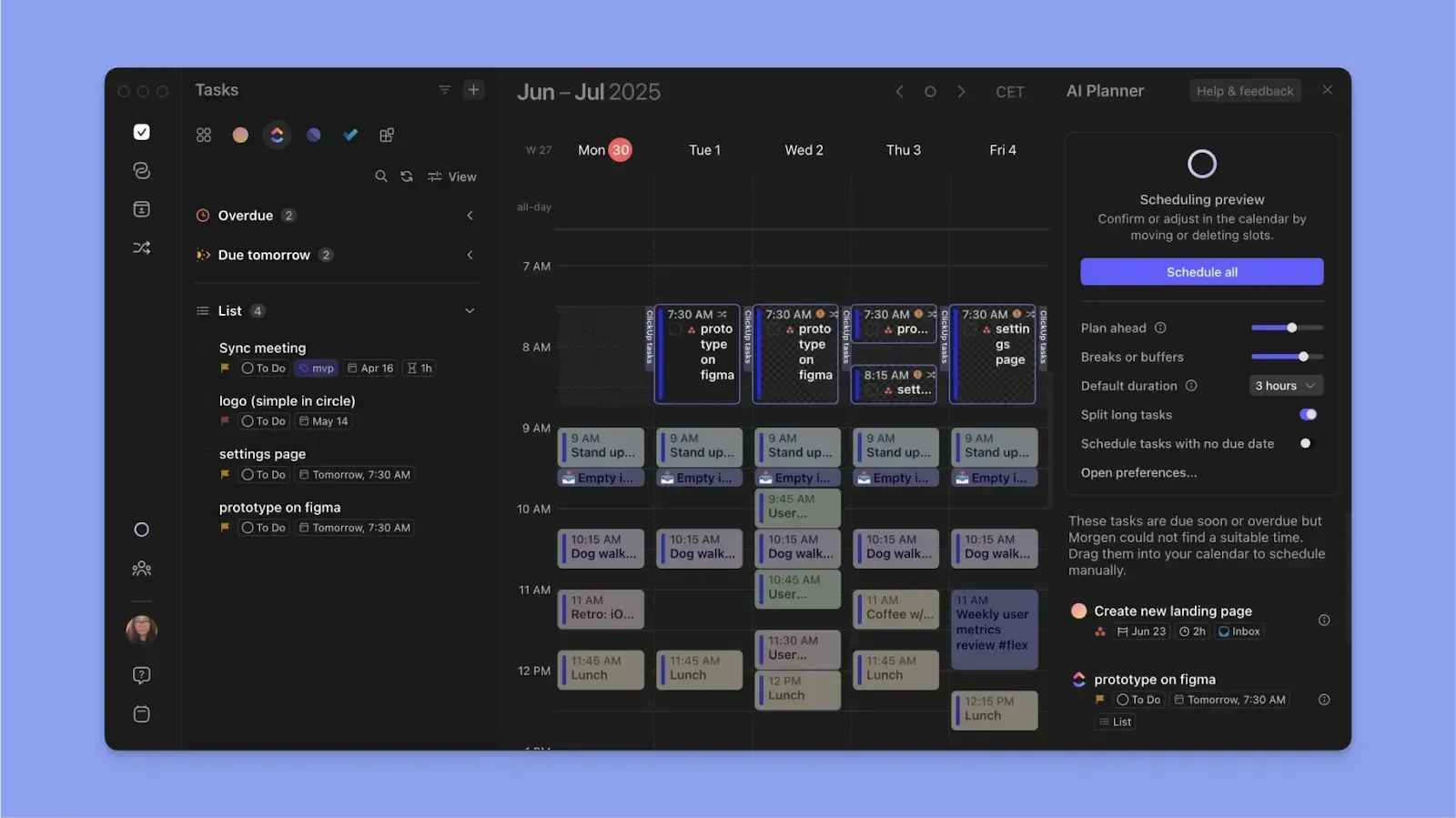
- AI plans you control: Morgen's AI Planner builds daily plans from your tasks and calendars, but you preview and approve before anything lands on your calendar.
- All platforms including Linux: Morgen runs on macOS, Windows, Linux, iOS, and Android.
Motion Key Features
Here are the core features that define the Motion experience. Each one builds on Motion's central promise: let AI handle the scheduling so you can focus on the work.
AI Calendar & Auto-Scheduling
This is Motion's flagship feature and the reason most people sign up. You add tasks with deadlines, priorities, and time estimates, and the AI assigns each task to the optimal time slot on your calendar. When a new meeting appears or a deadline shifts, Motion re-optimizes your entire schedule automatically.
Unlike traditional time-blocking tools where you drag tasks onto your calendar manually, Motion removes that step entirely. The AI considers your working hours, existing commitments, task urgency, and even deep work preferences when placing tasks. It sends hourly priority notifications to keep you on track.
This approach is polarizing. Users who thrive with external structure find it transformative. Users who prefer making their own scheduling decisions find it too rigid. There is no "suggest then approve" mode—Motion's AI takes full control.
AI Task Manager
Motion's task manager goes beyond a standard to-do list. Every task you create becomes a scheduling input for the AI engine. You set a deadline, priority level, and estimated duration, and Motion handles the rest—finding the right time slot and adjusting when plans change.
Useful features include "do dates" vs. "due dates" (when to start vs. when to finish), at-risk task flagging when deadlines are in jeopardy, and recurring task support. Custom labels and filters help organize work across projects.
The tradeoff: Motion's task manager is a closed system. You cannot import tasks from Todoist, ClickUp, or Notion. If you already have a task management workflow you like, you will need to rebuild it inside Motion. This is one of the key differences between Motion and tools like Morgen, which integrate with your existing task apps.
AI Project Manager
For teams, Motion's AI Project Manager automates the coordination work that typically falls on managers. It tracks task dependencies, calculates team capacity, and adjusts project timelines automatically when individual schedules shift.
The standout here is predictive deadline analytics. Motion flags when a project is at risk of missing its deadline before it happens, giving teams time to reallocate resources. Cascading schedule adjustments mean that when one task slips, downstream tasks are automatically rescheduled.
Motion claims projects get completed 32% faster using its AI project management. The Gantt chart feature (Business AI plan only) provides visual timeline views with auto-scheduling built in. For small teams running multiple projects simultaneously, this can replace standalone tools like Asana or Monday.com.
AI Meeting Assistant
Motion's meeting scheduling works through booking pages and scheduling links—similar to Calendly. You create a booking page with your availability preferences, share the link, and invitees pick a time that works for both parties.
Where Motion differentiates is that your task schedule is factored into availability. If Motion has blocked time for a high-priority task, that slot will not appear as available for meetings. This integration between task scheduling and meeting scheduling is unique to all-in-one platforms like Motion.
The tool supports multi-calendar conflict prevention and team combined availability for group meetings. Video conferencing links from Zoom, Google Meet, or Microsoft Teams are added automatically.
AI Meeting Notetaker
Added as part of the SuperApp expansion, Motion's meeting notetaker joins your meetings automatically to record, transcribe, and summarize discussions. It extracts action items and can create tasks from meeting outcomes directly in Motion's task system.
Motion claims their notetaker is "80% more accurate than human notes." While that specific figure is hard to verify independently, the feature does close the loop between meetings and task execution, something that typically requires a separate tool like Otter.ai or Fireflies.
This feature is relatively new and competes in a crowded space. The quality of transcription and summarization will determine whether it can replace dedicated meeting note tools.
AI Workflows
AI Workflows lets you convert standard operating procedures (SOPs) into automated, scheduled projects. You input a process via files, natural language, or AI Docs, and Motion generates a project with assigned tasks, dependencies, and deadlines.
For agencies and service businesses that repeat similar processes for different clients, this can save significant setup time. Instead of manually creating a new project from scratch, you describe the process once and let Motion handle the rest.
The feature is ambitious but still maturing. It works best for straightforward, repeatable processes rather than complex, multi-branching workflows.
Motion Additional Features
AI Docs, Wiki & Notes
Motion added an AI-powered document editor that handles drafting, writing, and organizing notes. It includes wiki-style knowledge management and can extract tasks from documents. The docs feature is functional for basic writing and internal documentation, but it is not a replacement for dedicated tools like Notion or Google Docs. Think of it as a convenient scratchpad that lives inside your project management system.
AI Sheets & Databases
A spreadsheet-like interface with AI capabilities for tracking data, budgets, or simple databases. It combines structured data with AI intelligence for analysis and automation. For teams already deep in Excel or Google Sheets, this will not replace those tools. For lightweight data tracking within Motion projects, it fills a gap.
AI Chat
Motion includes a chat-based AI assistant for work queries and task management. You can ask questions about your schedule, create tasks via natural language, and get work-related answers. It uses the AI credits included in your plan (7,500 credits/month on Pro AI, 15,000 on Business AI), with overage charges if you exceed your allocation.
Motion Integrations & API
Motion's integration ecosystem is one of its weaker points. The tool offers 9 native integrations: Google Calendar, Microsoft Outlook 365, iCloud Calendar, Gmail, Zoom, Google Meet, Microsoft Teams, Siri, and Zapier. Additional integrations with Slack, HubSpot, and Salesforce are mentioned on feature pages.
The philosophy here is deliberate: Motion wants you to use its built-in tools rather than connecting external ones. That works if you are willing to go all-in on Motion. If you rely on tools like Todoist, ClickUp, Linear, or Notion for task management, Motion does not integrate with them.
An API is available for all users, and Zapier support enables custom automations. But bidirectional sync with third-party task managers is not supported natively.
Compare this to Morgen's integration approach, which connects to Google Calendar, Outlook, iCloud, plus task tools like Todoist, ClickUp, Notion, Linear, and Obsidian. Morgen's philosophy is the opposite: bring your own tools, and Morgen will unify them.
Motion Mobile App
Motion is available on iOS and Android, alongside desktop apps for macOS and Windows and a web app. The mobile experience mirrors the core scheduling functionality, you can view your AI-optimized schedule, check off tasks, and see what is coming next.
The mobile app works well for day-of schedule management and quick task updates. More complex operations like project setup, Gantt chart management, and workflow configuration are better handled on desktop where screen space is not a constraint.
One notable gap: there is no Linux support. Developers and technical professionals who use Linux as their primary operating system will need to rely on the web app.
Motion Pricing
When you look at all the software categories Motion now covers—calendar, tasks, projects, docs, sheets, meetings, and workflows—the pricing makes more sense as an all-in-one replacement. Whether it delivers enough value in each category to justify the cost depends on how many of those features you use.
There is no free plan. Motion offers a 7-day free trial, no credit card required upfront. After that, you pay or you lose access.
The pricing has increased significantly in recent months. Users who signed up at earlier pricing tiers have reported approximately 30% increases without advance notice. The AI credits system adds another cost dimension: if you exceed your monthly allocation (7,500 on Pro, 15,000 on Business), overage charges apply at $0.25 per 100 credits (Pro) or $0.19 per 100 credits (Business).
For context, Morgen's Pro plan starts at €15/month (annual billing), roughly half the cost of Motion's cheapest annual plan. Morgen includes AI daily planning, unlimited calendar and task integrations, and scheduling links without AI credit limits.
Motion Pros & Cons
Community sentiment
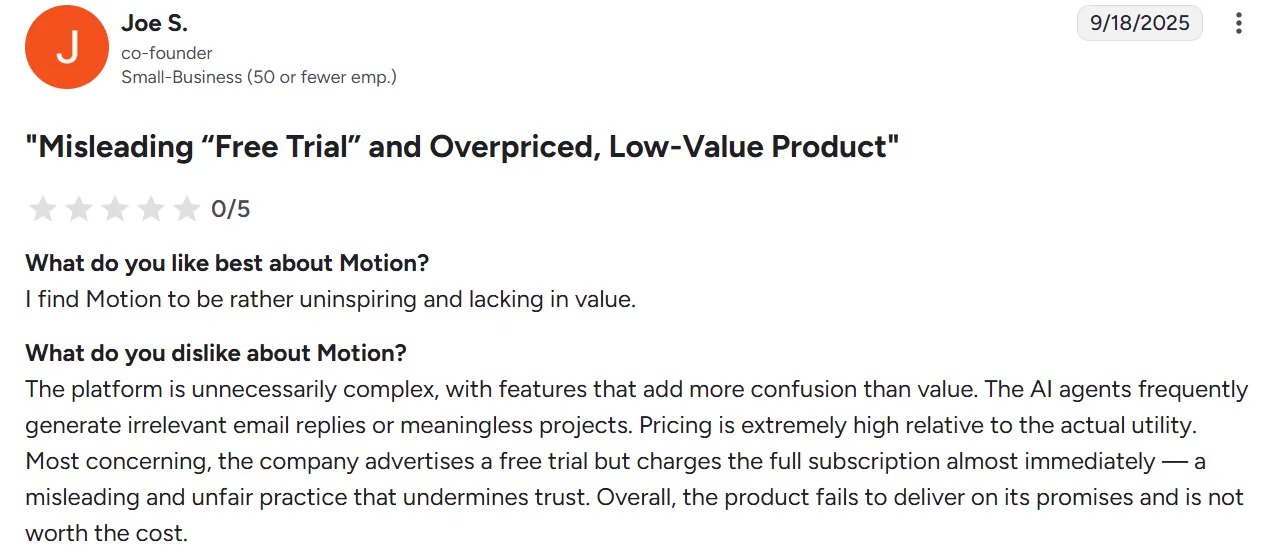
Across Reddit communities (r/UseMotion, r/productivity, r/ProductivityApps, r/ADHD), the conversation around Motion has shifted notably negative since the SuperApp pivot. Users who joined for the focused AI calendar feel the product has lost its identity. Pricing increases without notice are a recurring frustration. ADHD communities remain the most positive segment, praising the external structure the AI scheduling provides. Many long-time users report actively seeking alternatives due to the price-to-value ratio.
Morgen: A Motion Alternative
Morgen is an AI-powered daily planner designed for professionals who want the coordination work handled for them, not just scheduled automatically without their input.
Where Motion focuses on full automation across an expanding suite of tools, Morgen unifies your calendars and tasks into a single AI-powered daily planner syncing across Google Calendar, Outlook, and iCloud while integrating tasks from Todoist, ClickUp, Notion, Linear, and more.
Key Features
Morgen fills the gaps left by Motion's all-in-one approach:
AI Planning With User Control
- What Motion does: AI schedules tasks directly on your calendar with no approval step. You see the result after it happens.
- What Morgen does differently: Morgen's AI Planner builds realistic daily schedules from your tasks and calendars, prioritizing by deadlines and capacity. You preview the plan, add or ignore tasks, adjust time estimates, and approve before anything lands on your calendar.
- The benefit: You get the efficiency of AI planning without surrendering control over your day.
Deep Task Tool Integrations
- What Motion does: Requires you to use its built-in task manager. No integrations with Todoist, ClickUp, Notion, or Linear.
- What Morgen does differently: Morgen imports tasks from Todoist, ClickUp, Notion, Linear, and more. Your existing workflow stays intact—Morgen just adds the planning layer on top.
- The benefit: No migration required. Keep the tools your team already knows.
Focused Design vs. Feature Bloat
- What Motion does: Tries to be everything—calendar, tasks, projects, docs, sheets, workflows, meeting notes, and AI chat.
- What Morgen does differently: Stays focused on one thing: helping you plan your day. Morgen handles calendar unification, task management, and AI-powered daily planning with time-blocking Frames without trying to replace your entire software stack.
- The benefit: A faster, cleaner experience with less cognitive overhead.
Who Morgen Is Best For
Professionals who value control and flexibility: If you want AI to help you plan your day but do not want to hand over the keys entirely, Morgen's "suggest then approve" model gives you the best of both worlds. You keep your existing task tools, get AI-powered planning, and stay in the driver's seat. Read the full Motion vs Morgen comparison for a deeper look.
Is Motion Worth It?
Our overall Motion review? It depends on how much you want to consolidate—and how much you are willing to pay for it.
If you are looking for a single platform that handles your calendar, tasks, projects, docs, and meetings with AI automation tying everything together, Motion delivers on that vision. The core AI scheduling engine remains one of the best available. Having an AI that continuously re-optimizes your day as plans change is genuinely useful, especially for busy professionals and teams running multiple projects.
That said, Motion is not for everyone. The "SuperApp" direction has added complexity and cost that many users did not ask for. At $29–$39/month (annual) with limited integrations and no free plan, you are paying a premium—and you need to fully commit to Motion's ecosystem to get value.
If you want AI-powered daily planning without the lock-in, Morgen offers a lighter, more flexible alternative at roughly half the price. The 14-day free trial (vs. Motion's 7 days) and 30-day money-back guarantee give you more time to decide.
Motion's trajectory suggests it will keep expanding. Whether that expansion adds genuine value or further dilutes the focused scheduling tool that made it popular will determine its long-term success.
For a deeper look at how Motion stacks up against specific alternatives, see our comparisons: Motion vs Akiflow, Motion vs Asana, and Motion vs Monday.com. Or browse our best time blocking apps roundup for a wider comparison.
Motion FAQs
Does Motion Have a Free Plan?
No. Motion does not offer a free plan. The only way to test it without paying is the 7-day free trial.
Does Motion Replace Google Calendar?
Not exactly. Motion integrates with Google Calendar, syncing your existing events. It adds an AI scheduling layer on top, placing tasks between your meetings. Your Google Calendar remains intact—Motion adds to it rather than replacing it.
Can People With ADHD Benefit From Motion?
Yes. Users with ADHD and executive dysfunction consistently rank Motion's AI scheduling as one of its strongest benefits. The external structure of having every time slot planned removes the decision fatigue that comes with an open calendar. The tool tells you what to work on and when, which provides the accountability structure many ADHD users need.
Does Motion Work With Todoist or ClickUp?
Not natively. Motion's task management is a closed system. You can use Zapier to push tasks into Motion from other tools, but this is one-way only. If you want an AI calendar tool that integrates with Todoist, ClickUp, Notion, and Linear, Morgen supports those integrations natively.
How Much Does Motion Cost per Month?
Motion's Pro AI plan costs $49/month (monthly billing) or $29/month (annual billing). The Business AI plan costs $69/month (monthly) or $39/month (annual). There are no free plans or student discounts available.
Is Motion Worth the Price Increase?
That depends on how many of Motion's features you use. If you rely on the AI calendar, task manager, and project management daily, the all-in-one platform can replace several separate subscriptions. If you only need AI scheduling without docs, sheets, and workflows, you may be paying for features you do not use.
Does Motion Have an API?
Yes. Motion provides an API for all users with documentation at docs.usemotion.com. Zapier integration is also available for no-code automations.
What Platforms Does Motion Support?
Motion is available on web, macOS (requires macOS 11+), Windows, iOS, and Android. There is no Linux support. If you need a Linux-compatible daily planner, Morgen is one of the few options with a native desktop app.
.webp)


.png)