
.svg)
→ Choose Morgen if you manage multiple calendars and need AI-assisted task scheduling software to sync across Google, Outlook, Fastmail, and iCloud: best for solopreneurs, developers, and marketers who need an AI calendar app that also schedules tasks, creates booking links, and syncs busy availability
→ Choose Reclaim AI to sync Google and Microsoft accounts: best calendar planner for remote professionals and small teams who want tasks and focus time scheduled automatically around synced events, but with limited control over how the schedule adapts
→ Pick OneCal if you want a calendar sync tool to clone events across multiple accounts: best for users who need scheduling links and real-time sync across Google, Outlook, and iCloud, but no task planning
→ Choose SyncGene for syncing calendars, contacts, and tasks: best synchronization service for users in Google and Microsoft ecosystems who need full data sync, but no scheduling links
→ Get SyncThemCalendars to mirror availability across accounts: best for freelancers who only need a calendar syncing tool for Google, Outlook, and iCloud, without booking links or task management
If CalendarBridge's sync limits or lack of task planning are holding you back, these five alternatives cover more calendars, deeper planning features, and broader pricing options, compared side by side to help you choose the right tool faster.
Top 5 Best CalendarBridge Alternatives: At a Glance
| Alternative | Best For | Standout Feature | Starting Price | G2 Rating | Capterra Rating |
|---|---|---|---|---|---|
| Morgen | AI-powered scheduling across meetings, routines, and tasks | Real-time calendar propagation across Google, Outlook, iCloud, and Fastmail + AI-assisted task scheduling | Free trial, $15/month | 4.8/5 | 5.0/5 |
| Reclaim AI | AI calendar sync with habit and focus time protection | Automatic busy block syncing + AI scheduling for tasks, habits, and focus time | Free plan, $10/seat/month | 4.8/5 | 4.7/5 |
| OneCal | Pure multi-account sync and scheduling links | Real-time event cloning across Google, Outlook, and iCloud | Free trial, $5/user/month | 4.7/5 | — |
| SyncGene | Syncing calendars, contacts, and tasks together | Free/busy or full event and tasks syncing across Google and Microsoft + contact sync | Free trial, $16.67/month | 4.5/5 | — |
| SyncThemCalendars | Calendar availability mirroring across multiple accounts | One-way, two-way, or multi-way availability syncing across major calendars | Free trial, $3.99/month | — | 4.9/5 |
1. Morgen: Best for AI-Powered Daily Scheduling Across Events and Tasks
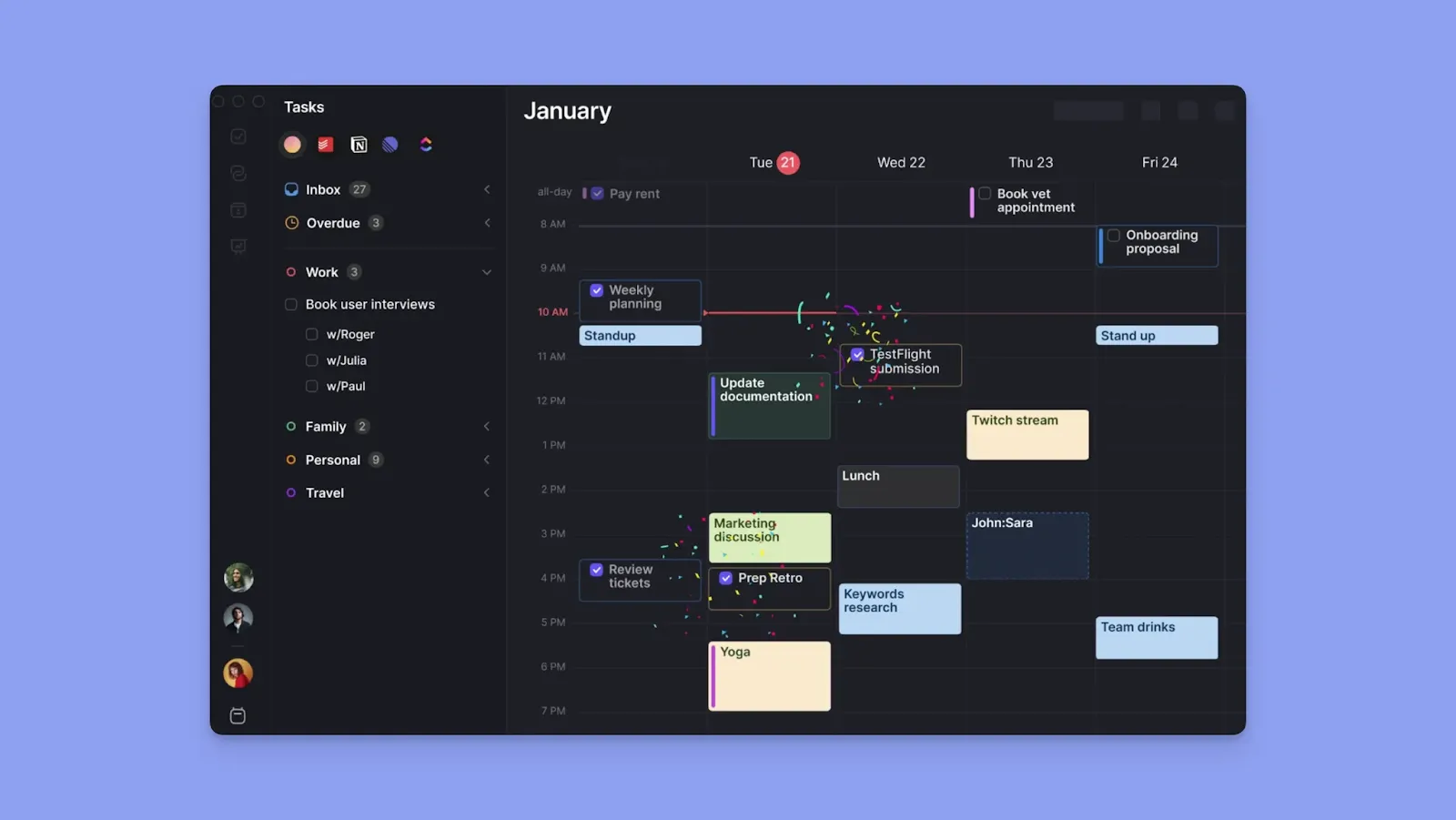
Morgen is a digital planning tool that connects with unlimited calendars and imports tasks from external task tools. You plan your entire day in one view and sync events and busy blocks across all connected calendars.
Morgen Key Features
Morgen combines multi-calendar sync, task planning, and scheduling. Here are three features when looking for a CalendarBridge alternative.
Calendar Propagation
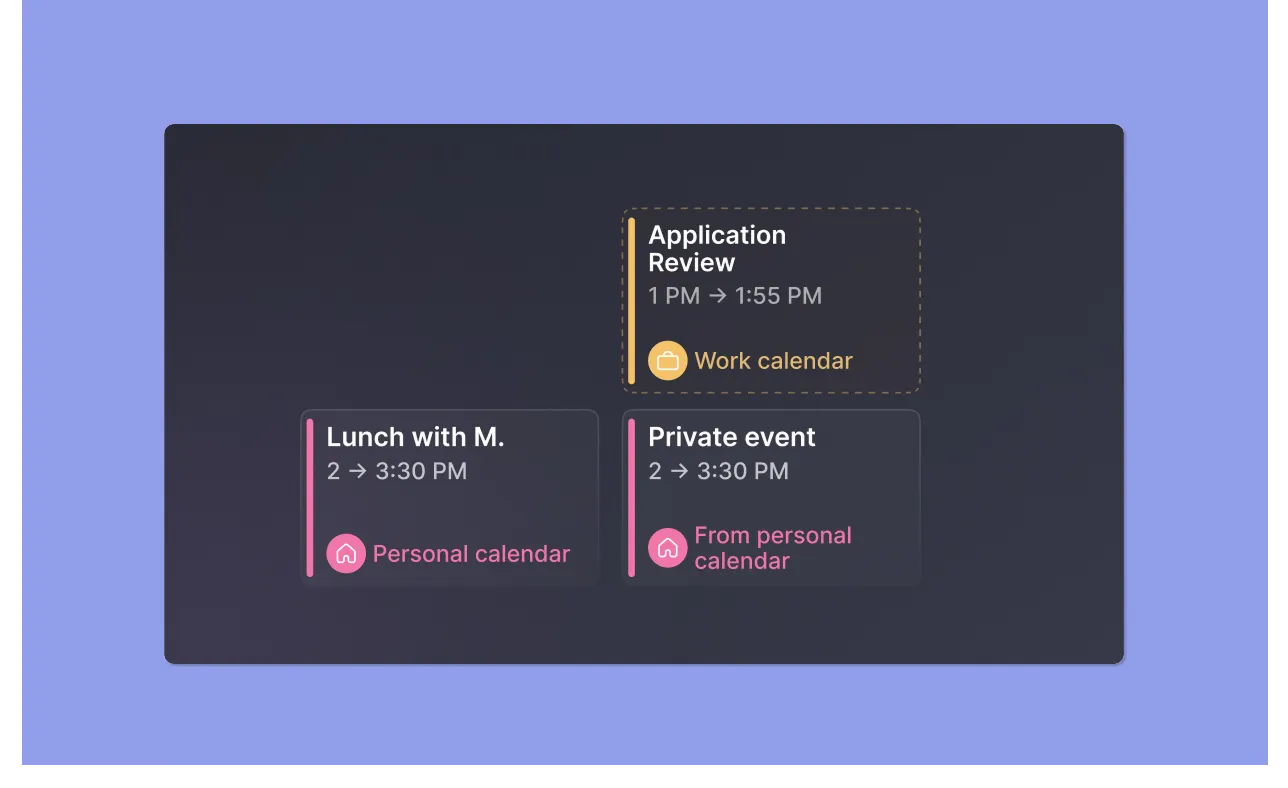
Sync unlimited calendars from Google, Outlook, iCloud, and Fastmail, then set up a Calendar Propagation workflow to copy events from a source calendar to a destination calendar. Mark events busy to propagate them to the destination calendar.
Tip: The workflow runs daily and covers a 21-day rolling window, and declined or cancelled events don’t propagate. Use additional settings or the “Nerd Mode” for advanced control over how the events propagate.
AI Task Planning and Frames

Add integrations to import tasks from Notion, Linear, ClickUp, Todoist, Obsidian, Google Tasks, Microsoft To Do, and Apple Reminders.
The AI Planner suggests where each task fits into your day based on your calendar availability. Its co-pilot approach means you review every suggested time block before scheduling.
When you create Frames for structured task planning, enable "Propagate Frames" in the Calendar Propagation workflow to push them into your other calendars as events.
Booking Pages and Scheduling Links

Create a Booking page, then add multiple scheduling links, buffers, and travel time. Morgen will check availability across connected calendars and sync these meeting
events.
Tip: For one-time meetings where you want to offer specific slots rather than open availability, use Open Invites instead. Or, create multi-person scheduling links for a team-based meeting with multiple hosts.
Morgen Pricing
| Plan | Billed Monthly | Billed Annually |
|---|---|---|
| Individuals | $30 | $15/month |
| Teams | $25/seat | $10/seat/month |
Note: Students and non-profit organizations get 25% off, and switching from Motion, Fantastical, Sunsama, and Reclaim gets you 15% off.
Where Morgen Shines
- Unified calendar and task planning: Plan your full day across events, tasks, and routines without switching apps
- Routine planning that writes to your calendar: Create Routines for recurring activities, and they become recurring events that propagate
- Modern, fast interface: Color coding, keyboard shortcuts, and a Command Bar keep planning quick
Where Morgen Falls Short
- No AI chat for event coordination: Morgen's AI does not flag events from email, or reschedule, edit, or cancel calendar events
That gap is exactly why the team behind Morgen built Kai, an AI personal assistant you can chat with to manage your calendar, triage your email, take your meeting notes, and bring your tasks, events, and meetings together in one place.
Morgen Customer Reviews
Jim H says this about Morgen: “Great product. It's aesthetic and gives me total visibility across all my calendars (personal, business, etc).”

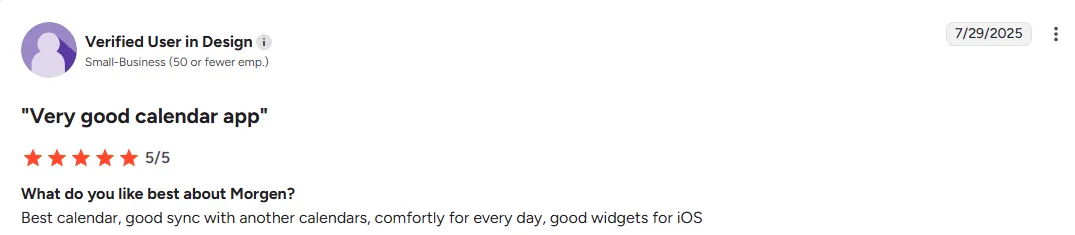
On G2, a verified reviewer shares that Morgen offers “good calendar sync.”
Who Morgen Is Best For
- Solopreneurs, freelancers, developers, and marketers: Professionals who manage commitments across multiple calendars and want to plan their full day without context switching
Who Morgen Is Not Best For
- Enterprise teams that need centralized admin controls to manage calendar access and configurations across a large number of users
Download and install Morgen on Mac, Windows, Linux, or mobile, and start syncing your events in minutes.
2. Reclaim AI: Calendar Management App for Automatic Syncs and Focus Time Protection

Reclaim AI automatically schedules tasks, habits, and focus time while syncing availability across Google Calendar and Outlook
Key Features
- Calendar sync: Creates real-time busy block copies across all connected accounts
- Task and habit planning: Reclaim auto-schedules tasks into your calendar by priority, and habits get recurring time blocks that reschedule themselves when meetings land on top of them
- Availability-based scheduling links: Share real availability across all connected calendars and only book meetings when you are actually free.
Pricing
| Plan | Billed Monthly | Billed Annually |
|---|---|---|
| Lite | Free | Free |
| Starter | $12/user/month | $10/user/month |
| Business | $18/user/month | $15/user/month |
| Enterprise | — | $22/user/month |
You can also see a detailed breakdown of Reclaim pricing in our full guide to help you decide which plan fits your budget.
Where Reclaim AI Shines
- Automatic schedule updates: The AI continuously rebuilds your day as meetings change
- Team-wide availability sync: Everyone on your team can connect multiple calendars and show their real availability during work hours
Where Reclaim AI Falls Short
- No iCloud support: Calendar sync is limited to Google Calendar and Outlook
- Aggressive automatic task planning: When new synced events land, Reclaim reschedules your entire workday, which may reduce your productivity as you adapt
Customer Reviews
“It has helped me sync family commitments as well as work,” shares Zehra Jagani.

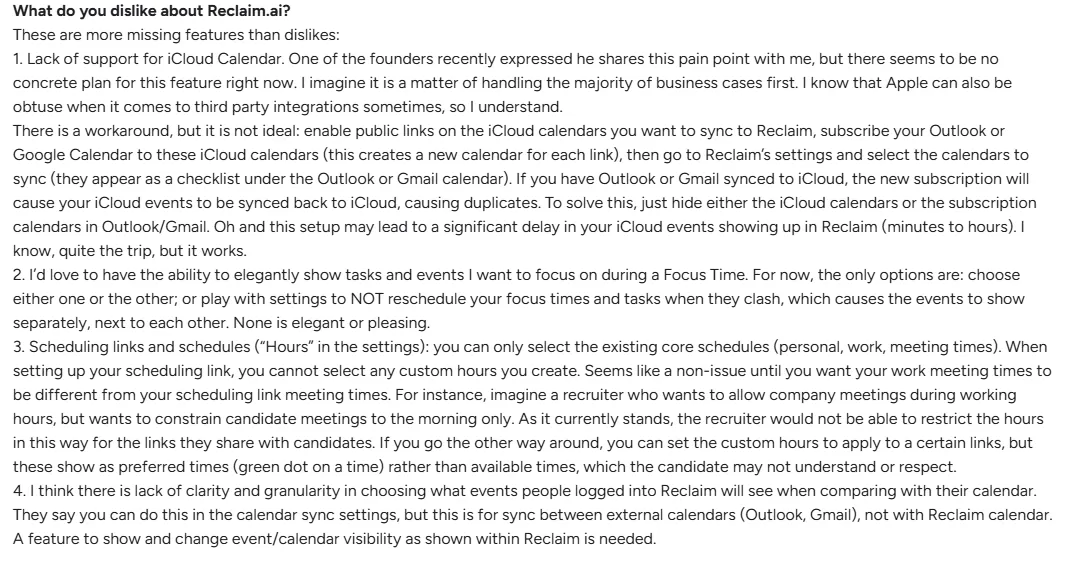
Luigi P complains about the lack of iCloud support and the inability to edit events inside Reclaim:
Who Reclaim AI Is Best For
- Remote professionals and small teams on Google Calendar or Outlook who need automatic cross-calendar sync with automatic task scheduling with AI built in
Who Reclaim AI Is Not Best For
- Apple Calendar users or anyone managing more than two calendar ecosystems who need reliable sync across all of them
3. OneCal: For Cloning Events With Advanced Control Settings in Real Time

OneCal is a dedicated calendar sync tool that duplicates events across Google, Outlook, and iCloud accounts as they happen.
Key Features
- Multi-way calendar sync: Connect more than two calendars and set one-way or multi-way sync rules to duplicate events across in real-time
- Privacy controls: Choose exactly what syncs. Show events as "Busy," copy only the title, or share full event details
- Scheduling links: Create unlimited booking links drawn from all connected calendars
Pricing
| Plan | Billed Monthly | Billed Annually |
|---|---|---|
| Starter | $6/user/month | $5/user/month |
| Essential | $12/user/month | $10/user/month |
| Premium | $30/user/month | $25/user/month |
Where OneCal Shines
- Connects up to 50 calendars with unlimited syncs: No cap on how many sync rules you create across connected accounts
- Calendar view: See all connected Google and Outlook calendars in one unified view
Where OneCal Falls Short
- Calendar limits on lower plans: Starter covers only 2 calendars, and Essential covers 5. If you manage more than five accounts, you jump straight to the $25/user/month Premium plan
- No task planning or AI features: OneCal does not support task scheduling or focus time protection
Customer Reviews
“OneCal is a very simple way to link all of your calendars into one,” shares Kasey H.

“I find the limit of 50 calendars quite restrictive for some of our use cases, which makes it challenging when needing to manage more,” Alexander L.

Who OneCal Is Best For
- Consultants and fractional executives: Professionals managing multiple Google, Outlook, or iCloud accounts who need reliable sync and shareable booking links
Who OneCal Is Not Best For
- Busy professionals who need to schedule work around meetings without opening a separate tool
4. SyncGene: Cloud-Based Sync App for Calendars, Tasks, and Contacts

SyncGene syncs calendars, contacts, and tasks across Google, iCloud, Office 365, and Microsoft Exchange in one setup
Key Features
- Calendar sync: Set one-way or two-way sync between connected accounts with a free/busy option to keep event details private on destination calendars
- Contact and task sync: Sync address books and task lists alongside calendar events
- Folders for organization: Use SyncGene filters to share and manage folders across connected calendars
Pricing
| Plan | Billed Monthly | Billed Annually |
|---|---|---|
| Fair Use | $0 | $0 |
| Individual/Premium | $16.67/month | $8/month |
| Enterprise | Custom | Custom |
Where SyncGene Shines
- Broad platform support: Syncs across a wide range of calendar and contact sources, including Google, iCloud, Outlook, Exchange, Android, iPhone, Samsung, and more
- One-way and two-way sync: Choose sync direction per account pair, so you control which accounts update each other
Where SyncGene Falls Short
- No scheduling links: You cannot share availability or let others book time with you directly from SyncGene
- Less intuitive interface: The dashboard is harder to navigate than most alternatives, especially across multiple sync sources
Customer Reviews
“SyncGene is the only tool that syncs both calendars and tasks,” according to this Reddit user.

Ihr Name shares their frustrations with the syncing features on Trustpilot:

Who SyncGene Is Best For
- Individuals and enterprises managing fragmented data across different accounts who need contacts, meetings, and scheduled tasks synced in one step
Who SyncGene Is Not Best For
- Power users who want an aesthetic interface, keyboard shortcuts, and AI planning features alongside calendar sync
5. SyncThemCalendars: For Fast Calendar Synchronization Across Google, Microsoft, and iCloud

SyncThemCalendars sets up a sync between your Google, Outlook, and iCloud calendars in under two minutes.
Key Features
- One-way and two-way sync: Set directional rules between any two calendars so changes flow in the direction you choose
- Privacy controls: Rename events, hide descriptions, or show only titles on destination calendars so private details stay private
Pricing
| Plan | Billed Monthly | Billed Annually |
|---|---|---|
| Basic | $4.99/month | $3.99/month |
| Premium | $9.99/month | $7.99/month |
| Professional | $19.99/month | $17.99/month |
Where SyncThemCalendars Shines
- Fast setup: When you connect calendars, SyncThemCalendars starts running full sync in under two minutes
- Unlimited calendars on all plans: Connect unlimited Google, Outlook, and Apple calendars
Where SyncThemCalendars Falls Short
- Sync limits per plan: While you can add as many calendars as you have, you can only create 5 syncs on the Basic plan, 16 syncs on Premium, and 36 on Professional
- Sync only: No scheduling links, task management, or AI task or event planning features
Customer Reviews
On the Google Workspace Marketplace, users share mixed experiences with SyncThemCalendars.
Kelly Maxson praises how easy it was to install and keep appointments synced:

Meanwhile, Bill Gillin questions whether the $3.99/month price is worth it for lighter users who don't manage many calendar entries.

Who SyncThemCalendars Is Best For
- Freelancers and consultants running multiple Google, Outlook, or iCloud accounts who need fast, reliable availability sync with no extra features to configure
Who SyncThemCalendars Is Not Best For
- Professionals managing complex multi-account setups who need more sync connections and to consolidate tasks into the same calendar view
Reasons to Consider an Alternative to CalendarBridge
If you manage multiple accounts or want to plan beyond events, CalendarBridge limits how far you can scale your setup. Here are reasons to choose an alternative:
Limited Calendar Provider Support
CalendarBridge supports Google, Outlook, and iCloud. It limits your workflows if you rely on other services and subscription calendars.
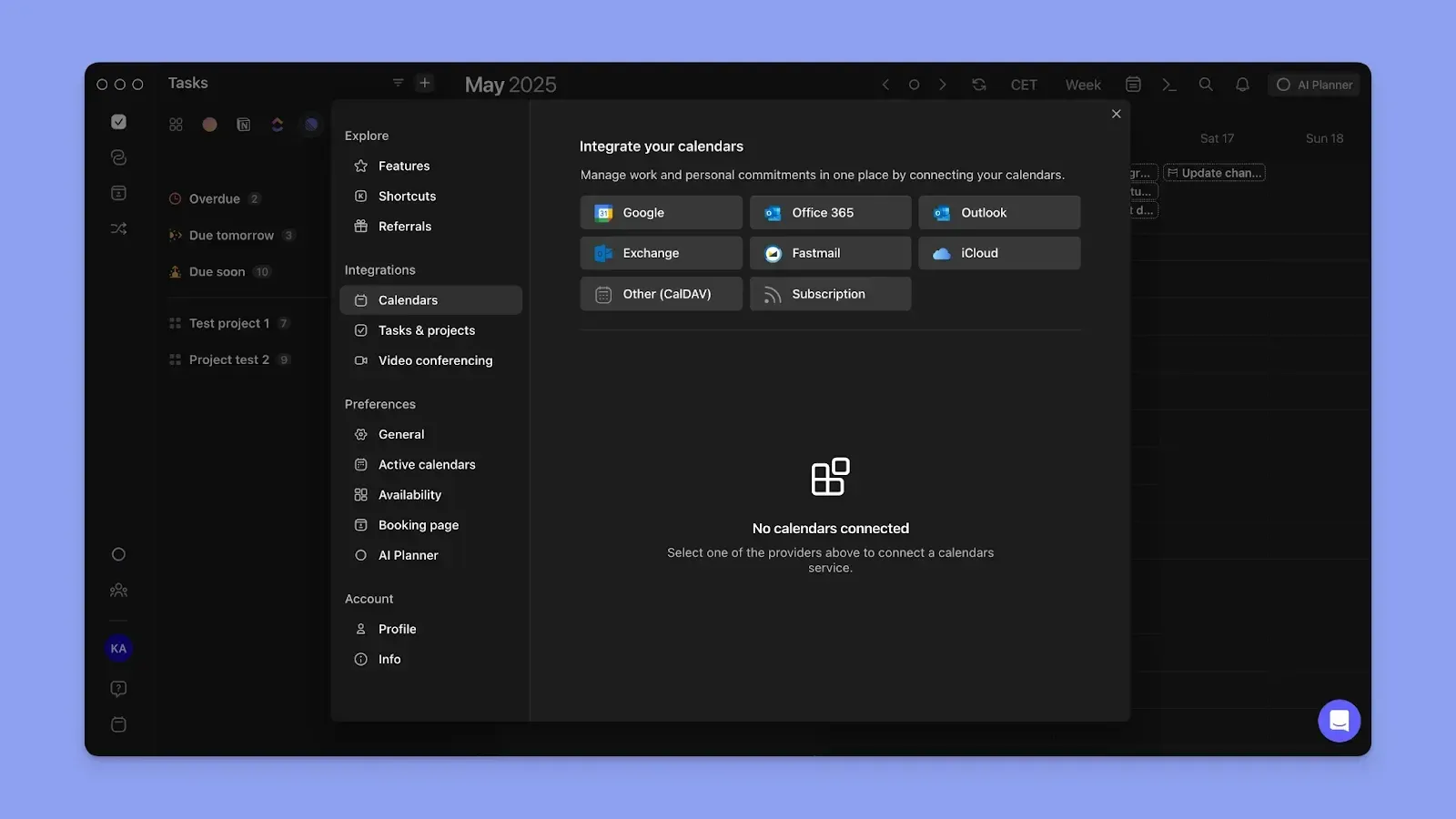
Morgen supports a broader mix, including Fastmail and subscription calendar models. You can connect and sync across more services, work or personal calendars, and shared calendars without workarounds.
Tip: Create calendar sets to assign each calendar a keyboard shortcut (numbers 0-9). By clicking one or a combination of the numbers, you’ll view only commitments on those calendars plus blocks synced from other calendars.
Hard Limits on Sync Connections
On CalendarBridge's most expensive plan, you can only manage up to 8 calendars, create 8 multi-way sync connections, and 36 one-way syncs.
For busy professionals juggling more calendars, this limits how many automatic workflows you can create to reduce context-switching.

Morgen lets you create multiple instances of a Calendar Propagation workflow with no cap on how many you run simultaneously.
For Advanced Event Color Coding
CalendarBridge lets you color-code events by source calendar so you can tell where a synced event came from. But that’s how far color-coding goes.

In Morgen, when an event syncs, the entire block carries the source calendar color automatically. Click the block’s color icon and choose from 13 additional outline colors to apply on top.
From there, you track the event by calendar source (the vertical bar) and by your own planning context (outline color).
Tip: Use the outline color to group events by client, project, or life area across your synced calendars.
No Task Management Alongside Calendar Sync
According to Speakwise, 82% of people have no time management system in place. If you only keep track of events, you’ll still be switching between your calendar view and task tools to get work done.
So, look for a CalendarBridge alternative that supports task planning alongside events.
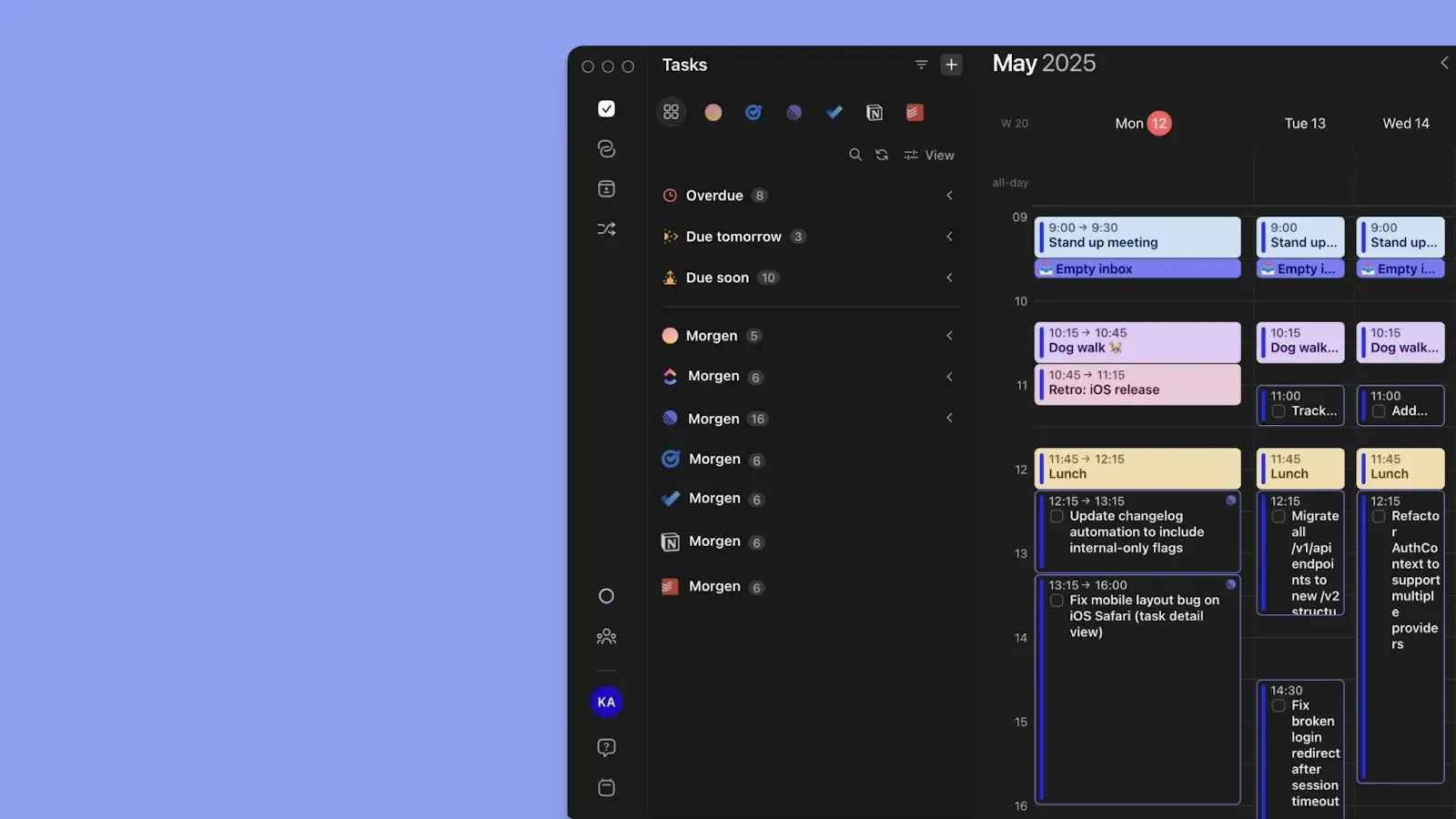
Morgen lets you drag and drop tasks or have the AI Planner suggest placements into available calendar slots.
Tip: Mark important tasks as "not flexible," and the AI Planner won’t suggest rescheduling anchored commitments when the day changes.
Try Morgen's free Schedule Builder to build your ideal week, and connect your calendars to sync events, tasks, and routines at no cost.
No Fix for ADHD Decision Fatigue and Time Blindness
If you struggle with decision-making paralysis and keep asking "what do I work on now?", CalendarBridge leaves a huge planning gap.

Morgen is designed with ADHD brains in mind. Schedule tasks around synced calendar events, plan by energy level, and let the AI Planner suggest how to resolve scheduling conflicts when they arise.
Start Syncing Calendars and Planning Your Day with Morgen
CalendarBridge solves availability sync. Morgen does the same and also helps you stop switching to task managers to decide which work to complete before the next event.
See how Morgen V4 simplifies scheduling, and start your 14-day free trial to start creating achievable daily plans.

.svg)
.webp)


